TP-Link Deco XE75
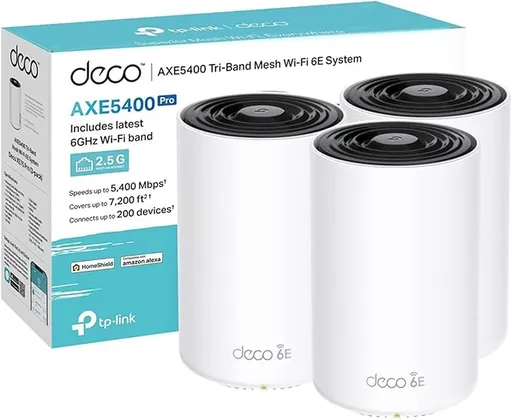
Idéal pour : Idéal pour couvrir une grande habitation avec un backhaul Ethernet et des appareils WiFi 6E.
En bref : Le consensus Reddit décrit un mesh rapide, simple à utiliser et avantageux, surtout avec un backhaul Ethernet ou dans un logement peu cloisonné. Les nombreux signalements de déconnexions sur les appareils IoT et le réseau 2,4 GHz imposent toutefois une réserve importante.
Au-delà de ce modèle, la marque TP-Link (toutes gammes) recueille 46 % d'avis positifs sur 385 utilisateurs Reddit. Ce signal marque ne compte pas dans la note du modèle ci-dessus.
Points forts
Backhaul efficace
7 0
« XE75 is a tri band the others 2 are dual band systems theoretically you should see improved WiFi speed with a tri band system as it will use the 6ghz as a backhaul » Voir l’avis
« A few months too late here, XE75 supports ethernet backhaul. » Voir l’avis
« Need to mention that I use wired Ethernet backhaul so all WiFi bandwidth pushed to devices. » Voir l’avis
Bon rapport qualité-prix
5 0
« Unless the pro is very similar in price, I would go for the xe75. » Voir l’avis
« If after checking all that you still want to upgrade, the TP-Link Deco XE75 2-pack sits right at your £200 budget and is a solid tri-band Wi-Fi 6E system — but honestly, you might already have the… » Voir l’avis
« Thanks yeah I figured the regular XE75 would be best, I think there was only a $20 difference between that and the Pro so that’s what made me consider the Pro » Voir l’avis
Fiabilité éprouvée
3 0
« I have 3 Xe75s and they work great but eventually will add in be63s » Voir l’avis
« I just struggle when I see recommendations and when I check, user reviews for those suggested devices that aren't TP-Link are far poorer than the xe75 mesh I'm looking at. » Voir l’avis
« This is my first mesh WiFi system and it runs extremely well from what I had before. » Voir l’avis
Débits élevés
8 2
« XE75 is a tri band the others 2 are dual band systems theoretically you should see improved WiFi speed with a tri band system as it will use the 6ghz as a backhaul » Voir l’avis
« It will meet your needs and then some, without breaking the bank for a marginal performance boost you won't be able to use or detect. » Voir l’avis
« Some issues persists rarely, for example I cannot figure out why one of nodes dropping bandwidth from 160Mhz to 80mhz (happens once in 3-4 months), but overall stability and connection with WiFi 6E… » Voir l’avis
Excellente couverture Wi-Fi
3 1
« Range is extreme but I was itching for unnecessary wifi 7 (there were some be2x promos). » Voir l’avis
« That’s what I have in my 900sq ft house and gig internet » Voir l’avis
« I have a ~2800sqft house and with both set up with a wired back haul and I can get decent coverage around the entire house. » Voir l’avis
Fonctions complètes
4 2
« Smart home devices you can put on a separate IoT network so you don’t clutter your main network with lots of devices. » Voir l’avis
« If after checking all that you still want to upgrade, the TP-Link Deco XE75 2-pack sits right at your £200 budget and is a solid tri-band Wi-Fi 6E system — but honestly, you might already have the… » Voir l’avis
« From that lineup, I'd lean toward the TP-Link Deco XE75 or Asus ZenWiFi XT8 if you want WiFi 6E future-proofing, but honestly the Eero Pro 6E is probably the most plug-and-play reliable option with… » Voir l’avis
Points faibles
Aucun point faible notable.
| Critère | Note /10 | Ce qu'en dit le consensus |
|---|---|---|
| Stabilité | 5.4 | La stabilité divise fortement, avec de nombreux problèmes IoT et 2,4 GHz, mais aussi des installations parfaitement stables. |
| Backhaul | 9.6 | Le backhaul filaire ou 6 GHz est apprécié, mais le câblage et le choix des ports peuvent exiger une configuration rigoureuse. |
| Fonctions | 5.1 | Le réseau IoT séparé et le WiFi 6E sont appréciés, mais le mode point d'accès désactive plusieurs fonctions avancées. |
| Débit | 7.9 | Les débits sont généralement élevés, mais les ports Gigabit limitent les connexions supérieures à 1 Gbit/s. |
| Couverture | 7.7 | Plusieurs utilisateurs obtiennent une bonne couverture avec deux ou trois bornes, malgré des avis contradictoires sur la portée. |
| Fiabilité | 9.2 | Certains utilisateurs rapportent un fonctionnement durable et sans problème, tandis que de rares baisses de bande passante subsistent. |
| Prix | 9.6 | Le XE75 est souvent jugé compétitif face aux modèles Pro ou WiFi 7 plus coûteux. |
| Installation | 9.3 | L'installation et l'utilisation sont décrites comme simples par les utilisateurs satisfaits. |
Avis Reddit
30 avis analysés · Positifs 21 Neutres 5 Négatifs 4
avis pertinents ·
-
rcocchiararo 🇬🇧
1 commentaire analysé
-
purespeed44 🇬🇧
5 commentaires analysés
r/TpLink · Deco x60 vs xe75 or be25 upgrading old x50 system XE75 is a tri band the others 2 are dual band systems theoretically you should see improved WiFi speed with a tri band system as it will use the 6ghz as a backhaul
r/TpLink · Deco XE75 vs XE75 Pro vs BE25 The key Differences on the XE75 and XE75 pro are not astronomical the pro version just adds a single 2.5gb Ethernet port the rest are 1gig ports but the difference between the BE25 and XE75 pro and non pro is the BE25 is a dual band system with no 6ghz band so since you have a couple of WiFi 7 devices that band is missing in the BE25 but the BE25 is all 2.5gb Ethernet ports so if you use wired backhaul and say in the future you upgrade to a 2gig plan from your ISP you would benefit from this that way. Wireless backhaul not so much as this is where both XE75’s excel is with them being a tri band system and utilizing that 6ghz band if your running wireless backhaul if your wired backhaul all the bands are open for use therefore speeds theoretically should be better. My suggestion is if you want a wifi 7 system that’s tri band and fairly affordable and really want to future proof yourself get a BE63 system if you don’t want to spend the money on that the normal XE75 would suffice like I said unless your isp upgrades you to over 1gig speed wise then you would want a multigig system like the pro xe75
r/TpLink · Ongoing Deco XE75 / BE63 IoT Disconnects – Looking for Beta Firmware 1.4.6 / 1.1.8 or Real Fix BE63 and XE75 do not mesh well together at all in had a BE63 3 pack and added the XE75 and it completely tanked my system. Constant disconnects huge slow downs I removed the XE75 and added another BE63 and issues were gone. Something doesn’t mesh well with the 6E systems and the 7 systems. I don’t know what it is.
r/TpLink · Google Nest devices constantly dropping Remove the underscore and any special characters it’s a problem deco never fixed I know this along with a ton of others because we had the same issue. Try it without any special characters in the ssid and the password
r/TpLink · Google Nest devices constantly dropping Does your WiFi name or password have any special characters in it? If it does remove them and reboot the system. Decos don’t play well with cameras doorbells and so on especially if you have like a ? Mark or any special characters in your WiFi name or password
-
Odd-Comfortable-652 🇬🇧
1 commentaire analysé
r/TpLink · Deco XE75 vs XE75 Pro vs BE25 You currently don't have a need for the xe75 pro or the be25, given your current plan and devices. You can always upgrade to wifi-7 down the road in parts, and still make use of the xe75 for a period of time. The decos all work together fairly seamlessly. Unless the pro is very similar in price, I would go for the xe75. It will meet your needs and then some, without breaking the bank for a marginal performance boost you won't be able to use or detect.
-
CautiousInternal3320 🇬🇧
1 commentaire analysé
r/TpLink · TP-Link Deco BE22 vs BE25 vs XE75 Pro - 2025 October (Wireless backhaul testing) Are you sure that BE25 offers the 6Ghz wifi band? TP-Link documents: * for BE22 and BE25: 5 GHz: 2882 Mbps, 2.4 GHz: 688 Mbps * for XE75: 6 GHz: 2402 Mbps, 5 GHz: 2402 Mbps, 2.4 GHz: 574 Mbps
-
Gypsydave23 🇬🇧
3 commentaires analysés
r/TpLink · TP-Link Deco BE22 vs BE25 vs XE75 Pro - 2025 October (Wireless backhaul testing) Why not the be63? They are WiFi 7 around the price as the xe75 pro. I have 3 Xe75s and they work great but eventually will add in be63s
r/TpLink · Deco be25 or XE75? I think 3 xe75s would work well. That’s what I have in my 900sq ft house and gig internet
r/TpLink · Deco XE75 Pro vs BE25 I like the xe75. My iPhone gets about 600-700mbps. It’s very stable and easy to use
-
Pete77a 🇬🇧
1 commentaire analysé
r/HomeNetworking · Why do TP-Link get a hard time from people,and routers made by Asus are often praised.... But are They working and not have any known security exploits? I just struggle when I see recommendations and when I check, user reviews for those suggested devices that aren't TP-Link are far poorer than the xe75 mesh I'm looking at. I have an older Orbi mesh setup (rbk20) now and it's worked well, but I'm having problems as of late. I also have an Asus wifi 6 router (can't recall what model) that I use for the dedicated AP for the VR headset and oc for pcvr.. So I'm not brand loyal, just it's hard to ignore the Asus mesh routers I looked that cost much more, don't get as good feedback from users on Amazon. I get that users on Amazon provide feedback when they buy, not later when they haven't received updates... So maybe that's some of the reason
-
hamo78 🇬🇧
2 commentaires analysés
r/TpLink · Deco be25 or XE75? Xe75 will be just fine. Smart home devices you can put on a separate IoT network so you don’t clutter your main network with lots of devices.
r/TpLink · Deco be25 or XE75? What is your Internet speed? If you go with xe75 you are limited to 1 gig ports. The xe75 pro has a 2.5 gig port if you have a connection faster than 1 gig.
-
NetDaemons89 🇬🇧
1 commentaire analysé
r/HomeNetworking · Router recommendations for speed and range Before spending a penny, worth knowing what you actually have — the ZenWifi BD4 is a Wi-Fi 7 router. Your ISP handed you genuinely decent hardware, which means the 600 Mbps you're seeing probably isn't the router's fault. A few things worth checking first: **Speed test on a wired connection** — plug a laptop directly into the BD4 with an ethernet cable and run a speed test. If you're getting close to 1000 Mbps wired but only 600 on Wi-Fi, the router is fine and it's just wireless physics doing what wireless physics does. No router upgrade fixes that gap entirely. **Where are you running the speed test from?** Wi-Fi speed drops off fast with distance and walls. 600 Mbps from across the house on Wi-Fi 7 is actually pretty reasonable. **Is the BD4 in router mode or bridge mode?** If your ISP has their own modem/router box upstream of the BD4, you may have double NAT happening — two devices both trying to route your traffic. That quietly kills performance and no upgrade fixes it. If after checking all that you still want to upgrade, the TP-Link Deco XE75 2-pack sits right at your £200 budget and is a solid tri-band Wi-Fi 6E system — but honestly, you might already have the best kit on the street and just need a small placement or config tweak.
-
sahrckr 🇬🇧
1 commentaire analysé
r/TpLink · Deco XE75 Pro vs BE25 A few months too late here, XE75 supports ethernet backhaul.
-
djovosch 🇬🇧
1 commentaire analysé
r/TpLink · Deco M4 vs X60 vs XE75 Pro vs BE25 in terms of range and reliability I have Deco XE75 2 units (not Pro, because the Pro difference only is 2.5gbit port). This is my first mesh WiFi system and it runs extremely well from what I had before. Some issues persists rarely, for example I cannot figure out why one of nodes dropping bandwidth from 160Mhz to 80mhz (happens once in 3-4 months), but overall stability and connection with WiFi 6E devices very nice. Need to mention that I use wired Ethernet backhaul so all WiFi bandwidth pushed to devices.
-
Architekt52 🇬🇧
1 commentaire analysé
r/HomeNetworking · Mesh network comparison From that lineup, I'd lean toward the TP-Link Deco XE75 or Asus ZenWiFi XT8 if you want WiFi 6E future-proofing, but honestly the Eero Pro 6E is probably the most plug-and-play reliable option with excellent app management. The Orbi systems are solid performers but Netgear's firmware updates can be hit-or-miss, and at that price point you're better off with Asus if you want more advanced features. One thing to watch: make sure whatever you pick has wired backhaul capability since you'll be on fiber—running ethernet between nodes will dramatically improve performance over wireless mesh hopping.
-
Teenage_techboy1234 🇬🇧
1 commentaire analysé
r/wifi · Budget, 1 gig mesh system I do know about those. They really would honestly only be good if you have Wi-Fi 6E capable devices. Otherwise, I feel like the BE25s give you a more balanced system, although they don't have the 6GHZ band. You could also look at a set of BE63s, which would be your best bet, though they are significantly over your budget.
-
liwahoo 🇬🇧
1 commentaire analysé
r/TpLink · Deco XE75 vs XE75 Pro vs BE25 Thanks yeah I figured the regular XE75 would be best, I think there was only a $20 difference between that and the Pro so that’s what made me consider the Pro
-
Environmental_Day558 🇬🇧
1 commentaire analysé
r/TpLink · Deco XE75 vs XE75 Pro vs BE25 A few days ago I got the 2 pack of deco xe75 because it was the cheapest of off the configurations at $150. I have a ~2800sqft house and with both set up with a wired back haul and I can get decent coverage around the entire house. I may add one more downstairs later but I'm mainly on the main or upper floor. Imo I wouldn't worry about trying to future proof, just get what you need now. By the time wifi 7 becomes a standard in most devices have or you would need 2.5gb fiber, the equipment for it would be a lot cheaper. I rememeber looking at getting 2.5gb switches for my setup, 3 years ago a 8port unmanaged tplink switch was over $200 now the same one is $70. Also a 3 band wifi 6e would have a lot better performance than a 2 band wifi 7 device especially if you have a lot of iot devices connected.
-
S3Nd0427 🇬🇧
1 commentaire analysé
r/TpLink · Ongoing Deco XE75 / BE63 IoT Disconnects – Looking for Beta Firmware 1.4.6 / 1.1.8 or Real Fix I'm having the same problems, I had be63 version 1 and I got TP-Link to send me an RMA but be63 version two and it was working good for a week but now it's just back to a shitshow and all my iot devices and Govee lights keep disconnecting from 2.4ghz And then they refuse to reconnect I have to literally reboot everything to get it to reconnect. But for the longest time I thought I was the only one dealing with this. In a way I'm kind of glad I'm not alone in this cuz this shit has been driving me insane. And I've tried so many things, a lot of the things that you tried. And nothing works permanently. And I had the XE75 before I got the BE63 and I regret getting rid of that because I never had any problems with the XE75s.
-
ScaryGary0013 🇬🇧
1 commentaire analysé
r/TpLink · Ongoing Deco XE75 / BE63 IoT Disconnects – Looking for Beta Firmware 1.4.6 / 1.1.8 or Real Fix Same here but support wont help. They can't make the same issue happen. I had to buy another cheap router for my IOT devices till they can fix this.
-
quadpop 🇬🇧
1 commentaire analysé
r/TpLink · Ongoing Deco XE75 / BE63 IoT Disconnects – Looking for Beta Firmware 1.4.6 / 1.1.8 or Real Fix Not ideal, but you could use a standalone router and put the Decos in Access Point mode. I installed a PFSense router ahead of my XE75’s and all that IOT weirdness went away.
-
Jazzlike_Ad9021 🇬🇧
1 commentaire analysé
r/TpLink · Ongoing Deco XE75 / BE63 IoT Disconnects – Looking for Beta Firmware 1.4.6 / 1.1.8 or Real Fix Where did you find the beta? I have 2 BE63's and 2 XE75's and they seem to work well together so far.
-
Dirone 🇬🇧
1 commentaire analysé
r/TpLink · Ongoing Deco XE75 / BE63 IoT Disconnects – Looking for Beta Firmware 1.4.6 / 1.1.8 or Real Fix I got a beta upgrade and now my iot woes has stopped.
-
cpeg78 🇬🇧
1 commentaire analysé
r/TpLink · Ongoing Deco XE75 / BE63 IoT Disconnects – Looking for Beta Firmware 1.4.6 / 1.1.8 or Real Fix I’m having the exact same problem too. It’s really annoying — for about two weeks now, my 2.4 GHz network keeps dropping out all the time.
-
SignalShade 🇬🇧
1 commentaire analysé
r/TpLink · Deco XE75 vs X80 vs X68 Using XE75 as well along with some S7's. The 75's are awesome and the WiFi 6 is pretty good but obviously lacks a lot of range. Wired backhaul is really the only option. I might get some more to replace the 7's
-
neXta17 🇬🇧
2 commentaires analysés
r/TpLink · Google Nest devices constantly dropping Hiya - I went that route too, using the system in AP mode and foregoing the additional settings, parental controls, etc. Seemed okay for a while but didn't last unfortunately. I've factory reset all my devices this week and they still all disconnect regularly, it's got to be the Deco system so, like you, I'll look to replace eventually. Fingers crossed it has worked for you though 🤞
r/TpLink · Google Nest devices constantly dropping I have exactly the same issue, I've changed every setting I can think of and still no joy. No special characters in my wifi password either. It is hugely frustrating - please let me know if you find a solution. I do think some of it falls on Google - my nest hub max continuously loses connection, but I can't remove the device from the home app to start from scratch, it just doesn't work. My gen 1 nest cam started playing up, but I could reset it - but now it won't connect to the wifi (and shows up 3 times in the home app, and I know can't delete them) Feels like a half-arsed effort from both parties with glitches galore.
-
PicklesNicholls 🇬🇧
2 commentaires analysés
r/TpLink · Google Nest devices constantly dropping I thought I'd report back to you on this. A few more things I tried, and one which has 'I think' ultimately fixed it, as I've had a solid connection from the usual suspects for the past week. There was a suggestion to try a SSID and PW combo with no special characters. My network SSID did contain an underscore, but I'm 99% certain the default SSIDs contained this. Anyway, I split the 2.4 and 5Ghz networks, and created a new 2.4 with no special characters and.... I still had disconnects. This basically killed 2 birds with one stone as I read a post in the Nest reddit where someone had the same issue, and 1 of either 2 changes fixed the issue. The first being splitting the 2.4 and 5Ghz networks (although I wasn't convinced with this as of already tried forcing devices to specifically use 2.4), and the second change was putting the Deco into AP mode. I did this, and so far so good. I've had my rear garden camera drop off twice, but I know that is signal strength due to where I've placed one of the APs this time round. I'll be changing that but I have a bit of wiring and cable tidying I need to do first. Am I happy I've had to put it in AP mode? Not really, as I was using the VPN feature and you basically lose this and a subset of other router features when you change modes, because now they're just dumb mesh APs. However it's great not to have constant device offline alerts popping up on my phone! I'll certainly be looking to replace this awful system, maybe when the manufacturer warranty expires. But for now..... it seems to be working 🤞
r/TpLink · Google Nest devices constantly dropping At this point I'm thinking of throwing it in the proverbial bin, as it's been about 3 months of constant config changes and nothing works. Yeah I appreciate the Nest devices aren't faultless, I have had issues with the older cameras in the past when I had the Nest WiFi but that seemed to be when Google gave you the option to migrate them from the old Nest app to the Home app. As soon as I did this I lost access completely and had to rescan their QRs and set them up again, which resulted in a headache as the Home app kept saying they were already managed. Sorted it in the end but still..... annoying.
-
Optimusdiesel 🇬🇧
1 commentaire analysé
r/TpLink · Deco XE75 Pro vs BE25 They both have similar specs. If you can take advantage of 160mhz and above the deco Be25 will provide better throughput at 320mhz. If you have a place that doesn't have a lot of thick walls, the xe75 6ghz band might benefit you with its higher speeds and will be able use 6ghz interference free.
-
Hot_Car6476 🇬🇧
1 commentaire analysé
r/HomeNetworking · Orbi vs Eero I'm gonna through the Deco XE75 into the mix. Supper good alternative that's cheaper but still offers exceptional features for home users.
-
LubricatedFox 🇬🇧
1 commentaire analysé
r/TpLink · Deco ethernet backhaul megathread Hi, have 3 Deco XE75, firmware 1.4.3. Deco1 (main) Has WiFi connection to Deco2 And wired connection from main Deco1 to TSW202 and from there to Deco3 Fond out, Ethernet connection have to be on same Deco port (1, 2, 3) for Deco1/Deco3!!! Switch has loop detection disabled, TSP is enabled. Now everything works OK. When they were on different port, these loopbacks triggered TSP and set port on which Deco3 is connected to role of Backup and Deco3 established wifi connection to main Deco1. I have tried to disable TSP but then loopbacks triggered repetitive shutdowns.
-
Upstairs-Big6550 🇬🇧
1 commentaire analysé
r/TpLink · Which Deco Mesh System? (BE25 vs. XE75 Pro vs. X4300 Pro) I've discovered that some BE25 have total output of 3600Mbps (called also BE3600) and some are 5000Mbps...XE75 is 5000Mbps...I think BE25 for me is out of equation...I'm not in a rush, but if I find good offer on XE75Pro or BE65 I go for one of those 2
-
UNSW_PCSoc 🇬🇧
1 commentaire analysé
r/TpLink · Deco ethernet backhaul megathread yes it will work if the netgear switch is compatible
-
TestSample1183 🇬🇧
2 commentaires analysés
r/HomeNetworking · Xfinity /Google Nest Wifi/ MoCA configuration Idk tbh. I didn’t follow this exactly. I used one 8-way splitter which had 7 outputs, one of which was from the router back feeding the internet to the remaining 6 outputs. I don’t have a reason for why it works, but it does. Sorry I can’t be more helpful.
r/HomeNetworking · Xfinity /Google Nest Wifi/ MoCA configuration Sorry my replies are jumbled around… the trick for me was to make sure all the LAN ports were connected to the 2.5 GHZ LAN connect on my mesh setup. I used the Deco XE75, and it had different speed LAN ports. When they were not all on the same port, the Mesh system wasn’t connencting to each other via Ethernet, but rather WiFi which provided a weaker signal strength.
-
Necessary-Log1556 🇳🇱
1 commentaire analysé
r/Deals_Pricely · Whole-home WiFi… ZERO dead zones 😳📶 $197.99 (-27%) TP-Link Deco XE75 WiFi 6E Mesh System (3-Pack) 🔥 **Next-gen internet speed** [**https://amzn.to/41B5438**](https://amzn.to/41B5438)
Aucun avis pour ce filtre.
Souvent comparé à
Questions fréquentes
Le Deco XE75 est-il stable avec les objets connectés ?
Les avis Reddit sont très partagés. Plusieurs utilisateurs signalent des déconnexions récurrentes des caméras, sonnettes et autres appareils 2,4 GHz, parfois atténuées par une mise à jour, un routeur séparé ou le mode point d'accès.
Le backhaul Ethernet fonctionne-t-il bien ?
Oui, les utilisateurs Reddit obtiennent généralement de bons résultats en backhaul Ethernet. Certains indiquent toutefois que le câblage, le commutateur et le choix cohérent des ports peuvent demander des réglages précis pour éviter un retour involontaire au backhaul sans fil.
Le Deco XE75 offre-t-il de bons débits ?
Le consensus Reddit rapporte de bons débits, avec un témoignage autour de 600 à 700 Mbit/s sur iPhone. La bande 6 GHz et le fonctionnement tribande sont appréciés, mais les ports Gigabit limitent l'intérêt des accès Internet dépassant 1 Gbit/s.
Le mode point d'accès conserve-t-il toutes les fonctions ?
Non. Des utilisateurs Reddit expliquent que ce mode peut résoudre certains problèmes de stabilité, mais fait perdre le VPN, le contrôle parental et plusieurs réglages de routage.
Super cool I bumped into this. I have 3 xe75 (non pro, all wireless). Range is extreme but I was itching for unnecessary wifi 7 (there were some be2x promos). Saved me the money xD