TP-Link Deco M5
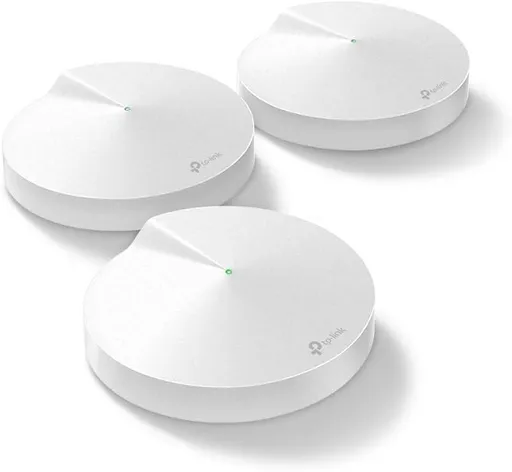
Idéal pour : Les utilisateurs prêts à suivre les mises à jour firmware de près pour stabiliser un mesh d'entrée de gamme.
En bref : D'après les avis, le Deco M5 souffre d'un backhaul filaire instable : les nœuds reviennent souvent en wifi et la connexion peut se dégrader après une journée d'usage. Des mises à jour firmware améliorent les choses pour certains, mais la fiabilité reste inégale.
Au-delà de ce modèle, la marque TP-Link (toutes gammes) recueille 42 % d'avis positifs sur 311 utilisateurs Reddit. Ce signal marque ne compte pas dans la note du modèle ci-dessus.
Points forts
- Couverture jugée correcte pour un modèle de milieu de gamme, comparée à d'autres produits.
- Le backhaul filaire fonctionne bien chez certains utilisateurs, avec un débit stable.
- Une mise à jour firmware a permis à plusieurs utilisateurs de résoudre les coupures (retour à une connexion stable, débit amélioré).
Points faibles
- Le backhaul Ethernet a tendance à repasser en wifi, avec des unités trop éloignées pour bien retomber en secours.
- Débit en retrait par rapport aux attentes chez certains (autour de 600 Mb/s en transfert local).
- L'appli Deco est jugée peu claire lors des problèmes de connexion, sans option pour désactiver le backhaul sans fil.
- Des coupures répétées de connectivité internet sont rapportées, parfois après seulement une journée de fonctionnement stable.
| Critère | Note /10 | Ce qu'en dit le consensus |
|---|---|---|
| couverture | 8.1 | Jugée correcte pour la gamme, sans retour négatif spécifique dans les avis analysés. |
| debit | 3.4 | Débit jugé décevant par certains (transfert local plafonné autour de 600 Mb/s), mais amélioré après une mise à jour firmware chez d'autres utilisateurs. |
| backhaul | 3.7 | Le backhaul filaire est signalé comme instable : plusieurs nœuds repassent en wifi sans que l'utilisateur puisse forcer le mode filaire, avec des soucis pour retomber correctement en secours. |
| fonctions | 0.0 | L'appli est critiquée pour son manque de clarté en cas de problème, et l'absence d'option pour désactiver le backhaul sans fil est un point de frustration. |
| stabilite | 2.6 | Instabilité récurrente : la connexion tient parfois une journée avant de se dégrader, bien qu'une mise à jour firmware ait résolu le problème pour certains. |
| fiabilite | 0.0 | Perte de connectivité internet fréquente selon plusieurs retours, un point de friction important. |
Avis Reddit
9 avis · 👍 5 😐 0 👎 4
-
maurimojrr/TpLink · Deco ethernet backhaul megathread →2024-04-16T17:14:19
Just an update for you, my cenario: ISP modem -> Deco M5(main) -> TL-SG1016D -> 2 Deco M5 (satellites) Works fine, my SG1016D is v12 that comes with 2 switches Loop and Isolation both I needed to turn off to make ethernet backhaul work fine
-
DependentBeat1205r/homeoffice · best mesh wifi system? tired of wifi dead zones already. →2026-05-21T02:37:24
Don’t just go with the brand. Understand that within each brand are budget models and higher models with better coverage and faster speeds. If you provide a description of your home (3 storey with no ethernet cabling for example) and provided details of your router (tp link deco m5 with 2 satellites for example) you may get more useful advice.
-
HanHan_spmr/TpLink · Deco ethernet backhaul megathread →2025-07-24T18:40:29
UPDATE: i talked to my supplier, he exchanged my D-Link switches with newer reversion. i found out from a website ... if your reversion is C6 or above... it support IEEE1905.1 i comform both (using wireshark): Dlink DGS-1024C hw ver. F6 UPC code F6/E Dlink DGS-F1010P-E hw ver. A1 UPC code F6/E do support IEEE 1905.1 after that all drop ping went away. i got 140mbps over cable and 60 mbps over wifi both fat roaming and Beamforming are off. so far so good... make sure your deco firmware is the newest... one of my M5 got exchange too... when it came it was 1.7.8 firmware... it only giveme less than 7mbps over wifi... upgrade to 1.8.5... it goes 50s...
-
HanHan_spmr/TpLink · Deco ethernet backhaul megathread →2025-07-20T18:06:31
@UNSW_PCSoc after several test and observation : i think the main problem is not IEEE 1905.1 i can see it very clearly on the POE switch. the M5 uses a POE 48v to 12v converter... when the loop on between EB and WB occurs on yhe M5... the port on the switch got turn off, hence turn off the M5 tplink have to give us option to turn off WB on each deco.
-
watagangstar/TpLink · Deco ethernet backhaul megathread →2025-02-28T03:14:55
Adding my experience to the thread and also a couple questions in case anyone has insight. Questions: 1. does setting custom DNS (cloudflare or google) potentially break internet connectivity, (ignoring external factors like the DNS having errors)? 2. does the number of decos connected via ethernet backhaul in the network impact the stability/reliability of internet connectivity? # Setup: Have 4x deco M5. my setup is designed around ethernet backhaul for all the access points cable internet from wall -> cable modem -> 1x deco (main) -> switch -> 3x deco in various locations For the switch I have 2x TL-SG108 and most recently D-Link DGS-108. I have 2 of the SG108s because i had connectivity issues (will detail below) and i sent it in for warranty repair. Then because i needed a switch i bought a 2nd one. Because still connectivity issues, i tried the DGS-108. That was even worse. immeidately did not work. so back to the TL-SG108. # Connectivity Issues So what was the connectivity issue i'm having? I've had various issues, including constant dropping of the deco's from ethernet backhaul and reverting to wifi. but the most recent challenge that has been going on for like 6 months with no end in sight is this: - deco's all connected to main deco via ethernet backhaul - all lights green - computers on network all recognize the wifi and connect to it without issue... - but there is no internet connectivity the loss in internet connectivity happens very often and what prompted me to buy the DGS-108 was because it was happening like once every couple hours. To fix the issue, I just unplug the switch, plug it back in and internet starts working again. # Observations for whatever reason, I had unplugged the ethernet backhaul for one of the routers. I didn't realize it till much later afterwards, but it seems like stability got way better, i.e. internet connectivity didn't drop as much. The other day i connected that deco back to the network, and instantly started having internet connectivity issues like every 4-6 hours. sometimes shorter. I could keep experimenting but i also have a gazillion other things to do that are higher priority once internet is up. # TLDR - DGS-108 does not work for me - I have wierd internet connectivity issues with the decos where it frequently drops - TL-SG108 still has problems but the best solution for me so far interested to hear if anyone has input on the above.
-
mr32197r/TpLink · Deco ethernet backhaul megathread →2025-02-06T08:11:48
In case someone might find this useful. I initially used this set-up with my Deco M5 3 pack: ONT - Wireless Router TP-Link HX510 - Switch TP Link TL-SG108E - 3 Deco M5s. Two Deco M5s would connect with a green light, and one Deco M5 would not connect with a red light. The mobile app did not show the ethernet icon. It looked like the app was displaying the wifi icon even though the two Decom M5s were wired in, showing good speeds. After checking the diagram on this page, [https://www.tp-link.com/us/support/faq/1794/](https://www.tp-link.com/us/support/faq/1794/) I changed the set up to: ONT - Wireless Router TP Link HX510 - One Deco M5 - Switch TP Link TL-SG108E - Two Deco M5's. Now the app is displaying the ethernet icon for both Deco M5s. The downside of this set up is I am wasting one Deco M5 next to the wireless router in the garage. I will have to source one additional Deco M5 separately to cover the area fully. https://preview.redd.it/cimeya488hhe1.png?width=415&format=png&auto=webp&s=65a3d58e67046da505196922aabc15b7409ec8b3
-
Sekk8877r/TpLink · Deco ethernet backhaul megathread →2024-11-30T11:45:16
Hi y'all, u/UNSW_PCSoc, thanks for starting this thread. The TL support wasn't even remotely helpful. **The hardware:** \- 3 x Deco M5 \- 2 x TL SG 1005D unmanaged switches (worked with ethernet backhaul) \- 1 x IPTV set-top box I've gone through most of it but couldn't verify if my setup would work well, so I am sharing 1 setup I tried & 2 potential ones I'm wondering about: \- **Setup #1** (diagram: [https://ibb.co/2PnDSwT](https://ibb.co/2PnDSwT) )- IPTV stopped working (was working before when the switch provided the internet connectivity directly to the IPTV. The ethernet backhaul worked. \- **Setup #2** ( [https://ibb.co/2k7rnvL](https://ibb.co/2k7rnvL) )- putting the unmanaged switch between the ISP and the Deco (Main). Not sure if the Deco would go into Ethernet Backhaul. The guide explicitly said ISP -> Main DECO. \- **Setup #3** ( [https://ibb.co/1THf3qg](https://ibb.co/1THf3qg) ) - CGPT advice here. Get a managed switch at the ISP entry point. Create a 2 VLANs (1 x IPTV + 1 x Home Network). This should mitigate any issues with Deco not getting direct ISP network access to enable ethernet backhaul. It sounded theoretical, so I was hoping for advice before I buy a managed switch and delve into VLANs. Any help here would be greatly appreciated before I purchase a managed switch. Thanks!
-
the_ayatollar/TpLink · Deco ethernet backhaul megathread →2024-11-19T15:57:35
My setup is: **ISP Modem** <-> **Main Deco** <-> **Switch** <-> **3x Satellite Decos** Decos are all M5. All cables are Cat5E or Cat6. **ISP Modem** has four LAN ports and a few devices connected (like PS5, Smart TV) and the Main Deco. **Switch** has 3x Satellite Decos and a few devices (Smart TVs mainly). **Switch** is an 'unmanaged' TP-Link LS1008G. I get the same type of issues. At odd times of the day, devices revert to Wireless backhaul and because the Decos are so spread out, they even struggle to fall back to this. The Deco app is a mess when this happens. It shows some Decos as completely offline but when I look at them they have a solid green light. I've tried operating my Deco network in both Router Mode and AP mode. Both modes work fine for \~1 day and then it all starts to fail; and I have to reboot everything more or less to get things back, and sometimes switch the ethernet cables at each Deco into the alternative LAN port. It all works fine then for maybe another day or so and again all fails. Is it safe to say the LS1008G doesn't support ethernet backhaul neither? I've tried other brand switches (D-Link, Mercusys) and the same issues occur.
-
EragusTrenzalorer/TpLink · Deco ethernet backhaul megathread →2023-07-21T07:25:26
I had a further question about this. Does the Deco reserve some network bandwidth when it uses Ethernet backhaul? I've noticed that when am wired to the M5 Deco and the Deco is using ethernet backhaul to the gigabit switch, I'm getting speeds that are only 600Mbps or so when transferring files between computers on the network. There is also variability in the transfer speeds as if it were using Wifi and not ethernet to do the transfer. I also did a Wifi transfer test and was getting 500Mbps when about 1m from the Deco. If I connect to the switch directly and not through the Deco, I get full gigabit file transfers. It's strange because the app says it's successfully using Ethernet backhaul for all the connections between Decos, but the file transfer test seems to suggest it is using 5GHz Wifi somewhere in the process.
Aucun avis pour ce filtre.
Souvent comparé à
Questions fréquentes
Le Deco M5 garde-t-il le backhaul filaire de façon fiable ?
Pas toujours : plusieurs utilisateurs constatent un retour vers le wifi malgré un câblage Ethernet, un souci parfois corrigé par une mise à jour firmware.
Quel débit attendre en usage réel ?
Les avis sont partagés : certains plafonnent autour de 600 Mb/s en transfert local, d'autres voient une amélioration nette après mise à jour du firmware.
Le Deco M5 convient-il à un grand nombre d'appareils ?
Les retours analysés ne détaillent pas le nombre d'appareils supportés, mais soulignent surtout des soucis de stabilité de connexion sur la durée.
Faut-il mettre à jour le firmware régulièrement ?
Oui : plusieurs utilisateurs rapportent une nette amélioration de la stabilité et du débit après une mise à jour firmware.