Asus ZenWiFi BQ16 Pro
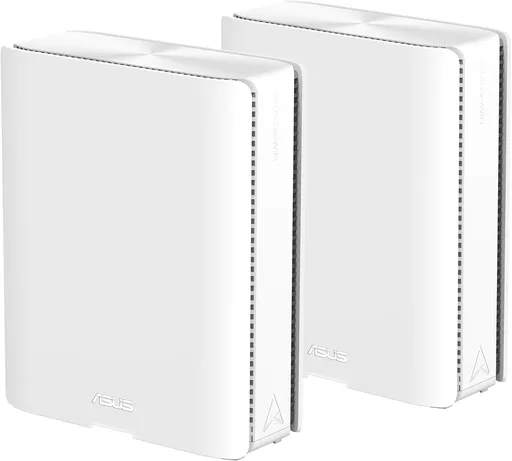
Idéal pour : Idéal pour les grands logements, les connexions multigigabit et les utilisateurs prêts à ajuster les réglages.
En bref : Les avis Reddit décrivent un mesh très rapide, bien couvert et riche en réglages, notamment avec un backhaul MLO efficace. Le consensus reste toutefois partagé à cause de problèmes de stabilité, surtout sur la bande 2,4 GHz, et d’un prix élevé hors promotion.
Au-delà de ce modèle, la marque Asus (toutes gammes) recueille 47 % d'avis positifs sur 205 utilisateurs Reddit. Ce signal marque ne compte pas dans la note du modèle ci-dessus.
Points forts
Excellente couverture Wi-Fi
4 1
« Now that it's all configured all I can say is WOW, WOW, WOW! » Voir l’avis
« Each unit covers up to 4,000 square feet. » Voir l’avis
« So far wifi reception has been great, even out in the backyard where my google wifi pucks struggled. » Voir l’avis
Débits élevés
7 2
« Connected to the 5GHz network I get between 800-900 Mbps down, and connected to 6GHz I get full 1Gbps down. » Voir l’avis
« That's great speed for sure, especially through a concrete floor. » Voir l’avis
« What a huge difference it's made throughout my house, super fast speeds in every corner of the house, no constant lagging, and just solid full signal. » Voir l’avis
Fonctions complètes
9 4
« It’s about time same price as the 970 series and I appreciate the free parental controls and VPN, which both require subscriptions with Netgear » Voir l’avis
« I switched to ASUS BQ16 Pro which has worked amazingly so far, modern app interface (Orbi app is trash) and never have to think about it. » Voir l’avis
« Since the major specifications are identical between the two the BE98 Pro should work well with the BQ16 Pro. » Voir l’avis
Bon rapport qualité-prix
7 4
« It’s about time same price as the 970 series and I appreciate the free parental controls and VPN, which both require subscriptions with Netgear » Voir l’avis
« Wow so you saved about $600 by buying used/like-new condition! » Voir l’avis
« If I knew then what I know now I wouldn't have waited and just paid the full price, but am super glad I got this at such a significant discount. » Voir l’avis
Points faibles
Connexion instable
5 9
« This is the only band that I have issues with on my BQ16 Pro. » Voir l’avis
« I think it's time to jump ship from Asus because despite the reboots, resets, and staying current on the firmware, it always does the same. » Voir l’avis
« After about 3 weeks uptime my BQ16 Pro just starts dropping 2.4Ghz connections. » Voir l’avis
Backhaul limité
2 3
« You're using a VPN (issue #1) and it sounds like you're connecting to one of the mesh units, which uses WiFi to backhaul back to the actual router which is probably 2.4ghz so all your speeds are… » Voir l’avis
« The wireless backhaul (6 GHz) was barely hanging on just to avoid dropping entirely. » Voir l’avis
« They don't like Ethernet backhaul at all. » Voir l’avis
| Critère | Note /10 | Ce qu'en dit le consensus |
|---|---|---|
| Prix | 5.3 | Le prix est jugé élevé, avec un rapport qualité-prix nettement plus convaincant en promotion. |
| Fonctions | 6.8 | Les utilisateurs apprécient les réglages avancés, les réseaux dédiés et les services inclus sans abonnement. |
| Stabilité | 2.7 | Les avis sont très partagés, entre fonctionnement irréprochable et déconnexions nécessitant des redémarrages. |
| Backhaul | 3.4 | Le backhaul MLO peut être très rapide, mais sa fiabilité dépend fortement des obstacles et de la configuration. |
| Débit | 7.0 | Les utilisateurs rapportent souvent des débits proches du gigabit, avec quelques limites liées aux appareils et aux réglages. |
| Fiabilité | 6.6 | Certains utilisateurs le trouvent parfaitement fiable, tandis que d’autres rencontrent gels, coupures et pertes de visibilité. |
| Couverture | 7.2 | La couverture est généralement excellente, mais le 6 GHz traverse mal certains murs épais. |
| Installation | 4.3 | L’interface paraît accessible, mais les termes techniques et la configuration par application peuvent compliquer l’installation. |
Avis Reddit
23 avis analysés · Positifs 10 Neutres 3 Négatifs 9
avis pertinents ·
-
CanewoodPlace 🇬🇧
5 commentaires analysés
-
JerusM 🇬🇧
16 commentaires analysés
r/ASUS · About to leave ASUS... ZenWiFi BQ16 Pro Haven’t had any issues since updating to the latest FW
r/ASUS · About to leave ASUS... ZenWiFi BQ16 Pro Hasn’t happened in a while. There was a FW update a few days ago. Can’t say for sure if it’s fixed
r/orbi · Current deal Orbi 870 I bough the 2 pack for $650 during Black Friday last year. Returned them due to lots of issues between the wireless backhaul. I’d avoid. I ended up getting ASUS BQ16 pro with no issues
r/ASUS · About to leave ASUS... ZenWiFi BQ16 Pro Thanks! I installed the update last night, will see if the issue is resolved
r/ASUS · About to leave ASUS... ZenWiFi BQ16 Pro Is it devices specifically connected to 2.4GHz being disconnected? This is the only band that I have issues with on my BQ16 Pro. It usually happens after 3+ weeks without a reboot. Rebooting fixes it. Hoping that a firmware update fixes the issue
r/ZenWiFi · ⭐⭐⭐⭐⭐ ASUS BQ16 Pro – Real-World Review My ISP bandwidth is 1Gbps down 75Mbps up. I have a 2.4GHz only IoT network, and connected to that I get 85 Mbps down/ 75Mbps up. Connected to the 5GHz network I get between 800-900 Mbps down, and connected to 6GHz I get full 1Gbps down. It uses MLO for the wireless backhaul which has to connect to a node that’s downstairs through a concrete floor and I still get full gigabit speeds on devices connected to the node There hasn’t been any slowdown on any of the bands at any point
r/orbi · Plz recommend between Orbi 870, 970 or Eero Max 7 I was in a similar situation when I wanted to upgrade to WiFi 7 after having Orbi RBR753. Bought an Orbi 871 and it was a nightmare. I didn’t believe the reviews but it was a nightmare that I ended up returning to Amazon. There was no way I was going to spend hours trouble shooting and collecting logs to submit after spending $699 (during Black Friday 2025) or waiting on an update. Netgear tried to blame it on my house (odd considering the RBR750 worked flawlessly). Double odd that it would operate at full speed and then suddenly stall to dial up speeds randomly. I switched to ASUS BQ16 Pro which has worked amazingly so far, modern app interface (Orbi app is trash) and never have to think about it. The Netgear guy that lurks on Reddit even blocked me when I called them out on the BS. Also good luck waiting on firmware updates, they haven’t put out an update since 09/2025. I’ve had 3 updates since on ASUS, along with no subscription fees or paywalls ever. I’m now an ASUS convert. Get the BT10 or BQ16Pro if you want the top of the lot Save yourself the nightmare
r/ASUS · About to leave ASUS... ZenWiFi BQ16 Pro I just checked my ASUS app (I’m not at home) and every single one of my 2.4GHz devices is offline. By the looks of it it’s worse
r/ASUS · About to leave ASUS... ZenWiFi BQ16 Pro I just did a feedback ticket via the ASUS app. You should as well, the more issues they’re aware of the more likely a fix can be issued. Here was my feedback: Select: Connection / Speed Problem > Recently > Unable to connect to wireless network > 2.4GHz band Hello ASUS Support, I am experiencing a recurring issue with my BQ16 Pro system. After approximately 2–3 weeks of continuous uptime, all devices connected to the 2.4 GHz band suddenly disconnect and lose internet connectivity. When this occurs: • All 2.4 GHz devices disconnect simultaneously • Devices connected to 5 GHz and 6 GHz continue functioning normally • The 2.4 GHz band appears to stop responding entirely The only way to restore connectivity for 2.4 GHz devices is to perform a full system reboot. This behavior has occurred multiple times, and the pattern is consistent with long uptime before failure. Request: Please investigate whether this may be a firmware issue, memory leak, or radio process failure affecting the 2.4 GHz band after extended uptime. A firmware fix would be greatly appreciated. If needed, I would be happy to provide system logs or additional diagnostics.
r/orbi · Orbi 970 sucks, what to move to? ASUS BQ16 Pro has been amazing for me. I had the Orbi 870 and I returned it after a couple weeks: nothing but problems
r/orbi · My experience with Orbi 870 has been a nightmare I’ve since returned the Orbi 870 for the ASUS BQ16 Pro, has been working perfectly. iPhone 15 Pro max supports WiFi 6E which is 6 GHz WiFi as well
r/ZenWiFi · ⭐⭐⭐⭐⭐ ASUS BQ16 Pro – Real-World Review 2.4GHz is pretty congested in my area on channels 1, 6 and 11 so I’m guessing that’s why I don’t get higher speeds but it’s not important as I only have smart bulbs that use it.
r/ZenWiFi · ⭐⭐⭐⭐⭐ ASUS BQ16 Pro – Real-World Review Which channel is your 2.4GHz network on? I had to set mine to 20Mhz only for compatibility with LIFX bulbs so maybe that’s why my speeds are a bit lower
r/ZenWiFi · ⭐⭐⭐⭐⭐ ASUS BQ16 Pro – Real-World Review I got it for $719 during Black Friday. I don’t have any WiFi 7 devices yet but I do have WiFi 6E main devices and they have benefited a lot. Also needed strongest possible wireless backhaul which this is flawless
r/ZenWiFi · ⭐⭐⭐⭐⭐ ASUS BQ16 Pro – Real-World Review Damn that’s a great deal! When was it on sale at that price?!
r/orbi · My experience with Orbi 870 has been a nightmare UPDATE - Dec 3 2025 Returned the Orbi 870 for a full refund to Amazon. Purchased an ASUS BQ16 Pro (2 pack) during Black Friday for $719. Could not be happier, everything just __works. I’m now getting full gigabit speeds in every device that has the hardware for it. Wireless backhaul between the concrete floor that the Orbi struggled with is not an issue anymore. The ASUS app feels like generations above, and the level of customization is insane!
-
fotoflux 🇬🇧
1 commentaire analysé
r/orbi · Orbi 970 sucks, what to move to? I switched to Asus ZenWiFi BQ16 Pro after having many, many issues with iOT devices and disconnects, especially when switching between satellites on the 770 system. I have no issues now. It’s about time same price as the 970 series and I appreciate the free parental controls and VPN, which both require subscriptions with Netgear
-
ADirtyScrub 🇬🇧
1 commentaire analysé
r/HomeNetworking · At My Wits End with WiFi Speed for Work Laptop - Help? ASUS BQ16 Pro There's dozens and dozens of things that can affect WiFi speeds. Hardwire and test. You're using a VPN (issue #1) and it sounds like you're connecting to one of the mesh units, which uses WiFi to backhaul back to the actual router which is probably 2.4ghz so all your speeds are going to only be as fast as the wireless backhaul.
-
sunrisebreeze 🇬🇧
7 commentaires analysés
r/ZenWiFi · ⭐⭐⭐⭐⭐ ASUS BQ16 Pro – Real-World Review That's great speed for sure, especially through a concrete floor. By comparison my ASUS XT8 on 2.4ghz (speed test) gets me about 113mbps about 6-10 feet from the router, and then it drops to 50-70mbps about 20 feet away. Enjoy your new mesh system.
r/ZenWiFi · ⭐⭐⭐⭐⭐ ASUS BQ16 Pro – Real-World Review Wow so you saved about $600 by buying used/like-new condition! That’s incredible. I think you’d agree even though it took an hour to set it up the deal was so worthwhile. That’s excellent!!! I think these “like new” devices are a great bargain. A router just sits on a shelf; it’s not like a laptop or some other physical device that sees a lot of use. So as long as the device still works and someone didn’t “brick” it with an update or do something physically to damage the device, it should be just like a new one. Only after many years of use could the device maybe start to break down after heating/cooling of components on the circuit board, but that won’t happen on a “like new” item that is a month or so old. And it would probably never happen anyway. I’ve had my router 4.5 years and it still works the same as when I got it. Enjoy your new system and glad to hear it is working so well. I have been tempted to upgrade, but think I will probably stick with my ASUS XT8 (WiFi 6) system until ASUS stops providing firmware updates. It is working well now and I only have a 400mbps internet plan, so I don’t need a very fast system anyway. Plus I only have a single WiFi 7 device (iPhone), and the XT8 is handling my device load fine right now.
r/ZenWiFi · ⭐⭐⭐⭐⭐ ASUS BQ16 Pro – Real-World Review Very nice review, thank you. Does anyone else think these are expensive? Currently about $1100 for a two-pack at Amazon (I realize they were less expensive during Black Friday ($719 according to camelcamelcamel.com)). Even at $719 I don't think I would buy these yet. Is there a genuine need for WiFi 7 mesh systems for most people?
r/HomeNetworking · Asus RMA/WiFi Mesh configuration Thanks for sharing your choice, good to know. Since the major specifications are identical between the two the BE98 Pro should work well with the BQ16 Pro. Regarding getting another BQ16 Pro, are you sure you need one? Each unit covers up to 4,000 square feet. If the units are placed closely together it’s not providing much benefit, since the coverage will overlap. Up to you of course how you wish to set up the system. Enjoy your mesh system!
r/HomeNetworking · Asus RMA/WiFi Mesh configuration **TL;DR:** If physical appearance matters, wait for the BQ16 Pro to come back in stock. Otherwise, if you don't care about looks, the BE98 Pro should work fine (and be a bit of an upgrade). The BE98 Pro gives you an extra LAN port and more port selection (2.5GB ports), along with an extra USB 2.0 port. But the important stuff (quad band support, theoretical speeds, memory, spatial streams) are identical, so either should work well. If you get the BE98 Pro, it's up to you which you configure as the router. Since I assume you already have a BQ16 Pro set up as a router, you would save time/effort by just adding the BE98 Pro as an AiMesh node. **More details:** Interesting offer from ASUS. I compared the tech specs for both, and you can too if you wish: [https://www.asus.com/us/networking-iot-servers/whole-home-mesh-wifi-system/zenwifi-wifi-systems/asus-zenwifi-bq16-pro/techspec/](https://www.asus.com/us/networking-iot-servers/whole-home-mesh-wifi-system/zenwifi-wifi-systems/asus-zenwifi-bq16-pro/techspec/) and [https://rog.asus.com/us/networking/rog-rapture-gt-be98-pro/spec/](https://rog.asus.com/us/networking/rog-rapture-gt-be98-pro/spec/) I think you could flip a coin and use either, and it would work pretty much the same. The BQ10 Pro and GT-BE98 Pro are in the same performance class ("BE30000 Ultimate BE Peformance"). They claim to provide the same speeds on every band, and both have the same bands (2.4ghz/5ghz/6ghz-1/6ghz-2), same amount of memory (2GB), and same spatial stream support on all bands (4x4). The big difference is physical: The BQ16 Pro looks pretty, like a work of art; but the BE98 Pro looks like a big hulking spider. BTW, the BE98 Pro is quite large, so keep that in mind before making a decision. Another difference is port selection. BQ16 Pro has 10GB WAN/LAN, 10GB LAN, 1GB WAN/LAN and two 1GB LAN (total of 5 ports). BE98 Pro has 10GB WAN/LAN, 2.5GB WAN/LAN, 10GB LAN, and three 2.5GB LAN (total of 6 ports). BE98 Pro has a wider selection of ports too (BQ16 Pro has 10GB or 1GB; BE98 Pro has 10GB/1GB/2.5GB to choose from). The BE98 Pro has an extra USB 2.0 port too (both have a USB 3.0 \[BQ16\] or USB 3.2 gen1 \[BE98 Pro\] port too). Which will you get?
r/ZenWiFi · ⭐⭐⭐⭐⭐ ASUS BQ16 Pro – Real-World Review Excellent, glad you know the tip! 😉 No one told me that, I had to figure it out myself after wondering for months why my clients weren't staying connected. I wouldn't worry too much about the speed difference for 2.4ghz. If you have a lot of interference in your area, it will impact speeds. I don't always get 113mbps but that's what I got when I tested it this week. The time of day of the test can also cause the speed to vary. According to ASUS this is the theoretical maximum speed of 2.4ghz on your mesh system: **WiFi 7 (802.11be) (2.4GHz): up to 1376 Mbps** If you ever see that, it will be a miracle! Mine "only" has a theoretical top speed of 574 Mbps. Again, if I saw that I would really be amazed. Especially since my internet service is only 400mbps. (I easily exceed 400mbps via WiFi when using 5ghz band though!) I wish all the stupid "smart" devices could use 5ghz instead.
r/ZenWiFi · ⭐⭐⭐⭐⭐ ASUS BQ16 Pro – Real-World Review Thanks for sharing more info! By the way I have an ASUS XT8 mesh system (it's WiFi 6). It also has excellent wireless backhaul (XT8 has a 2nd dedicated 5ghz band with 4x4 spatial streams for backhaul). I have the router and mesh node two floors apart and still got excellent signal when they were using wireless backhaul. I now have them connected via wired backhaul (ethernet), but the performance via wireless backhaul was just as good. I am not as familiar with ASUS's WiFi 7 mesh products. Looks like they use MLO (multi link operation) for the backhaul. The BQ16 Pro states it has a 6ghz dedicated backhaul but the product page also mentions using MLO for backhaul (combining 2.4ghz/5ghz/6ghz-1/6ghz-2 bands). I looked up the tech specs of the BQ16 Pro and it's got 4x4 streams for all 4 bands: [https://www.asus.com/us/networking-iot-servers/whole-home-mesh-wifi-system/zenwifi-wifi-systems/asus-zenwifi-bq16-pro/techspec/](https://www.asus.com/us/networking-iot-servers/whole-home-mesh-wifi-system/zenwifi-wifi-systems/asus-zenwifi-bq16-pro/techspec/) This should give it more capacity for concurrent client connections, as average mesh systems (such as mine 😉) only have 2x2 streams for the 2.4ghz and 5ghz client bands. Only the XT8's dedicated 5ghz backhaul band is 4x4. Since 6ghz doesn't have long range I wonder if the system uses the 5ghz band for the majority of backhaul traffic and if this slows down 5ghz clients. Since you posted your review, **have you noticed any client slowdown** for any of the bands? Or is it all good regardless of whether client is using 2.4ghz/5ghz/6ghz? **BTW what speed do you get for the 2.4ghz client?** To help understand performance could you connect your mobile phone to the 2.4ghz wifi network and run a speed test in the same room as the router (maybe 6 feet away from it) and then 20 feet away, then share the results here? I would like to know how fast 2.4ghz is with this premium WiFi 7 mesh system. Another benefit over the Orbi is that ASUS gives you all the security features with product purchase. Orbi (Netgear), eero (Amazon) and TP-Link charge a subscription fee for additional security and parental control features, which is a terrible surprise for customers who do not realize this until after purchasing a device from Orbi/eero/TP-Link.
-
DannyDaCat 🇬🇧
4 commentaires analysés
r/ZenWiFi · ⭐⭐⭐⭐⭐ ASUS BQ16 Pro – Real-World Review I just set mine up last night, and I think I had a similar situation, as I had to do a full Factory reset, not the standard reset. I will say that the initial config and on-boarding experience is a real hot mix of easy to use UI but difficult wording and descriptions that are extremely technical, so I can see whomever had this tried, got far enough to set up the local device passwords and maybe get them paired, but then gave up. It took me at least an hour to get both devices factory reset AND I had to physically connect my laptop to it to get to the Router config pages for each. It even need a Firmware update so they never got that far. Now that it's all configured all I can say is WOW, WOW, WOW! What a huge difference it's made throughout my house, super fast speeds in every corner of the house, no constant lagging, and just solid full signal. I don't have the fastest internet connection out there, but just not having the throttling and drops makes it feel like I have a fast plan. If I knew then what I know now I wouldn't have waited and just paid the full price, but am super glad I got this at such a significant discount. It was in brand new condition, not even a scuff. All that told me that it was used was the network and power cables were undone.
r/ZenWiFi · ⭐⭐⭐⭐⭐ ASUS BQ16 Pro – Real-World Review A few days ago, it was one of their "used" items that had an 8+ score on their site. I did some research and found that their product scoring for "used" items is extremely conservative and that items tend to be significantly better to almost new even at this score level, and that it's mostly cosmetic and barely noticeable so I took a chance. They still have a 30-day return policy so why not.
r/ZenWiFi · ⭐⭐⭐⭐⭐ ASUS BQ16 Pro – Real-World Review Thanks for this! I’ve been on the fence about getting this over the orbi. I ended up getting this after b&h had a sale for a two pack for $500. Due to be delivered tomorrow. I’m super excited, the WiFi has been really crappy lately, and I’m sure I made it worse by trying to make my own rigged mesh system with two wireless AP’s I had.
r/ZenWiFi · ⭐⭐⭐⭐⭐ ASUS BQ16 Pro – Real-World Review If it ain't broke, don't fix it, right? By the time your system starts to show it's age it'll probably be at WiFi9, and this system or something similar will be super cheap for sure! For those of you out there who aren't sure, I will hazard a guess that it'll be worth while to try it out.
-
Azure340 🇬🇧
1 commentaire analysé
r/HomeNetworking · eero - Max 7 Tri-band Mesh Wi-Fi 7 System or NETGEAR - Orbi 970 Series BE27000 Quad-Band Mesh Wi-Fi 7 System ? I think it depends how much control you want. If plug and play go with eero. I personally don't like how its controlled by Amazon. I went with Asus Zenwifi bq16 pro. Its a beast and costs less than others. Gives you lots of control but you will have to tinker the settings to make sure its stable with all your devices. It has a lot of advanced features and sometimes older devices don't like them so i uave separate IoT network for those and then my 5 / 6 Ghz Wifi 7 network. I use Ethernet backhaul but i tried wifi backhaul and it used MLO backhaul so the speed is great
-
WilliamG007 🇬🇧
1 commentaire analysé
r/ASUS · About to leave ASUS... ZenWiFi BQ16 Pro I’ve been having the same issues. After about 3 weeks uptime my BQ16 Pro just starts dropping 2.4Ghz connections. After I reboot the main unit in the Asus app, it all works again. Is there something going on here I need to fix because it’s driving me insane. 😭 Only workaround seems to be to schedule a full reboot once a week, but obviously that’s not ideal…
-
HieuDo 🇬🇧
1 commentaire analysé
r/HomeNetworking · Townhouse Network: 10G Backbone, Wi-Fi 7 Mesh, and too many Thermal Cameras That definitely would have been the cleaner route, but this network actually evolved completely in reverse! I started out just wanting a high-end Wi-Fi 7 mesh for an easy setup, which is why I bought the ASUS ZenWiFi BQ16 Pro system. However, I quickly realized that 6GHz signals don't stand a chance against thick townhouse concrete walls. The wireless backhaul (6 GHz) was barely hanging on just to avoid dropping entirely. That forced me to run Ethernet cables and buy the Omada switches to build a proper 10Gbps backbone. Same thing happened with security; I got tired of unstable consumer gear, gave away my Google Nest system except the doorbell, and upgraded to industrial Dahua cameras. While I'd love to go full Omada APs now, the ZenWiFi nodes are actually doing double duty as localized switches. The 2nd BR node gives me that extra 10Gbps port directly to the Mac Studio, and the other nodes host smaller clients like my QNAP NAS and Kyocera printer without me needing to drop extra mini-switches in every room.
-
ddgconsultant 🇬🇧
1 commentaire analysé
r/ZenWiFi · ⭐⭐⭐⭐⭐ ASUS BQ16 Pro – Real-World Review Microcenter has the two pack on sale for $899.99 https://preview.redd.it/hj8u95iv2y4h1.jpeg?width=4000&format=pjpg&auto=webp&s=9e8ebcd647719d4ba6072dbc82952df9f9a2d9e3
-
Townie5 🇬🇧
1 commentaire analysé
r/orbi · Orbi 970 2 pack Weird Issues The ASUS ran fine for 3 weeks. My Dyson Fans and Shield Pro, which I use for my Plex, wouldn't connect to the wifi tho. So I picked up a Deco BE95 today and set it up. Everything connected without issue. Was honestly the easiest wifi setup I've ever done.
-
Hlrius 🇬🇧
1 commentaire analysé
r/orbi · Orbi 970 2 pack Weird Issues I’ll be curious as to how your experience is with the ASUS. I replaced my old orbi mesh with it and the speed difference was dramatic. But…it has been an absolute nightmare, my constant need to unplug it, reboot made the speed increase moot. Some 5GHz devices would stop connecting while the 2.4GHz stayed put. Other times, the opposite would happen. The Orbi has been put back into action. I know they always say ‘slow and steady wins the race’…and maybe they’re onto something.
-
WonderfulFlow6800 🇬🇧
1 commentaire analysé
r/HomeNetworking · Thinking of the ASUS RT-BE88U (AUS) – Need advice on Mesh nodes for a wired backhaul setup I mean it all depends on how much coverage you need and how much you want to spend look up asus WiFi 7 mesh battle on YouTube channel called landpet the bq16pro has same cpu and ram as be88u its just expensive I think all asus ai mesh products work well with each other you could get that as a main unit and get a 2 pack of cheap ones because you are wired backhaul anyways either way you have a lot of options
-
RRR971 🇬🇧
1 commentaire analysé
r/ASUS · Help needed: brand new ZenWiFi BQ16 Pro with dead WAN controller? Solved: After 24hrs at it I was about to send it back. Had one last reset and this time ditched the setup through the app. Worked like a charm! And continues to work very well. Bottom line, just don't use the app
-
ASUSTechMKTJJ 🇬🇧
1 commentaire analysé
r/ASUS · About to leave ASUS... ZenWiFi BQ16 Pro There is a lot to unpack in this type of scenario. I would recommend using a more basic approach and use Smart Connect, which unifies all channels and lets the router auto-assign. If you have critical IoT devices, enable the IoT dedicated band. Beyond that in the app or WRT firmware, ou can assign devices to fixed nodes if you prefer not to have the router go through consistent optimizations. Generally, this should not be required, but we implement this feature for a reason as every device matrix and environment is different. You can find this under Bind To Ap in the app. You also might want to look more closely at the connection quality for the devices you are noting issues with most consistently. Beyond this, if you have devices that use MLO, some may experience issues, and you may want to consider disabling it. I would recommend you go through our formal service and support channels for formalized support, and also consider submitting a debug log from the app/firmware interface so our team can perform deeper debugging. Merlin firmware will not change our WiFi management; it just extends some functionality that, for most, is not needed due to the extensive basic feature set. Thank you for your patience and understanding.
-
nopethanks1 🇬🇧
1 commentaire analysé
r/HomeNetworking · At My Wits End with WiFi Speed for Work Laptop - Help? ASUS BQ16 Pro Same thing is happening to my work computer, which is also an HP Elitebook. I have the BQ16 Pro mesh routers. Everything is on a 2Gbps cable provider. Speed tests on a different computer regularly get 1.7Gbps, but the work computer gets 20-50Mbps, with giant latency issues at 700-1200ms. Can't turn off the VPN. Still trying to diagnose the real problem. When I jump on my phone hotspot, speeds go way up (>175Mbps). Reverted firmware for BQ16 and forced binding to the main router - no change. Hardwired gigabit - no change. Still looking for what might be the issue. What VPN software does your company use?
-
VRAddictAnonymous 🇬🇧
1 commentaire analysé
r/orbi · Orbi 970 sucks, what to move to? I'm using ASUS BQ16 Pro. 3 pack, BE30000. Runs like it was designed to. Was on Netgear and Linksys previously.
-
IntelligentPart7193 🇬🇧
1 commentaire analysé
r/ZenWiFi · ⭐⭐⭐⭐⭐ ASUS BQ16 Pro – Real-World Review I loved my XTs... superb. But I moved to the BQ16/BE30000 to get all the VLAN/Smart Master functionality. Main Network was so much better. All the rest was a mess of visibility issues; reliability issues, and forever dropouts and network freezes...
-
SuperDuperLuckyDuck 🇬🇧
1 commentaire analysé
r/HomeNetworking · Should I bother updating home network to mesh routers (wifi7)? I just did this. Was running 5 google wifi pucks gen 1 all hardwired around our 1964 lathe and plaster house. Upgraded to Sonic 10g. After some research I went with **Asus BQ16 Pro 2** pack. One each at the opposite corners of the house and then one **ASUS RT-BE58U WiFi 7 BE3600** for the garage, all wired cat6 backhaul. Black Friday got the BQ16 routers down to $715, and the BE3600 at $99. I ended up getting a couple TRENDnet 5-Port 10G Switches, TEG-S750. If you are just doing wifi and don't need anything 10G on your network you can skip this. So far wifi reception has been great, even out in the backyard where my google wifi pucks struggled. The router interface is easy to use and has options that other routers charge you for. My iPhone 16 was getting 1350 Mbps speed test in the living room with the router. Right now in the middle of the house between the two routers I'm getting 747 Mbps on the iPhone.
-
darkveins2 🇬🇧
1 commentaire analysé
r/wifi · Wifi penetration in the steel-reinforced concrete jungle Ahh, a classic problem. When I was a network engineer, I also wrestled with a steel-reinforced concrete jungle for multiplayer simulations. The cause of your headache is the mesh network. These are notoriously unstandardized and unreliable. What you want are wifi access points, connected by ethernet cable to your primary router. You can use a specialized AP or a router in AP mode. The upgrade to WiFi 7 for MLO is questionable. Novel features often have buggy firmware implementations, until a sufficient period of stabilization has elapsed. If you need it, or are made of money, then I’d say go for it. Just remember to disable MLO if things get weird. If you’re not made of money, you can get a cheaper wifi 6 router. Remember that you’ll also need to get one or two APs.
-
nateman99 🇬🇧
2 commentaires analysés
r/ASUS · First time Asus ZenWifi user - absolutely HORRIBLE HORRIBLE experience - new BT10 FWIW, their wireless products can do mesh or wired backhaul. In fact, when I was deploying it, it connected via mesh before I realized I had a wiring problem. And, UniFi Network (the management layer) has worked plug and play. Heck, adding nodes was VASTLY easier than the mesh node process on ZenWifi. You do have the power to tweak a lot of knobs and dials, but you don’t have to. I did create a dedicated SSID for the 2.4GHz dependent IOT devices. For the first time ever, I don’t have any cameras or devices as “not responding” in Apple Home. That has never happened on either the XT8 or BQ16 Pro. That being said, are you in the market for some BQ16 Pro nodes? I have three for sale. 😉
r/ASUS · First time Asus ZenWifi user - absolutely HORRIBLE HORRIBLE experience - new BT10 I'm experiencing the same issue, but I decided to invest in the VERY EXPENSIVE BQ16 Pro. Unfortunately, the problems are much the same. They do not LIKE mixed backhaul. They don't like Ethernet backhaul at all. They only stabilize when they're using MLO. I've unplugged the Ethernet to keep them stable (if you can call it that). And now, they are randomly rebooting. Just in the middle of the day, the main node craps the bed and starts over. And ASUS's solution is to reboot and perform a hard reset. I had three XT8s that served me well for YEARS with few problems. But these new Wi-Fi 7 models are just disappointing. I'm past my return period, or I'd have returned them to Amazon. DO NOT BUY ASUS's WiFi 7 products until they resolve their issues. They are not good.
-
dbv2 🇬🇧
2 commentaires analysés
r/HomeNetworking · Asus BQ16 Pro or Netgear 970 Seems fine. Not sure it is any better than my older Netgear WiFI 6 mesh system. Think that was RBR 50. I could test it if you want me too. Speed wise it is definitely faster.
r/HomeNetworking · Asus BQ16 Pro or Netgear 970 I ended up testing both. They both performed very well similar speed wise everywhere I tested in our house and outside. Asus BQ16 Pro might be somewhat faster in spots. I ended up keeping the Asus BQ 16 Pro. Feel like it has more options than the Netgear 970, a three warranty and their security package is free, where Netgear is a subscription. Also, like the web interface and the Asus app better than Netgear. I would be happy with either, but the Asus is an overall better value. The only thing I wish it had was 2.5 gbe ports instead of the 1 gbe and then it would be the absolute best. It does offer 2 10gbe ports, while Netgear only offers one.
-
Wide_Right_1991 🌐
1 commentaire analysé
r/ASUS · Asus ZenWiFi BQ16 Pro - Merlin Firmware? Not supported. [https://www.asuswrt-merlin.net/about](https://www.asuswrt-merlin.net/about)
Aucun avis pour ce filtre.
Souvent comparé à
Questions fréquentes
Le BQ16 Pro couvre-t-il bien une grande maison ?
Les utilisateurs Reddit relèvent une excellente couverture, parfois jusque dans le jardin, avec de bons débits dans toute la maison. Les murs épais en béton peuvent toutefois fortement affaiblir le signal 6 GHz.
Le backhaul sans fil est-il performant ?
Le consensus Reddit est positif lorsque le backhaul MLO bénéficie d’un signal suffisant, avec des débits élevés même entre deux étages chez certains utilisateurs. D’autres signalent une liaison 6 GHz fragile à travers des murs épais, imposant alors un câblage Ethernet.
Le BQ16 Pro est-il stable avec les objets connectés ?
Les retours sont contradictoires. Plusieurs utilisateurs ne rencontrent aucun problème, tandis que d’autres rapportent la déconnexion récurrente des appareils 2,4 GHz après quelques semaines, parfois corrigée temporairement par un redémarrage ou une mise à jour.
Vaut-il son prix ?
Les utilisateurs Reddit jugent souvent son tarif normal très élevé. Les avis deviennent plus favorables en promotion, notamment grâce aux nombreuses fonctions incluses sans abonnement.
u/JerusM this is generic feedback and they always respond the same way. There is a new firmware update that just released: ASUS ZenWiFi BQ16 Pro Firmware version 3.0.0.6.102\_39254 Check if it's available in your router settings. Hopefully this provides a fix.
The last firmware has been solid.
I think it's time to jump ship from Asus because despite the reboots, resets, and staying current on the firmware, it always does the same.
You're welcome. I just installed it now... so, fingers crossed and we'll see. I'm still planning to make the move to Ubiquiti.
It’s the same as you… it’s only 2.4 band and happens every couple of weeks