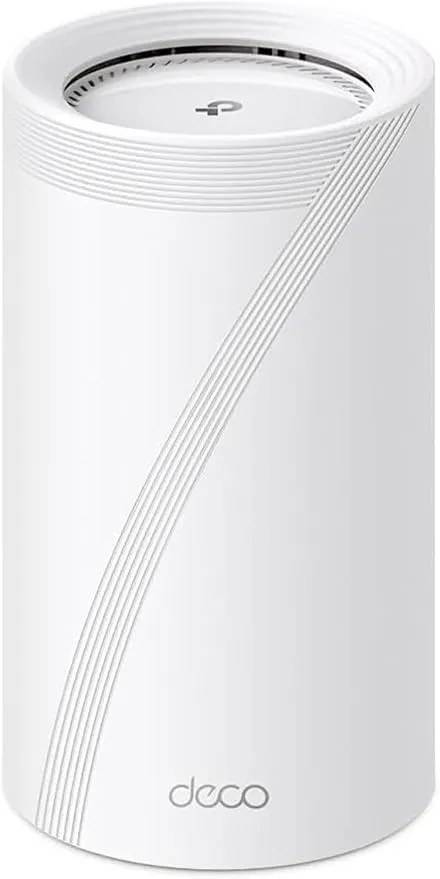
TP-Link Deco BE63
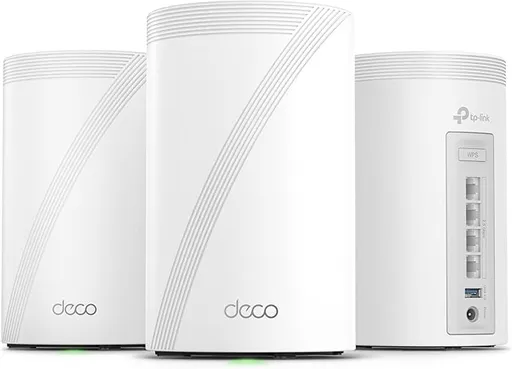
Idéal pour : Idéal pour les grandes habitations, les connexions multigigabit et les installations mêlant backhaul Ethernet et sans-fil.
En bref : Le consensus Reddit décrit un mesh très performant, bien couvrant et riche en connectique, mais dont la stabilité varie fortement selon les appareils et la configuration. Les problèmes de réseau 2,4 GHz, d’objets connectés et de redémarrage après une coupure constituent le principal risque.
Au-delà de ce modèle, la marque TP-Link (toutes gammes) recueille 46 % d'avis positifs sur 385 utilisateurs Reddit. Ce signal marque ne compte pas dans la note du modèle ci-dessus.
Points forts
Fiabilité éprouvée
7 1
« The mesh works perfectly fine even with older 2.4ghz only devices like switches and stuff. » Voir l’avis
« My BE63 3-pack has been working fantastic for the month I've had it. » Voir l’avis
« We have a Tp-Link Deco BE63 and it's not the best thing in the world, but as long as you don't turn off the auto features, it works very well. » Voir l’avis
Excellente couverture Wi-Fi
6 2
« The TP Link Deco BE63 is good for large homes » Voir l’avis
« We actually need four of them in our house, it's not that large but it's construction and design mean that Wi-Fi doesn't travel very well within it. » Voir l’avis
« The wireless one is solely to service a place in the house that is hard to reach without putting a dedicated node up there. » Voir l’avis
Installation facile
4 1
« It also opens up the solution that if I ever do need more coverage, popping an extra wired node later anywhere in the basement with easier wiring is a breeze. » Voir l’avis
« The software is great, simple setup, and you'll know quickly via the feedback of the software if it will give you the coverage you want. » Voir l’avis
« Simple, basic network configuration, monitoring and management via an app and TP-Link's cloud servers. (If TP-Link decides to sunset the Deco product and shut down their servers, the mesh would still… » Voir l’avis
Backhaul efficace
6 2
« I believe it can use MLO as the backhaul between the nodes instead of just using a single band if you are going to use wireless backhaul., I know that the BE63 can use MLO backhaul. » Voir l’avis
« Wireless backhaul will have better throughput. » Voir l’avis
« The difference is a few milliseconds with the same speeds. » Voir l’avis
Bon rapport qualité-prix
5 2
« Honestly though, it creates a relative to the competition inexpensive product that performs just as well. » Voir l’avis
« I got my deco be63 on 1/1 from the TP link US store, 2 pack + 2 smart light bulb for $269. » Voir l’avis
« It's mess out there but I waded through it and am happy with where I landed (so far). » Voir l’avis
Débits élevés
7 2
« Some devices ( eg MacBook pros ) get 2x speed from 6ghz as they do not use the other bands at over 600mbps speed ( 1200 phy rate but wifi is not efficient ). » Voir l’avis
« But with Tp-Link routers, especially Deco mesh systems, you can't look at the specsheet as compared to the specsheets of other brands routers as they tweak the firmware to be as light as possible and… » Voir l’avis
« I have 1,250mbps internet service and I get around 800-1000 when connected to the 5ghz band (since 2.4 is almost always slower) but if I connect to the MLO network (WiFi 7) I get nearly max speeds my… » Voir l’avis
Fonctions complètes
12 9
« You can also look into deco be63, each unit has 4 2.5Gb ports. » Voir l’avis
« It seems to pass traffic on the local network, and even lets me manage the system from the app locally, when the Internet is down. » Voir l’avis
« It couldn't hurt to run the network optimization function in the Deco app. » Voir l’avis
Points faibles
Connexion instable
9 13
« I live an hour away from the airport as well, but it still happens, though not often recently. » Voir l’avis
« The real fun starts when they first boot up after power outage though. » Voir l’avis
« It’s possible your nodes are trying to push clients between bands and it’s causing them to disconnect in the process. » Voir l’avis
| Critère | Note /10 | Ce qu'en dit le consensus |
|---|---|---|
| Fonctions | 5.4 | La connectique, le MLO, l’optimisation réseau et le choix des bornes sont appréciés, mais certaines limitations et anomalies logicielles persistent. |
| Couverture | 7.6 | Les utilisateurs Reddit saluent généralement la portée, mais le 6 GHz traverse moins bien les obstacles et le réseau IoT peut avoir une couverture limitée. |
| Débit | 6.1 | Les débits sont souvent très élevés avec des clients compatibles, malgré quelques témoignages de lenteurs et de fortes variations. |
| Stabilité | 3.4 | Les avis Reddit sont très partagés, entre installations sans incident et problèmes répétés de coupures, d’IoT ou de redémarrage. |
| Fiabilité | 9.1 | Plusieurs propriétaires se disent très satisfaits, mais d’autres dénoncent des bogues aléatoires encore non résolus. |
| Backhaul | 6.7 | Le backhaul Ethernet est privilégié, tandis que le sans-fil peut rester rapide mais se montre plus sensible à la topologie et aux commutateurs. |
| Installation | 7.0 | L’application facilite la mise en route, mais le mode du modem-routeur et certains anciens périphériques peuvent compliquer l’installation. |
| Prix | 6.6 | Le rapport performances-prix est jugé compétitif par certains utilisateurs, mais les packs restent trop chers pour plusieurs budgets. |
Avis Reddit
43 avis analysés · Positifs 21 Neutres 5 Négatifs 16
avis pertinents ·
-
WordAlternative365 🇬🇧
1 commentaire analysé
-
Teenage_techboy1234 🇬🇧
10 commentaires analysés
r/TpLink · Deco BE25 better than X60? I believe it can use MLO as the backhaul between the nodes instead of just using a single band if you are going to use wireless backhaul., I know that the BE63 can use MLO backhaul.
r/HomeNetworking · Best mesh WiFi system for a large house with dead zones and multiple floors? Regarding cloud based mesh systems, we have a Tp-Link Deco BE63. It seems to pass traffic on the local network, and even lets me manage the system from the app locally, when the Internet is down.
r/TpLink · Does TP-Link Deco BE63 use Qualcomm chipset? They are extremely similar, and yes I do believe the BE63 uses a QUALCOMM chipset. I forget what chipset it is but I know that it has a 1.5 GHz quad core CVU, so I'm guessing that that means it's ARM Cortex A53 based, and a gigabyte of RAM along with 128 MB of storage. But with Tp-Link routers, especially Deco mesh systems, you can't look at the specsheet as compared to the specsheets of other brands routers as they tweak the firmware to be as light as possible and push as much performance out of the hardware as possible. That means they run the hardware a little bit hot to do so as well. Honestly though, it creates a relative to the competition inexpensive product that performs just as well.
r/TpLink · Having hard time connecting smart plugs to Deco BE25 Had this problem with our old HP printer and Deco BE63. You might need to get new smart plugs, I'd recommend Tp-Link. One thing you could try, that I didn't try, is unplugging all of the nodes except for the main one. You might be able to connect the smart plugs to that and then move them to their locations.
r/HomeNetworking · eero - Max 7 Tri-band Mesh Wi-Fi 7 System or NETGEAR - Orbi 970 Series BE27000 Quad-Band Mesh Wi-Fi 7 System ? Never Netgear. I've heard tons of bad things about their systems. We have a Tp-Link Deco BE63 and it's not the best thing in the world, but as long as you don't turn off the auto features, it works very well. That being said, the BE95 (Tp-Link's competitor to the 970 and max 7), from what I've heard, is less stable. Eero is probably your best bet, but Deco is a bit more customizable with a bit more included for the, cheaper, price.
r/TpLink · Deco BE25 (latest firmware) randomly assigns 192.168.0.x IPs in AP mode — gateway doesn't exist, internet dies I have a similar issue on the BE63. We run four of them in router mode. I believe twice now, we've lost Internet and the Decos have decided to reassign our DHCP pool to the 192.168.0 and then up to the the .3 range, cause why not? Luckily for us, we still had Internet access. The real fun starts when they first boot up after power outage though. because they can't wait their fucking turn to communicate, so they bum rush the modem, which stops it from connecting to Xfinity, which means no Internet unless we unplug the primary Deco, unplug all ethernet cables except for the one going to the modem yes that needs to be done, unplug the modem as well, plug the modem back in and wait two minutes, plug the main Deco back in and wait an additional minute, then plug in the other ethernet cables. I believe Tp-Link's latest update where you can now assign the WAN port was meant to try to patch this over, because I actually think that this is caused by auto sensing being dog shit on these things. TP link Decos have so many random ass bugs that need fixed. not sure when they're gonna get around to fixing the bugs that need fixed instead of just adding new features and fixing random shit that's not actually a problem, but I'd love if they started.
r/wifi · Budget, 1 gig mesh system I do know about those. They really would honestly only be good if you have Wi-Fi 6E capable devices. Otherwise, I feel like the BE25s give you a more balanced system, although they don't have the 6GHZ band. You could also look at a set of BE63s, which would be your best bet, though they are significantly over your budget.
r/HomeNetworking · Best mesh WiFi system for a large house with dead zones and multiple floors? What's wrong with Eero? We have a deco BE63 and have constant issues with devices being slow to respond on the local network, plus some of our cloud devices also are slow to respond. We are running Home Assistant, which I've been told by ChatGPT is causing some of the issues. We had considered Eero but went to Deco because we wanted more features included for free, but now I personally am thinking about different systems we can switch to. So far, a couple of different UniFi configurations are at the top of my list, with Eero being a close second.
r/TpLink · Deco XE75 vs XE75 Pro vs BE25 BE63. Tryband, decent specifications on the inside, pretty stable for us. Can't say it's been rock solid, but for most cases, it has been good. I honestly don't think you should go with TP Link networking stuff in general if you want the best stability.
r/HomeNetworking · Home network refresh recommendations I love our Tp-Link Deco BE63. We actually need four of them in our house, it's not that large but it's construction and design mean that Wi-Fi doesn't travel very well within it. Three are in the house and the fourth one serves our backyard. Would very much recommend as an alternative to Eero.
-
-dun- 🇬🇧
2 commentaires analysés
r/TpLink · Full Wi-Fi 7 Mesh Setup with Deco BE25 - 2.5Gbps Ethernet Backhaul & MLO vs Wi-Fi 6E? You can also look into deco be63, each unit has 4 2.5Gb ports. If you plan to upgrade to an even faster fiber in the future, then be65 offers two 5Gb ports and two 2.5Gb ports.
r/TpLink · Full Wi-Fi 7 Mesh Setup with Deco BE25 - 2.5Gbps Ethernet Backhaul & MLO vs Wi-Fi 6E? I'm from the US so I can't speak for the used market in Italy. In the US, I usually wait for holiday deals. I got my deco be63 on 1/1 from the TP link US store, 2 pack + 2 smart light bulb for $269. The regular price for a 2 pack be63 is around $300 after tax. As for connection problems, there are many reasons, some of the common ones are: - Placement of the unit. It's best to place the unit in an open area around 3-5ft from the ground, unless the unit is located on the second floor. - Don't put the unit in a closet or enclosed place. Walls and doors might affect the signal of wifi. (Especially concrete walls) - Use Ethernet backhaul for the nodes - If you have multiple nodes, try to connect each node directly to the main unit. Connecting a node to another node will lose speed. The Deco app has a feature to scan the best channel for each band (2.4, 5 and 6) and it will switch to the best channel. You can scan it as often as you like. It would be good if they can set a schedule to scan it automatically
-
Ed-Dos 🇬🇧
1 commentaire analysé
r/TpLink · Deco BE25 only giving 400-500 mbps compared to the 1.2gbps mentioned in the Deco app under internet speed test So just for kicks I turned off the 6ghz band on my BE63, made my phone renegotiate to 5ghz. If you go in the advanced settings and check your channel bandwidth for your 5ghz band, @160mhz I get about ~700-800 mbps, @80hz I get around 400mbps.. so check that I’m sitting about 5 feet away from the deco I’ connected to.
-
RE4Lyfe 🇬🇧
1 commentaire analysé
r/TpLink · Deco BE5000 (BE25) vs BE10000 (BE63): Is the Upgrade Worth It? Probably. Wireless backhaul will have better throughput. But overall speeds will still depend on your clients
-
dametsumari 🇬🇧
1 commentaire analysé
r/TpLink · Deco BE5000 (BE25) vs BE10000 (BE63): Is the Upgrade Worth It? Main router should be where you need fastest connectivity. 6ghz passes through obstacles not so well so it depends on what is on the way. Some devices ( eg MacBook pros ) get 2x speed from 6ghz as they do not use the other bands at over 600mbps speed ( 1200 phy rate but wifi is not efficient ).
-
Alarmmy 🇬🇧
1 commentaire analysé
r/amazoneero · Eero Max 7 with major range issues I went with TP Link BE63. The signal strength blew my mind.
-
a_single_beat 🇬🇧
5 commentaires analysés
r/HomeNetworking · TP-Link Deco BE63 is borderline magic. Well I tested the lines, and found that two of my lines had pair 4/5 fail. Opened them up, behold, line 5 and line 4 really didn't like staying in the jack. They had slipped out over the last 10 years. Because my speeds weren't this high back then, I probably didn't notice. gigabit working just fine now.
r/HomeNetworking · TP-Link Deco BE63 is borderline magic. Yep. Essentially the two nodes that service the main floor are wired. The wireless one is solely to service a place in the house that is hard to reach without putting a dedicated node up there. It also opens up the solution that if I ever do need more coverage, popping an extra wired node later anywhere in the basement with easier wiring is a breeze. Doubt it will be necessary, but its an option. I really like the fact that each node has 4 ports.
r/HomeNetworking · TP-Link Deco BE63 is borderline magic. I have one node wired and one wireless. The difference is a few milliseconds with the same speeds. I am capped at 1gbps down and 40mbps up anyways, so its nowhere near stressing the router's 2.5gbps limits.
r/HomeNetworking · TP-Link Deco BE63 is borderline magic. That is wild. Why would anyone ever need that many clients? (I forgot to mention 2 smart camera's with local network and cloud backup as well as a tesla charger and two tesla's. so +5 clients but I keep them on the IOT network which works great).
r/HomeNetworking · TP-Link Deco BE63 is borderline magic. When everyone is home: 2 smart TV's 5 smart phones 2 tablets, 3 laptops 3 desktops (two wireless) 1 smart watch I would say that is a healthy amount but they are spread across 2700+ sq feet, which is where the spread of the mesh really helps. The main node is centered around 1TV, 2 phones, smart watch and a tablet. The wired backhaul probably the majority of the rest. The wireless backhaul node takes care of my "man cave", two gaming PC's a TV, and my phone or tablet when I am there. So far not a single hiccup in terms of latency or speed that a human would notice. Testing the wireless backhaul on its own showed only a few ms of latency difference compared to connecting to the more far away/slower speed wired node, but increased throughput by 4x (from 200 to 800mbps).
-
Excellent-Falcon-727 🇬🇧
1 commentaire analysé
r/TpLink · Full Wi-Fi 7 Mesh Setup with Deco BE25 - 2.5Gbps Ethernet Backhaul & MLO vs Wi-Fi 6E? I was recently researching on budget setup to replace my old mesh Deco M5s and M9 pros (not well supported already, old FW and issues with new iphone 17s and guest network DNS). Purchased two archer BE550, they can be setup as mesh and its 3-band wifi 7, and 2.5G eth backhaul. I hoped to utilise all 3 bands for access only, as MLO. Reality check is - 1) MLO is a separate to main network (OK no biggie), 2) using only 5+6GHz bands (hmm.. I hoped for automatic fallback to 2.4 in worst case far from endpoints in backyard), 3) but worst is - MLO only works on main mesh node, it’s not roamed, hence reception is always pretty bad. This is CONFIRMED with Tplink support. They even said its common issue across models (eg. BE63) and other vendors. Maybe they can enable MLO roaming in future FW releases, maybe not. Looks like its not easy in implementation for consumer level hardware. I ended up “forgetting” about MLO, disabled it. And enabled 6GHz band as separate network. Little hack is that I assigned same SSID as main network, so that new iPhones, iPads and my Mac M4 pro prioritises 6GHz while its same SSID and creds like a main network. Oh yes another one big downside is - main network can not contain 6GHz band, only 2.4 and 5. Due to mandatory WPA3 auth. But, great plus was that my new devices hook up that 6GHz network even being far from routers. I still can not believe it, but its stable and much faster than in main network. I had 1.2Gbit/s in my synthetic local network tests across mesh. I would summarise that 6GHz band is a great advancement. 2-band Wifi 7 is a weird animal. Essence of 6e is new 6GHz band and Wifi7 adds improved latency and speed/modulation. Wifi 7 is like premium Mercedes on manual transmission. 2.4+5 bands will be Ok for most of us, but 6GHz is already delivering huge speeds, and we can expect improvements with using it in next firmwares.
-
meshedmyself 🇬🇧
2 commentaires analysés
r/TpLink · New WiFi 7 BE10000, Connectivity keeps dropping I second this. It's also important to note that changes should be made en masse. Change one aspect and if the problem doesn't go away, revert then change another. It couldn't hurt to run the network optimization function in the Deco app.
r/TpLink · Does TP-Link Deco BE63 use Qualcomm chipset? First 3 or 5 digits of the FCC ID are the Grantee/Applicant ID, so it's probably different global divisions of TP-Link. The remaining digits are the model. As you can see, the RTINGS image omits "V2", so it's likely V1. BE63 and BE65 are likely built on the same platform with minor spec differences, most observably in the ethernet ports, 4x 2.5 Gbps vs. 2x 5 Gbps + 1x 2.5 Gbps, respectively.
-
Cyberspots156 🇬🇧
2 commentaires analysés
r/TpLink · New WiFi 7 BE10000, Connectivity keeps dropping I live an hour away from the airport as well, but it still happens, though not often recently. I’m not sure if it’s the airport, a radar speed detector unit or some other issue. Make a note of your channel bandwidth for each SSID m’s 2.4 GHz, 5 GHz and 6 GHz. Next time your signal drops, check the channel bandwidth to verify that it hasn’t changed. If not, then you’ve ruled out that possibility.
r/TpLink · New WiFi 7 BE10000, Connectivity keeps dropping I’ve had the connectivity drops you describe when the Deco system detects a radar signal and switches channel bandwidth. I have seen it most frequently when using the 320 MHz channel bandwidth, losing connectivity temporarily as it drops to 160 Mhz. I’ve even had it to occasionally occur at 160 MHz channel bandwidth and lose connectivity as it drops to 80 MHz. Usually, I’ve received notifications when this occurs. This usually happens when you live near an airport with radar, but I don’t and I’ve still had it to happen.
-
Key-Ear-296 🇬🇧
1 commentaire analysé
r/TpLink · TP-Link Deco BE22 vs BE25 vs XE75 Pro - 2025 October (Wireless backhaul testing) Does your office have a coaxial somewhere? I would always try and run ethernet but I get it. I ran cat 6 solid copper throughout my whole house and all of my decos are wired backhauled. But if you do have a coaxial in the office. Try one of these. It could help. An thanks for doing that test! Thats good to see those results. I have 6 XE75 pro and the BE63. They all work great. I only had issues with my eufy cameras disconnecting. I was able to fix that with changing the 2.4g channel on the decos to 11. https://preview.redd.it/a9vibtz1iruf1.jpeg?width=1080&format=pjpg&auto=webp&s=f6986dffdb9c288dc29a5b204695f6c52772720e
-
mrNas11 🇬🇧
2 commentaires analysés
r/TpLink · Deco ethernet backhaul megathread After trial and error leading me to here, I found the route cause of my Deco random disconnections that have been occurring for years. These switches from TP-Link **do NOT work,** Initially tried with Deco S7 also tried with BE63 & X55 Pro * TP-Link 8-Port Gigabit Desktop Switch (TL-SG1008D) * TP-Link 5-Port Gigabit Desktop Switch (TL-SG1005D) * TP-Link 16-Port Gigabit Desktop/Rackmount Switch (TL-SG1016D) If you connect Deco via these switches, Backhaul tends to show WiFi and rarely establish Ethernet Backhaul, Decos show up as offline. After my Latest Deco upgrade BE63 & X55 Pro mixed, the above switches still do NOT work. For 2.5GbE options, happy to report this Aliexpress switch **works**, very reliable Deco behavior * **Hisource 4 & 8 Port 2.5G Ethernet Switch** For 1GbE this cheap switch **works**. used it to daisy chain 2 Deco devices temporarily * **RG-ES05G-L/RG-ES08G-L, 5 & 8 Port 10/100/1000 Mbps Unmanaged Non-PoE Switch**
r/TpLink · Deco ethernet backhaul megathread That’s strange, I used the K0402WS with no issues with my BE63/X55 Pros, now I switched it to a managed XikeStor SKS3200-8E2X. Which is also stable. It seems like a trial and error game with these Decos.
-
ScorchedWonderer 🇬🇧
1 commentaire analysé
r/HomeNetworking · WiFi 7 Recommendations: TP-Link vs. Unifi vs. Others? I have the be63 system! I have 3 “nodes” with 1 acting as my main router. I still get firmware updates with new features/bug fixes. The mesh works perfectly fine even with older 2.4ghz only devices like switches and stuff. Range is also very good. I have 1,250mbps internet service and I get around 800-1000 when connected to the 5ghz band (since 2.4 is almost always slower) but if I connect to the MLO network (WiFi 7) I get nearly max speeds my isp offers. The system also picks the best node to connect to and best band. It does a decent job at that. My only “compliant” atm is that they take a bit to introduce features that are requested. Like it took them a HOT ass minute to implement manual WiFi channel selections. If you got questions if it has specific features lmk :)
-
Independent-Study554 🇬🇧
1 commentaire analysé
r/sonos · Tried to upgrade my wifi. Didn’t go well For whatever reason, it was the only way for them to show up in the Sonos app. No idea why. Deco returned. Eero attempt tomorrow
-
Fender_Stratoblaster 🇬🇧
2 commentaires analysés
r/HomeNetworking · Wanting to upgrade Mesh system, everything I look at either has bad reviews or is like $700 for 3 units. My BE63 3-pack has been working fantastic for the month I've had it. Mine was $510 US. I got that tier for the 4 ports per hub and wifi 7. That's the difference in stepping down. Lower wifi tier and fewer ports. All I can do is make my recommendation. I researched before landing on the TP Link. It's mess out there but I waded through it and am happy with where I landed (so far).
r/HomeNetworking · Wanting to upgrade Mesh system, everything I look at either has bad reviews or is like $700 for 3 units. Take a chance on one. The software is great, simple setup, and you'll know quickly via the feedback of the software if it will give you the coverage you want. No matter what you get, be prepared to return it if not satisfied with coverage. It's best to connect them via ethernet but my furthest out is not wired and I'm getting full bandwidth on each device using it. The biggest challenge I had was figuring out I needed to turn the router side of my modem/router off.
-
Kitt9000 🇬🇧
2 commentaires analysés
r/amazoneero · Pro to Pro 7 "upgrade" has been a disaster I went from the Eero pro 6e I’ve had for years to the deco pro 7, be 13000 from Costco but also tried the be63…and the decos in terms of stability and speed have been much better than my eeros ever were. I tried the Eero pro 7 to take advantage of the Amazon trade-in deal as well with the pro 7s and I had similar issues as you, plus the speeds were quite erratic. I have no experience with deco’s prior to this but so far enjoying the stability. Further more if you have a wireless backhaul, you can in the deco software specify which node should connect to which and which decides (especially for static devices) should connect to which node if you want to override the automatic settings. This is a great feature that the eeros never had.
r/HomeNetworking · Can't decide between EERO 7 or TP-Link Deco 7 Pro BE63 mesh wifi I just switched from the Eero 6E pro that had a mix of wireless and wired backhaul and I was dealing with the wired node disconnecting randomly at times. I bought the be63 and eero pro 7 to try compare the two routers, esp with the discounts on the eero pro 7 with trade in, however I found the eero pro 7's speed to be quite inconsistent and slower whereas the be63 had remarkably good speeds, reliablity, and connection stability so far. I also apprecaite being able to change the setting of which node a static device should connect to if I choose. In the end I returned the eero 7 pro and be 63 and bought the deco be13000 at costco since that was on sale. The be13000 appears to have just as great performance as the be63 for me, perhaps slightly better range, but otherwise very similar. I dont think I'll purchase into the Eero experience again after the instability I experienced for many months on my 6e pro.
-
vdoubleshot 🇬🇧
2 commentaires analysés
r/HomeNetworking · Advice on Mesh Network Well, you are in a small majority. Very few users, even power users, have protection on all the nodes. Almost always the node in the back bedroom, hallway, laundry, etc is plugged straight into the wall. We see them start failing early and troubleshooting is a complete PITA. Eufy is unlikely to create any meaningful interference that would cause disconnects. What devices are disconnecting? It’s possible your nodes are trying to push clients between bands and it’s causing them to disconnect in the process. Before replacing I would attempt to separate the bands and see if that solves the issue.
r/HomeNetworking · Advice on Mesh Network Preface/disclaimer: I am the owner and lead architect for a ISP (mostly residential customers). When I talk about mesh systems I recommend against them for home less than 3,000 sq ft unless the home is thick construction (concrete forms, steel beams) or very long. 3,00-3,400 take it or leave it and >3,400 we recommend them but we recommend mesh systems where the per node price is 250-350. Follow up question on your current system: 1. How long have you had it? 2. Are all of the nodes on surge protectors? This is important because your disconnects may be unrelated to the system itself. I have BE63 nodes and they don’t exhibit this behavior but YMMV. Follow up comment pending.
-
Howie411 🇬🇧
1 commentaire analysé
r/HomeNetworking · Advice on Mesh Network Current tplink system ive had for about 2 months. The main node is in a power backup and the 2 satellite are just in standard surge protectors. I will also point out I have a Eufy Homebase S1 Pro that broadcasts it's own 2.4ghz signal, so I'm hoping there isn't interference between the bands. I have set the tplink to make sure it uses the least congested bands. One other note, with my ampli system I had the 2.4 ghz network and 5ghz network split but on the tplink it makes you use a shared name for both the 2.4 and 5ghz network.
-
nefarious_bumpps 🇬🇧
1 commentaire analysé
r/HomeNetworking · Looking to purchase a new router and need recommendations/advice The benefits of a UniFi UDR7 for your use case: * Ability to create separate SSIDs (and VLANs) for IoT/Smart devices. This can be beneficial when attempting to deal with finicky devices that don't fully support the latest WiFi standards, without downgrading network security or performance for your trusted devices. * Much better overall network control, security options, monitoring and management without being forced to use a cloud service (but a cloud service is available for use for remote management, if desired.) * Full range of switches, APs, cameras and sensors manageable from a single console for when you move into a bigger home. * Excellent community support. The benefits of a Deco BE63: * Slightly lower initial cost. * Among the most powerful WiFi APs in its price range. * Easily extend WiFi range by adding additional Deco stations using wireless mesh (but at reduced performance vs using wired Ethernet backhaul, like a traditional AP, and no integration with switches or other TP-Link network devices). * Simple, basic network configuration, monitoring and management via an app and TP-Link's cloud servers. (If TP-Link decides to sunset the Deco product and shut down their servers, the mesh would still run but there would be no way to manage or configure it.) * Community support can be hit-or-miss.
-
poisonsu 🇬🇧
1 commentaire analysé
r/HomeNetworking · Moving from Asus XT8: eero Pro 7 vs. Deco BE11000 – Need 2.4GHz stability + Real-time stats! Interested in what you decided to do. My 6 year old Eero is killing me with dropped 2.4 devices. Was looking at tp link be63 but apparently you can't manually shut off the 5ghz like you can with the eero app. So I'm leaning towards the eero pro 7.
-
TheEthyr 🇬🇧
1 commentaire analysé
r/HomeNetworking · TP-Link Deco BE63 is borderline magic. At least, the wired node can fully dedicate its Wi-Fi functions to servicing clients. That’s a good thing.
-
voipgv123 🇬🇧
1 commentaire analysé
r/HomeNetworking · Best mesh WiFi system for a large house with dead zones and multiple floors? Glad one vendor does. It appears the devices that run into this issue wants to talk (aka maybe looking up DNS) and gets so busy that even using local ip address does not get a response since all of communications is in the cloud.
-
SmoothNJMale2 🇬🇧
1 commentaire analysé
r/TpLink · Full Wi-Fi 7 Mesh Setup with Deco BE25 - 2.5Gbps Ethernet Backhaul & MLO vs Wi-Fi 6E? Deco comes with a simple to use VPN nothing to program or anything. I have the BE63 as my router and the other two BE63’s as nodes and I have no issues at all. I use the deco app to do a network optimization and also I reboot all 3 of them scheduled at 3am on Sundays just to give them a nice new refresh.
-
ConclusionDirect7045 🇬🇧
1 commentaire analysé
r/TpLink · Full Wi-Fi 7 Mesh Setup with Deco BE25 - 2.5Gbps Ethernet Backhaul & MLO vs Wi-Fi 6E? I had already seen, in Italy there is only the deco be65 not the be63, but they are out of budget, the be63 pack of 3 costs 500 euros while the deco be25 pack of 3 costs 200 euros
-
purespeed44 🇬🇧
3 commentaires analysés
r/TpLink · Deco XE75 vs XE75 Pro vs BE25 The key Differences on the XE75 and XE75 pro are not astronomical the pro version just adds a single 2.5gb Ethernet port the rest are 1gig ports but the difference between the BE25 and XE75 pro and non pro is the BE25 is a dual band system with no 6ghz band so since you have a couple of WiFi 7 devices that band is missing in the BE25 but the BE25 is all 2.5gb Ethernet ports so if you use wired backhaul and say in the future you upgrade to a 2gig plan from your ISP you would benefit from this that way. Wireless backhaul not so much as this is where both XE75’s excel is with them being a tri band system and utilizing that 6ghz band if your running wireless backhaul if your wired backhaul all the bands are open for use therefore speeds theoretically should be better. My suggestion is if you want a wifi 7 system that’s tri band and fairly affordable and really want to future proof yourself get a BE63 system if you don’t want to spend the money on that the normal XE75 would suffice like I said unless your isp upgrades you to over 1gig speed wise then you would want a multigig system like the pro xe75
r/orbi · BEWARE: Orbi 770 is absolute trash. Netgear support is even worse. TP link be63 is a good system and comparable to the 770 series with a lot less issues.
r/TpLink · Ongoing Deco XE75 / BE63 IoT Disconnects – Looking for Beta Firmware 1.4.6 / 1.1.8 or Real Fix BE63 and XE75 do not mesh well together at all in had a BE63 3 pack and added the XE75 and it completely tanked my system. Constant disconnects huge slow downs I removed the XE75 and added another BE63 and issues were gone. Something doesn’t mesh well with the 6E systems and the 7 systems. I don’t know what it is.
-
sinc3re1ydan 🇬🇧
1 commentaire analysé
r/TpLink · Ongoing Deco XE75 / BE63 IoT Disconnects – Looking for Beta Firmware 1.4.6 / 1.1.8 or Real Fix I recently bought the Deco BE63 and I had certain IoT devices like a Leviton Decora switch and Carro Smart Fan lose connection or not be able to connect. Giving errors like wrong password, or it can't find the network. Do you think this is related? I did have some success by asking my neighbor to disable their 40mhz channel-width for 2.4ghz. There is a lot of interference as I live in a city. I am only having issues with these IoT 2 devices not connecting with Deco though. I tried other dual-band Wifi 7 routers; Netgear Orbi, Amazon Eero, and Asus Zenwifi, and these devices stayed connected fine. And my old wifi was Google Nest Pro Wifi and it connected fine with that as well. So it definitely seems to be an issue with the Deco BE63.
-
DatacomGuy 🇬🇧
2 commentaires analysés
r/TpLink · New WiFi 7 BE10000, Connectivity keeps dropping Agree, disappointing. Going to Eero, all my problems disappeared. This new TPLink product isn't ready for prime time.
r/TpLink · New WiFi 7 BE10000, Connectivity keeps dropping I'm returning it. Just installed an Eero 7 and for the last hour it's been amazing. Seems faster, and no drops. Goodbye, TPLINK.
-
BokuNoNamaiWaJonDesu 🇬🇧
1 commentaire analysé
r/TpLink · New WiFi 7 BE10000, Connectivity keeps dropping This is really fucking dumb. Had TP Link for years without issues, then you bought yours and my network is trashed lol. But for real, I thought it was my old mesh network getting old so I upgraded to a newer TP Link since I liked the last one, and this brand new one is having the same issues. I even switched from Spectrum to Frontier in the meantime and it's definitely a TP Link issue across the board. Definitely returning this shit.
-
Medical_Copy_6967 🇬🇧
2 commentaires analysés
r/TpLink · New WiFi 7 BE10000, Connectivity keeps dropping Well my success was short lived. Everything worked for a few hours. Then the guest 2.4 I can see the signal but connecting to it always fails .. o have no f*ing idea what the problem is. I should try to connect with support and see my gate .. I’m a bit pissed right now …
r/TpLink · New WiFi 7 BE10000, Connectivity keeps dropping Remember IoT only is handled by main unit not the satellites. I learned this the hard way. If you want IoT signal to have the same reach, you should repurpose the guest network. Turn off Band Steering and connect that 2.4 SSID, in addition turn off IoT. In the process even if you have IoT off but you try to keep the same name as SSID for the guest it will give an error when saving. I had to turn on IoT, rename then turn it off before things started working. If you have Kasa switches, simply power cycle them by using the front facing switch on right below the switch .
-
Potential-Photo2967 🇬🇧
1 commentaire analysé
r/TpLink · New WiFi 7 BE10000, Connectivity keeps dropping My axe 5400 has been dropping connection couple times a day , so frustrating. I was about to return to Costco and get the B310000 but I also see here it’s causing the same drop problem.
-
Turbo442 🇬🇧
1 commentaire analysé
r/TpLink · New WiFi 7 BE10000, Connectivity keeps dropping OH MY F-ING GOD! Your serious the IoT network only works on the main unit? Why on Earth would that be? You just cleared up some big problems I have been trying to solve lately!!!THANK YOU THANK YOU THANK YOU! I
-
DeadLolipop 🇬🇧
1 commentaire analysé
r/TpLink · New WiFi 7 BE10000, Connectivity keeps dropping Literally get same Internet drop problem on my deco. It's a recent issue.
-
antdude 🇬🇧
1 commentaire analysé
r/orbi · BEWARE: Orbi 770 is absolute trash. Netgear support is even worse. Oh good, TP link be63 still allows local webgui access. I am not a fan of online app and account requirements.
-
ScaryGary0013 🇬🇧
1 commentaire analysé
r/TpLink · Ongoing Deco XE75 / BE63 IoT Disconnects – Looking for Beta Firmware 1.4.6 / 1.1.8 or Real Fix Same here but support wont help. They can't make the same issue happen. I had to buy another cheap router for my IOT devices till they can fix this.
-
Jazzlike_Ad9021 🇬🇧
1 commentaire analysé
r/TpLink · Ongoing Deco XE75 / BE63 IoT Disconnects – Looking for Beta Firmware 1.4.6 / 1.1.8 or Real Fix Where did you find the beta? I have 2 BE63's and 2 XE75's and they seem to work well together so far.
-
Dirone 🇬🇧
1 commentaire analysé
r/TpLink · Ongoing Deco XE75 / BE63 IoT Disconnects – Looking for Beta Firmware 1.4.6 / 1.1.8 or Real Fix I got a beta upgrade and now my iot woes has stopped.
-
cpeg78 🇬🇧
1 commentaire analysé
r/TpLink · Ongoing Deco XE75 / BE63 IoT Disconnects – Looking for Beta Firmware 1.4.6 / 1.1.8 or Real Fix I’m having the exact same problem too. It’s really annoying — for about two weeks now, my 2.4 GHz network keeps dropping out all the time.
-
scjcs 🇬🇧
1 commentaire analysé
r/HomeNetworking · Best mesh WiFi system for a large house with dead zones and multiple floors? Has TP Link addressed their back-door insecurity issues? [https://www.techspot.com/news/106011-tp-link-routers-could-banned-us-over-national.html](https://www.techspot.com/news/106011-tp-link-routers-could-banned-us-over-national.html)
-
LastBitofCoffee 🇬🇧
2 commentaires analysés
r/TpLink · Deco ethernet backhaul megathread Yeah if it glitched or congested somewhere during the week then I would've noticed, but the network was so smooth. My guest is the managed switch triggered loop prevention when one of the Deco hardwired went down, that's why it happened so suddenly. But if that's the case then I'm confused like how do people using their Deco BE63/95 cause they are prone to network loop issues.
r/TpLink · Deco ethernet backhaul megathread Hey OP, thank you for this mega thread. I'm dealing with an issue with my new BE63 (another name is BE11000). I added it into my current X55 pro pack, replaced the main X55 with the new BE63, everything else stay the same. ONT > Main Deco > **TL-SG105-M2** unmanaged > 3 satellite Decos **TL-SG105-M2** also connect > ***TL-SG116*** unmanaged switch ***TL-SG116*** also connect > TL-SG108 unmanaged switch & Other devices, (and previously there was an TL-SG105E managed switch connected to this ***TL-SG116*** as well) This topology has worked for me for nearly a year without issues, but right when I setup the BE63 as main Deco, I started to experienced network loss suddenly, like everything went down abruptly (all satellites blinking red), wired devices also disconnected, my phone keeps switching on/off wifi. I thought having 2 switches connected to the ***TL-SG116*** causing issue so I removed TL-SG108 out and the network has been good for a week. Until this morning when I got the same issue again. This time I removed the ***TL-SG116*** out of the network but still, so I reset everything again and put back the X55 pro as main Deco and removed the BE63. I also replaced TL-SG105E with the TL-SG108. It currently works and I hope it stays stable cause this topology has been working fine for me. Back to the BE63, the reason why I replaced the TL-SG105E managed switch is because it has loop prevention feature and other switches are unmanaged which I checked each of them on Tplink website and they don't mention loop prevention feature. I also saw that the BE63 has **Wireless and Wired Combined Backhaul** as the BE95. I really don't understand why they have that combined backhaul if it's prone to network loop issue like that. And do Tplink switches with Loop Prevention feature are not suitable for wired backhaul? Thanks again
-
UNSW_PCSoc 🇬🇧
2 commentaires analysés
r/TpLink · Deco ethernet backhaul megathread if all Decos are hardwired together directly, ethernet backhaul has to work. if it doesnt, then they're faulty units (rare).
r/TpLink · Deco ethernet backhaul megathread dont see why it wouldnt work keep your decos in AP mode unless you want one to be your main router/gateway to the internet. as to combinations of switches, 99.999% of the time, two supported switches on the same network will still work.
-
12gforce55 🇬🇧
1 commentaire analysé
r/TpLink · Deco ethernet backhaul megathread Hello! First this post was extremely helpful and probably saved me some head aches later down the road. Second, please go easy on me if everything is am saying is way off lol. I am looking to create a full ethernet backhaul network using the Deco BE63 (since is has four2.5GB ports) as my main Deco router connected to my ISP ONT/Modem. From there I am trying to figure out if this will work but I want to connect 3 TP Link Switches, 1 TL-SG105PP-M2 POE++ switch and 2 TL-SG1080-M2 Switches, to the main Deco BE63 directly. From the TL-SG105PP-M2 POE++ switch, I want to use the Deco X-50 POE ceiling mounted routers so they can be hardwired and use POE off that switch. I am thinking 2 or 3 of them. One on the 2nd floor, one on the main, and possibly one in the basement but if the BE63 is already in the basement, it might not be necessary. My main question there is will that work for Ethernet Backhaul or will that fail? I did not see that specific switch listed anywhere in this thread. Also, would the X-50s have to be in Access Point mode or can they stay in Router mode? For the other switches, the 2 TL-SG1080-M2's, I saw a few people saying they did not work but a couple that did. These switches would be used directly through the main BE63 as well and used to connect all the network drops throughout the house to connect to streaming devices, computers, NVR security camera system, etc. Just want to make sure this setup wouldn't interfere with above either. I am only paying for 1GB speeds from my ISP but will possibly be upgrading to their 2.4 option soon so I want to somewhat future proof my setup. We are lucky enough to have Cat6e cables running through out the home to all the locations for drops and poe access points or routers. The BE63 has 4 2.5GB ports on it so that would work perfectly for the 3 switches I need to plug into it and the one input from the ISP. Just want to be sure my mind is in the right place with all this and that this setup should work the way I think it would. Any recommendations are also welcome! Please let me know what y'all think!
-
Smarmy82 🇬🇧
1 commentaire analysé
r/HomeNetworking · Looking for reliable mesh system recommendation with 3 access points for maximum of ~$350. Doesn't seem to be a lot of good choices? TP Link "might be banned" so far has been utter bs for over a year now. I have a BE11000 setup from Costco and have had no real issues. I also have a BE63 linked to them. 3 of the four are Ethernet backhauled through an unmanaged 2.5Gb switch. I haven't messed with any of the deco settings except that I have high capacity mode on as I don't need the 2.4ghz backhaul and I turned off beam forming and MLO as I believe that was causing clients to not change APs.
Aucun avis pour ce filtre.
Souvent comparé à
Questions fréquentes
Le Deco BE63 couvre-t-il une grande maison ?
Les utilisateurs Reddit jugent sa portée très bonne, y compris dans de grandes surfaces et vers des zones difficiles comme un jardin ou une pièce isolée. Les obstacles pénalisent toutefois davantage la bande 6 GHz, et plusieurs bornes peuvent être nécessaires dans une construction défavorable.
Le Deco BE63 est-il stable avec les objets connectés ?
Le consensus Reddit est partagé. Certains utilisateurs ne rencontrent aucun problème, même avec d’anciens appareils 2,4 GHz, tandis que d’autres signalent des déconnexions de caméras, interrupteurs et ventilateurs connectés, parfois corrigées par un changement de canal ou une mise à jour.
Faut-il utiliser un backhaul Ethernet ?
Les utilisateurs Reddit recommandent généralement l’Ethernet pour exploiter au mieux les bornes. Le backhaul sans fil reste néanmoins jugé performant dans plusieurs installations, avec parfois des débits élevés et peu de latence supplémentaire, mais ses résultats dépendent davantage du placement et de l’environnement.
Le Deco BE63 offre-t-il de bons débits ?
De nombreux utilisateurs Reddit rapportent d’excellents débits, notamment avec le Wi-Fi 7, le MLO et des clients compatibles. D’autres observent toutefois des ralentissements ou des coupures, surtout lors de problèmes de stabilité ou de mélanges avec certaines bornes Wi-Fi 6E.
The TP Link Deco BE63 is good for large homes