TP-Link Deco BE85
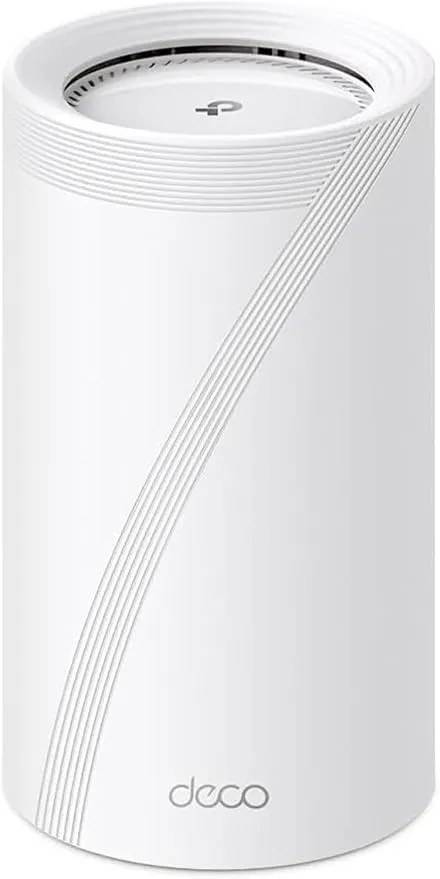
Idéal pour : Idéal pour un réseau domestique multigigabit pouvant relier les bornes par Ethernet.
En bref : Les avis Reddit saluent des débits très élevés et une bonne couverture intérieure, surtout avec un backhaul filaire. Le consensus reste toutefois partagé en raison de déconnexions, de firmwares inégaux et de problèmes de chauffe signalés.
Au-delà de ce modèle, la marque TP-Link (toutes gammes) recueille 46 % d'avis positifs sur 385 utilisateurs Reddit. Ce signal marque ne compte pas dans la note du modèle ci-dessus.
Points forts
Fonctions complètes
4 1
« Turn the High Priority setting On, which should help. » Voir l’avis
« so imo i would go for new decos like be65 or be85. » Voir l’avis
« How can Asus top of the line router that is so expensive only offer 1 gbe ports and not 2.5 gbe like the E85 or Orbi 970? » Voir l’avis
Débits élevés
2 1
« Now, with the Deco BE85 (Wi-Fi 7), my Wi-Fi 6E laptop reaches up to 1200 Mbps on OpenSpeedTest, and my Wi-Fi 7 devices can hit speeds up to 2500 Mbps. » Voir l’avis
« Speed test on my phone, near the camera shows around 700mbps. » Voir l’avis
Connexion stable
3 2
« 4h remote control on my system and they fixed it. » Voir l’avis
« I don't think it was drop outs as such, just felt a bit more 'laggy' at times - maybe it is in my head but everything feels snappier now, which tbh stands to reason as they are connected by 10GB… » Voir l’avis
« I'm running firmware 1.1.1 and it has been very stable. » Voir l’avis
Points faibles
Fiabilité à surveiller
0 3
« I had the Deco E85 and never took it out of the box, when learned about all their security concerns and potential US Ban. » Voir l’avis
« This has been by far the worst trash of Routers I have ever got, issue after issue, I have owned Netgear, Asus and other brands. » Voir l’avis
| Critère | Note /10 | Ce qu'en dit le consensus |
|---|---|---|
| Fiabilité | 0.0 | Les avis Reddit mentionnent des expériences très négatives, notamment chauffe, ventilateur et incidents répétés. |
| Débit | 6.8 | Les débits rapportés sont élevés en Wi-Fi comme en filaire, avec des appareils compatibles. |
| Fonctions | 7.1 | Certains réglages et correctifs firmware aident, mais plusieurs problèmes logiciels subsistent selon les utilisateurs. |
| Stabilité | 5.0 | La stabilité varie fortement selon le firmware, le support et le type de backhaul. |
| Backhaul | 9.3 | Le backhaul Ethernet est nettement préféré pour améliorer roaming, réactivité et stabilité. |
| Couverture | 4.4 | Les utilisateurs Reddit jugent la couverture intérieure bonne, mais plus variable sur deux étages et à l’extérieur. |
Avis Reddit
11 avis analysés · Positifs 5 Neutres 2 Négatifs 4
avis pertinents ·
-
nirhend 🇬🇧
3 commentaires analysés
-
tahabashir1991 🇬🇧
2 commentaires analysés
r/orbi · Biggest Reason I can’t Keep Orbi 970! Also I have noticed, orbi 970 one router was able to cover my 2 floor house for 1 gig internet speed wirelessly but deco be85 can't. I needed two deco be85 to get that speed in entire house. So more area is covered by orbi as well.
r/orbi · Biggest Reason I can’t Keep Orbi 970! You are right. I recently realized I never really needed 10Gbps LAN in the first place, but since I have multiple Wi-Fi 7 devices, I thought, why not test them out? Here's what I found: On my previous Wi-Fi 6 router, my laptops (Wi-Fi 6E) had connection speeds of 700–800 Mbps when connecting to Synology NAS. Now, with the Deco BE85 (Wi-Fi 7), my Wi-Fi 6E laptop reaches up to 1200 Mbps on OpenSpeedTest, and my Wi-Fi 7 devices can hit speeds up to 2500 Mbps. I also upgraded my internet to 2.5 Gbps (up and down). Since all my devices only have 256 GB of storage, I use my Synology NAS as the main drive for each device. The faster Wi-Fi speeds have been incredibly handy for this setup.
-
matthaus79 🇬🇧
2 commentaires analysés
r/TpLink · Best TP-Link Deco setup for a 1970s brick house in Denmark (wireless backhaul + garden coverage)? https://preview.redd.it/vf47v98arbxg1.jpeg?width=1625&format=pjpg&auto=webp&s=378f8a21f25e02147adb5db92e479963a15bc8aa Here you go this should help, I got my crayons out for you. So as you can see my house is a typical 2 floor house. Things to note: * Green main Deco be85 (which can actually be any it is just 'assigned' in the app) * Blue Deco be85 node 2 * Red is the outdoor be3600 To answer your questions * When your BE85s were using wireless backhaul, were you still getting stable performance, or did you notice dropouts/roaming issues often? * I don't think it was drop outs as such, just felt a bit more 'laggy' at times - maybe it is in my head but everything feels snappier now, which tbh stands to reason as they are connected by 10GB Cat6a. * Would you still choose BE85 again, or do you think something like BE65/XE75 would have been enough? * I picked the be85 due to them being a lot more powerful than the be65 and the be95 was over kill I thought, and is actually hard to get in the UK - I got them on launch day so hard them at least 18 months now, given the walls and the size of the house I dont think the be65 would have been enough tbh but cant say for sure. I think the be85 had better mimo and or better nics which is what made me go for it. Given how bad the signal is in the garden, I am glad I went for the be85 and very recently added the outdoor unit as it has fixed so many issues for me outside (can happily work off a laptop in the sun now, play music and stream netflix!) Inside the house was never an issue with just the be85s, but everything has improved outside and even in the kitchen oddly. * How far away is the BE3600 Outdoor from the nearest Deco unit? * There is approx 57ft from the outside kitchen wall to the outdoor Deco (just measured it) - so this does not even cater for the fact it goes through many walls and the internal distances too (about another 20-30ft as you can see depending what one it decides to connect to) - so you're talking 80ft+ including walls * Does the BE3600 Outdoor have line of sight to the main house, or does the signal go through walls? * See above / the pic, not line of sight at all, it seems to connect to the blue one most the time which means its also a diagonal which makes it quite a bit further * For garden devices like cameras or a robotic mower, has the outdoor Deco been stable enough? * The back garden first gen Google nest camera has been considerably more reliable since I have the outdoor unit in the Summer house - despite the fact the 'round trip' is much higher now (more hops), as it is connected to it without restrictions across the garden and the fact (despite the outdoor Deco connection being classed as 'weak') the connection is more solid to one of the main units now despite the extra hop. The Google cam basicaly goes wifi > summer house > wireless back haul to blue node > cat6a to red node > cat6 to ISP router Hope that helps, feel free for more follow ups. I have a large server host in the garage (which is actually a gym now) and since I dropped phyical cables to the sitting room, snug and blue node everything feels snappier and I have crap 70mbps internet at the moment - but as I push Plex around the house and game on my xbox the added stability helps everything feel more responsive.
r/TpLink · Best TP-Link Deco setup for a 1970s brick house in Denmark (wireless backhaul + garden coverage)? I have a 2900 sqft house and have a pair of be85s They work fairly well and for a long time were wireless back haul I have very thick walls in places too too Signal struggled outside the house in the garden but internally was good I managed to hard wire them now and the whole roaming and hand over seems much better now, less likely to get any sort of drops To do this i went out the house and around and back in as it was much easier than dealing with internal walls and floors I've since added the newer be3600 outdoor At the moment this is in the summer house over wireless back haul and works pretty well Gives good coverage to summer house and the garden area Its water and weather proof so could even go outside but it doesn't need to Its a tiny bit baggy at times but thats to be expected One day when my isp can actually give me decent Internet speeds I will hard wire this also.
-
Cyberspots156 🇬🇧
2 commentaires analysés
r/TpLink · Deco BE85 random disconnects (Wi-Fi + LAN losing IP) – anyone else experiencing this? Open the Deco app, touch the node in the app that is nearest the camera and verify that the camera is listed under Connected Clients. Next, touch the line listing the camera. This opens a new window. Turn the High Priority setting On, which should help. Touch Connection Preference, which opens a new window. Make sure Connection Type is 2.4 GHz. If it’s not, scroll down to Preferred WiFi band and select 2.4 GHz. Next, scroll back up to Preferred Deco and select the Deco nearest to the camera. If the camera is not listed under the nearest node, then check the Main BE85 node and see if the camera is listed. If it is listed under the Main BE85, then that’s your issue because the camera isn’t connecting to the nearest node. After making the above settings and you still have a problem, then I’m not sure where to go next. The one thing that keeps coming to mind is channel interference, preventing good WiFi connectivity between the BE85 and the camera on the 2.4 GHz band. It’s certainly possible that the BE85 is having a problem of some sort, whether it’s a matter of overheating or a component not functioning properly. The same could be true of the camera. That would take more in depth diagnostics.
r/TpLink · Deco BE85 random disconnects (Wi-Fi + LAN losing IP) – anyone else experiencing this? I assume that the steps didn’t solve the problem. You said that the camera is close to one BE85 unit. How close? I assume the camera is connecting to the BE85 wirelessly. Please verify that the camera is connected to the closest BE85 by looking at the node in the Deco app. Is there one or more walls between the closest BE85 and the camera? Are we talking about older construction with thicker walls? Are the walls made of plaster or is there brick or concrete? These construction materials and wall thickness can cause WiFi signal degradation, sometimes significant. Is the camera model made strictly for 2.4Ghz or will it accept 2.4 GHz and 5.0 GHz. If it accepts both, then add the 5.0 GHz band to IoT or the network to which the camera is connected. Since you are running mesh, are you using wired or wireless backhaul? Wired is definitely better, if you can do it. What’s the bandwidth (speeds) you are seeing on the node closest to the node nearest the camera?
-
PieOMy669 🇬🇧
2 commentaires analysés
r/TpLink · Deco BE85 random disconnects (Wi-Fi + LAN losing IP) – anyone else experiencing this? Thanks again. Speed test on my phone, near the camera shows around 700mbps. Also, I already tried to reset the camera settings.
r/TpLink · Deco BE85 random disconnects (Wi-Fi + LAN losing IP) – anyone else experiencing this? Yes, the steps didn't solve the problem. The camera is about 5 meters away from the mesh unit, there is a wall between them (the camera is hanged outside my windows, the mesh is inside my room). It's a thick wall, but the signal I see in Deco app is great (still disconnects though). The camera is made for 2.4g only. Using my 2 mesh units with wired backhaul. When doing speed test, wirelessly I get 1Gbps (The maxium my phone's and my laptop's nic are cable of) and wired I get 2Gbps.
-
ermaneng 🇬🇧
1 commentaire analysé
r/TpLink · Archer BE550 + Deco BE25 Setup: Any Experiences? i also made this mistake and bought archer be550 and found out that they dont work with my older decos. i thought "easymesh" is an option to setup mesh easily which i found that it is a term for archer different mesh technology. so imo i would go for new decos like be65 or be85. i will use my 2.5G switches and deco router mode for cable connected devices and use deco mesh for wireless devices and sell archer be550 on market. end of story
-
dbv2 🇬🇧
1 commentaire analysé
r/orbi · Biggest Reason I can’t Keep Orbi 970! Good prespective. I am in similar situation. I had the Deco E85 and never took it out of the box, when learned about all their security concerns and potential US Ban. Now have a Asus BQ 16 Pro, still unboxed. Downfall of that one is 4 of the ports are only 1 gbe. How can Asus top of the line router that is so expensive only offer 1 gbe ports and not 2.5 gbe like the E85 or Orbi 970? Now have no idea what to do. Have always like Orbi. See they released a 870 yesterday, but that is only 1 10gbe ports and 4 2.5 gbe ports. Nice the mesh has 4 2.5 gbe ports too though.
-
turns2stone 🇬🇧
2 commentaires analysés
r/TpLink · Deco BE85 (BE22000) Wi-Fi 7 2-pack, my review coming from Orbi RBK50 mesh system Hi there. Yes, I would say so. I'm running firmware 1.1.1 and it has been very stable. The "BSH Hausgeräte" attribution is definitely sorted. I \*think\* the fan issue is OK as well. It worked well for months, then very occasionally came back so I moved to the 'top' 10GbE port. That is 100% silent. I should try the bottom port again, but for certain the TP-Link team made progress on the fan, if not completely resolved the situation.
r/TpLink · Deco BE85 (BE22000) Wi-Fi 7 2-pack, my review coming from Orbi RBK50 mesh system Yeah it kinda fixed itself on its own.
-
Fit_Dingo3637 🇬🇧
1 commentaire analysé
r/TpLink · Deco BE85 (BE22000) Wi-Fi 7 2-pack, my review coming from Orbi RBK50 mesh system Still broken for me, I wonder if a factory reset with the latest firmware maybe can sort it ..
-
wase471111 🇬🇧
1 commentaire analysé
r/TpLink · Deco BE85 (BE22000) Wi-Fi 7 2-pack, my review coming from Orbi RBK50 mesh system I no longer have this setup.. It's known for overheating
-
domitrescu99 🇬🇧
1 commentaire analysé
r/TpLink · Deco ethernet backhaul megathread I got the BE85 for the 10Gbps ports to support a high speed fiber connection of 10Gbps. This has been by far the worst trash of Routers I have ever got, issue after issue, I have owned Netgear, Asus and other brands. This one is going back and never again buying this shitty brand.
Aucun avis pour ce filtre.
Souvent comparé à

Questions fréquentes
Le Deco BE85 offre-t-il de bons débits ?
Les utilisateurs Reddit rapportent jusqu’à 1 Gbit/s sans fil sur certains appareils, 2 Gbit/s en filaire et davantage avec des clients récents. Les performances observées dépendent toutefois des appareils et de la configuration.
Le Deco BE85 est-il stable ?
Le consensus Reddit est contrasté. Certains firmwares et l’intervention du support ont corrigé des problèmes, mais plusieurs utilisateurs signalent des déconnexions persistantes ou revenues après une mise à jour.
Faut-il utiliser un backhaul Ethernet ?
Les utilisateurs Reddit le recommandent lorsque cela est possible. Le câblage des bornes améliore le roaming, la réactivité et réduit les coupures ressenties.
Un seul Deco BE85 couvre-t-il une grande maison ?
La couverture intérieure est généralement jugée bonne, y compris à travers un mur épais. Un utilisateur a toutefois dû employer deux bornes pour couvrir deux étages à haut débit, et la portée extérieure peut nécessiter une unité dédiée.
4h remote control on my system and they fixed it. Not sure what they did. Recommend to reach out support
I don't think I'm going to use any apps at this point. But want to keep this as an option for the future. Today, my main BE85 is in my office, connected to an Xfinity modem, and WAN connected. I have 2 other nodes across the house. This is what I want to replace eventually. I do have Ethernet across the house. The main BE85 unit feeds an old Netgear switch that spreads the network across the Ethernet slots in every room. The goal eventually is to get better network stability for the amount of devices I have. Maximize Wi-Fi and wired speed from the 1 gig I have (maybe 2 gig in the future). Everything else that matches the Unifi product line is Ring cameras and alarms, which I might replace in the future but also might not as they work well.
I have BE85 and have these issues fe day 1. My TP-Link kasa keep disconnecting and I tried everything. At some point I worked with support and they provided a beta firmware back then (1.1.1) which solved it. Since updating to latest 1.2.0 it's like a shit show. I find that changing the 2.4ghz channel width to 20Mhz did helped and reduced it dramatically but still didn't solved it. I'm in contact with support and now need to schedule a troubleshoot session. I wonder if they will provide yet again a beta firmware to potentially solve it or not. Side comment, when I got the BE85 I was very disappointed with that expirence, tried the top of the line Asus back then and it had the same issue. I think it's more of a configuration consider I have many IoT devices running on 2.4ghz