TP-Link Deco BE65
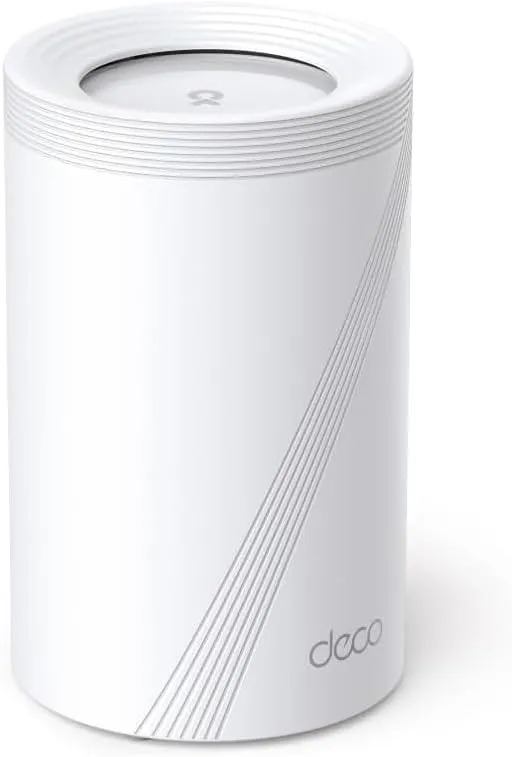
Idéal pour : Idéal pour couvrir une grande habitation et préparer une connexion supérieure à 1 Gbit/s, avec un budget confortable.
En bref : Le consensus Reddit souligne une excellente couverture, de bons débits et une connectique adaptée aux réseaux rapides. Le prix élevé et plusieurs témoignages de coupures ou de configuration pénible tempèrent toutefois ce bilan.
Au-delà de ce modèle, la marque TP-Link (toutes gammes) recueille 46 % d'avis positifs sur 385 utilisateurs Reddit. Ce signal marque ne compte pas dans la note du modèle ci-dessus.
Points forts
Excellente couverture Wi-Fi
5 0
« If you can place 1 in the front 1st floor, and another in the rear 2nd floor you'll have great speeds/coverage everywhere. » Voir l’avis
« Deco has good signal range but having to deal with its painful setup tools makes me want to get another unit of Ubiquiti UDR7. » Voir l’avis
« I've got the 3 pack of DECO BE65s serving downstairs and I've been very pleasantly surprised by the signal strength throughout. » Voir l’avis
Fiabilité éprouvée
5 0
« I've heard the TP-Link Deco BE65 is solid, that will give you a bit of headway if you ever increase beyond 900mbit, and it supports proper MLO and wireless backhaul. » Voir l’avis
« TP link deco. I got the B65, 2 units, and works like a charm » Voir l’avis
« I moved to a tp-link deco setup that was less overkill for me and actually works :). Be65 my orbi 970s are collecting dust » Voir l’avis
Fonctions complètes
8 2
« If you plan to upgrade to an even faster fiber in the future, then be65 offers two 5Gb ports and two 2.5Gb ports. » Voir l’avis
« I have BE65 (primarily for wired backhaul ports) as my main unit and a few BE25 (all with wired backhaul) as satellites. » Voir l’avis
« I've heard the TP-Link Deco BE65 is solid, that will give you a bit of headway if you ever increase beyond 900mbit, and it supports proper MLO and wireless backhaul. » Voir l’avis
Débits élevés
6 3
« Put the be65 at your house so you have the speed and be25 or even a cheaper model for your grandmother since she might only need 200-300mbps? » Voir l’avis
« I've heard the TP-Link Deco BE65 is solid, that will give you a bit of headway if you ever increase beyond 900mbit, and it supports proper MLO and wireless backhaul. » Voir l’avis
« If you can place 1 in the front 1st floor, and another in the rear 2nd floor you'll have great speeds/coverage everywhere. » Voir l’avis
Points faibles
Installation complexe
0 3
« I missed this VLAN part during my first time setup and didn't get any connection even after adding correct VLAN manually. » Voir l’avis
« I tried the deco b65 system, installed moda adapters, and put one node per floor in a 3 floor house. » Voir l’avis
« Don't get me wrong: I think the Decos are quite attractive, but in the end for my setup too unstable - and the configuration and the app were a disaster for me. » Voir l’avis
Prix élevé
0 6
« Now I’m not going for 600$ for the BE65. » Voir l’avis
« It would set you back £380 for a two pack. » Voir l’avis
« Hi, in Italy a deco be65 unit costs 200 euros while two units cost 380 euros, adding the money for a be25 unit we are well above my budget » Voir l’avis
Backhaul limité
2 3
« I’ve seen a few reviews on YT from reasonably credible sources (from what I can see) that says the wireless backhaul between the BE65 and the BE65 Pro are miles apart with the Pro being way better. » Voir l’avis
« Even with all 3 units on a wired connection it still drops calls, stutters video, etc. » Voir l’avis
« As I can see from the app, my Deco2 is connected to EB and WB "Ethernet/5Ghz/6Ghz". » Voir l’avis
Connexion instable
3 4
« That said, I have some regular dropouts with the set up that never happened with the old Orbi it replaced. » Voir l’avis
« Even with all 3 units on a wired connection it still drops calls, stutters video, etc. » Voir l’avis
« Don't get me wrong: I think the Decos are quite attractive, but in the end for my setup too unstable - and the configuration and the app were a disaster for me. » Voir l’avis
| Critère | Note /10 | Ce qu'en dit le consensus |
|---|---|---|
| Fiabilité | 9.5 | Plusieurs utilisateurs Reddit le jugent robuste et fiable, malgré des expériences négatives sur la stabilité. |
| Stabilité | 3.9 | Les retours Reddit sont très contrastés, allant d'une connexion impeccable à des coupures récurrentes. |
| Backhaul | 3.5 | Le backhaul Ethernet direct est souvent conseillé, sans garantir l'absence de problèmes dans toutes les installations. |
| Installation | 0.0 | La configuration peut devenir laborieuse, notamment lorsque le profil VLAN n'est pas choisi dès l'installation initiale. |
| Débit | 5.6 | Les débits peuvent être élevés et adaptés au multigigabit, mais plusieurs utilisateurs restent loin du gigabit en Wi-Fi. |
| Couverture | 9.7 | Les utilisateurs Reddit saluent une portée généralement très solide, même dans les maisons à étages ou aux murs épais. |
| Prix | 0.0 | Le prix est majoritairement considéré comme élevé face aux modèles moins ambitieux de la gamme. |
| Fonctions | 7.3 | Le Wi-Fi 7 tribande, le MLO, la bande 6 GHz et les nombreux ports sont appréciés, mais l'impossibilité signalée de désactiver la gestion distante inquiète certains utilisateurs. |
Avis Reddit
35 avis analysés · Positifs 20 Neutres 2 Négatifs 9
avis pertinents ·
-
-dun- 🇬🇧
2 commentaires analysés
-
silvertejps 🇬🇧
2 commentaires analysés
r/TpLink · TP-Link Deco BE22 vs BE25 vs XE75 Pro - 2025 October (Wireless backhaul testing) I live in EU and here we have the BE65 instead. It’s far pricier than the XE75 pro. I wasn’t planning on putting 400$ on a router since mine was already working, but I did it anyway. Now I’m not going for 600$ for the BE65.
r/TpLink · TP-Link Deco BE22 vs BE25 vs XE75 Pro - 2025 October (Wireless backhaul testing) I live in EU and here we have the BE65 instead. It’s far pricier than the XE75 pro. I wasn’t planning on putting 400$ on a router since mine was already working, but I did it anyway. Now I’m not going for 600$ for the BE65.
-
arty118 🇬🇧
1 commentaire analysé
r/TpLink · Why do I see so much hate towards the Deco BE25 (BE5000)? I have BE65 (primarily for wired backhaul ports) as my main unit and a few BE25 (all with wired backhaul) as satellites. I don’t see any difference in performance for my use.
-
JustinTyme92 🇬🇧
1 commentaire analysé
r/orbi · Looking for practical differences between 770 and 970 I’ve seen a few reviews on YT from reasonably credible sources (from what I can see) that says the wireless backhaul between the BE65 and the BE65 Pro are miles apart with the Pro being way better. Thanks for the update, I appreciate it!
-
tweakophyte 🇬🇧
1 commentaire analysé
r/orbi · Looking for practical differences between 770 and 970 I did not. I got the Deco BE65 over the holidays. I wanted to wait for the prices to come down and the options to open up. That said, I have some regular dropouts with the set up that never happened with the old Orbi it replaced. I think there is a firmware in beta that is supposed to help with this.
-
electriclala 🇬🇧
1 commentaire analysé
r/TpLink · X50 vs BE25 DECO I have x50*3, be25 and be65(main) all connected via ethernet backhaul. Close to zero issues with either through the years. I haven't really noticed any difference. Be25 is wifi7 so a bit faster and supposedly more stability. Go for the be25 imo. You can find good prices on those, at least here in Scandinavia.
-
Achemidies 🇬🇧
1 commentaire analysé
r/ToobBroadband · Moving from the latest WiFi 7 Toob mesh to an ASUS mesh setup. I'm probably not the best person to ask for suggestions as I just went straight for the most overkill option. I've heard the TP-Link Deco BE65 is solid, that will give you a bit of headway if you ever increase beyond 900mbit, and it supports proper MLO and wireless backhaul. It would set you back £380 for a two pack. You could also look into the ASUS ZenWifi BT10, which is around £480 for a two pack. Check out Dong Knows Tech, he's done a lot of reviews on mesh systems.
-
ahj3939 🇬🇧
1 commentaire analysé
r/HomeNetworking · Looking to purchase a new router and need recommendations/advice If you already have ethernet in the home, why not? Deco BE65 twin pack is $300, which is the same as Dream router 7 after their "memory surcharge" If you can place 1 in the front 1st floor, and another in the rear 2nd floor you'll have great speeds/coverage everywhere.
-
h_1995 🇬🇧
2 commentaires analysés
r/TpLink · TP-Link Deco Be25 - can’t figure out how to get it to work not sure since I am not from UK but during initial setup, they do have a lot of predefined VLAN profiles from major ISPs. mind you these predefined VLAN profiles only show up during initial setup. I missed this VLAN part during my first time setup and didn't get any connection even after adding correct VLAN manually. Only after I factory reset and be sure to add VLAN during initial setup that my connection works I don't think there's a way to restore backups made from ISP-provided router to TP Link ones. You always start from scratch; configure your connection method according to your ISP (PPPoE/DHCP/bridge etc), load VLAN profiles or configure it manually during initial setup if needed, create your own WiFi SSID Deco has good signal range but having to deal with its painful setup tools makes me want to get another unit of Ubiquiti UDR7. Has less range but it handles things well that I don't even have to input my PPPoE credentials during initial setup. Has App, WebUI and SSH too, the latter is useful to configure PON SFP
r/TpLink · TP-Link Deco Be25 - can’t figure out how to get it to work last time I had to hard reset my BE65 so that I can choose correct VLAN profile during initial setup. If I were to set it manually after initial setup, it would simply fail.
-
carguy143 🇬🇧
1 commentaire analysé
r/TpLink · Deco M4 vs X60 vs XE75 Pro vs BE25 in terms of range and reliability I just got rid of my Nest Wi-Fi Pro and went for the BE65 because Google still haven't fixed a bug that impacts PPPoE connections and eventually caused their network to grind to a halt every 28 hours. The BE65 is great.
-
MovedToSweden 🇬🇧
1 commentaire analysé
r/homeoffice · best mesh wifi system for dealing with dead zones in a concrete house setup? TP link deco. I got the B65, 2 units, and works like a charm
-
Silver-Article9183 🇬🇧
1 commentaire analysé
r/TpLink · Best TP-Link Deco setup for a 1970s brick house in Denmark (wireless backhaul + garden coverage)? I have a 19th century stone house so you can imagine what the internal walls are like for wireless signal. I've got the 3 pack of DECO BE65s serving downstairs and I've been very pleasantly surprised by the signal strength throughout. I placed the units in a line as much as possible,starting at the ont box in the dining room, one unit in the hall, and the final unit in the living room. I've not needed to place any upstairs as the signal is strong there from the downstairs units. Deco do an outdoor be65 btw, so if you can run power to it and ethernet link from one of the other decos you should be able to get a strong signal in the garden as well.
-
genbio64 🇬🇧
1 commentaire analysé
r/HomeNetworking · TP-Link Deco BE63 is borderline magic. I tried the deco b65 system, installed moda adapters, and put one node per floor in a 3 floor house. It's been nothing short of a disaster with our 1 GB att fiber connection. Even with all 3 units on a wired connection it still drops calls, stutters video, etc. I've read so many reviews saying this system was great, but it's been nothing short of disappointment.
-
Babeedhee 🇬🇧
1 commentaire analysé
r/TpLink · Deco B65 - anyone tried these? Have had them for about 6 mths now and have gone from consistent drop outs and lags to none at all even during peak times
-
ConclusionDirect7045 🇬🇧
2 commentaires analysés
r/TpLink · Full Wi-Fi 7 Mesh Setup with Deco BE25 - 2.5Gbps Ethernet Backhaul & MLO vs Wi-Fi 6E? Hi, in Italy a deco be65 unit costs 200 euros while two units cost 380 euros, adding the money for a be25 unit we are well above my budget
r/TpLink · Full Wi-Fi 7 Mesh Setup with Deco BE25 - 2.5Gbps Ethernet Backhaul & MLO vs Wi-Fi 6E? I had already seen, in Italy there is only the deco be65 not the be63, but they are out of budget, the be63 pack of 3 costs 500 euros while the deco be25 pack of 3 costs 200 euros
-
cs37er 🇬🇧
1 commentaire analysé
r/orbi · Orbi 970 sucks, what to move to? Same here. After moving from Orbi to Deco, I wouldn’t go back. Not only faster and more stable, the app is pretty good - it gives plenty of control if you want to tweak.
-
Flat_Recognition_733 🇬🇧
1 commentaire analysé
r/orbi · Orbi 970 sucks, what to move to? I moved to a tp-link deco setup that was less overkill for me and actually works :). Be65 my orbi 970s are collecting dust
-
meshedmyself 🇬🇧
1 commentaire analysé
r/TpLink · Does TP-Link Deco BE63 use Qualcomm chipset? First 3 or 5 digits of the FCC ID are the Grantee/Applicant ID, so it's probably different global divisions of TP-Link. The remaining digits are the model. As you can see, the RTINGS image omits "V2", so it's likely V1. BE63 and BE65 are likely built on the same platform with minor spec differences, most observably in the ethernet ports, 4x 2.5 Gbps vs. 2x 5 Gbps + 1x 2.5 Gbps, respectively.
-
hyena-a 🇬🇧
1 commentaire analysé
r/HomeNetworking · ASUS ZenWifi BT10 Vs Tp-Link Deco BE65 Just returned my BE65 today after discovering you cannot disable remote management across the Deco range (I.e TP-Link always has access to the router, so if they ever get hacked, my own network would been vulnerable too). Couldn’t be bothered to buy another FW appliance to block this from happening. Looking to buy the BT10 now given ASUS gives you much more flexibility / customisation. Still going well on your end, any issues with 2ghz devices? Lastly, would you say your 2ghz/5ghz performance is better than your old router?
-
dametsumari 🇬🇧
1 commentaire analysé
r/TpLink · TP-Link Deco BE22 vs BE25 vs XE75 Pro - 2025 October (Wireless backhaul testing) I think I paid about 300 euros for 2 pack of BE65 ( last year, Black Friday discount).
-
Ok_Marionberry_8170 🇬🇧
3 commentaires analysés
r/TpLink · Deco BE25 vs Deco X60. Any real difference? This is a question. [Plus Deco X60 Issue] No, it never was. The ideal and most fitting replacement for an X60 is the BE65. The BE25 is just a bridge point. a stop gap to eventually upgrading/expanding to the BE65. If you have money for the BE65. Go for it! Hope this helped. God bless!
r/TpLink · Deco X60 vs Deco Be25 [Youll be dissapointed.] Wasn't able to update on the X95 sorry about that. But I've been using the X95s ever since this post. They've been going strong and great. Kind of why I did not update any longer. Speeds are reaching up to 300 mbps and change in the 2nd unit. Wireless connected to the X95 that serves as the main unit. And the full 600mbps at the main deco x95 unit. I have no complaints. Strong reception, strong signal. Wish I had ethernet backhaul on all of them, but my situation doesn't allow. Anyways, I understand you are interested in Wifi 7 systems. **By all means, do not settle for X95 any longer.** As I said in my another comment i replied to. **Things have changed in the Wifi 7 landscape.** If you don't yet have the funds for the BE65 or higher. Grabbing a BE25 is not a bad idea. It is an in-between point with the goal to eventually upgrade/expand to the BE65 when the time is right. This way, it is not awkward to suddenly slap on a Wifi 7 deco with a Wifi 6 one. It would be very awkward to see a BE25 as the main unit with X95s being secondaries. **TLDR: Go BE65. If money is tight, go with a BE25 until you can upgrade/expand to the BE65. Do not buy a wifi 6 system anymore if the budget allows.** Hope this helped. God bless mate!
r/TpLink · Deco BE25 vs Deco X60. Any real difference? This is a question. [Plus Deco X60 Issue] A store in SM North Edsa Annex. Sadly i cannot disclose their name as this would probably be something they would not like. But ask around, when you find out the price is good. Then it's probably them. Also, i know i gave the X60 such praise. But this was 10 months ago. The Philippine Landscape in terms of Wifi has changed drastically. Back then going with an X60 over a BE25 would have made sense. but now it just doesn't. There are now Wifi 7 Options with Tri-Band solutions like the BE65. It is at this point, I wouldn't recommend any non-X60 user to go for an X60. Skip it. If the BE65 is too much right now, I highly recommend BE25. **Not because it's any stronger than the X60 for non-Wifi 7 devices**. ***But because it is better suited to eventually upgrading to the BE65 and so on.*** Once again, the BE25 is just a bridge to eventually upgrade to the BE65 without fully having to shell out for 3 BE65 units or so. As time progress the X60 will only grow more obsolete and have less updates. Things changed a lot in 10 months. With the lifting of 6ghz restrictions, and the introduction of superior products. If not able to go for a full end-game solution. Then go for an in-between until you can. I hope this helped you. And have a good one!
-
INeedMuscles 🇬🇧
2 commentaires analysés
r/HomeNetworking · ASUS ZenWifi BT10 Vs Tp-Link Deco BE65 No worries but if you need feedback I can come back at the end of September to have some hand off experience with it. But of what I have searched the BE65 seems that they are more robust
r/HomeNetworking · ASUS ZenWifi BT10 Vs Tp-Link Deco BE65 Thanks for noticing us and I am sorry for what they have caused. Thanks god I decided to go with the BE65 instead so far after 5 days I have experienced no issues. I have seen that the BT10 have multiple issues
-
ermaneng 🇬🇧
1 commentaire analysé
r/TpLink · Archer BE550 + Deco BE25 Setup: Any Experiences? i also made this mistake and bought archer be550 and found out that they dont work with my older decos. i thought "easymesh" is an option to setup mesh easily which i found that it is a term for archer different mesh technology. so imo i would go for new decos like be65 or be85. i will use my 2.5G switches and deco router mode for cable connected devices and use deco mesh for wireless devices and sell archer be550 on market. end of story
-
LDL1975 🇬🇧
1 commentaire analysé
r/TpLink · Deco be65 and be25 setup I have 4 BE25 units in a 2 stories 4500 sq ft home and all wired backhaul and it worked great. Personally, I would return the BE 25 and get a 3 pks combo of BE65 since you have a 5gig internet , then get a 10 gb switch. The BE25 is only have 2.5 gb ports. I would not mix match the BE65 and BE25, it will downgraded it since one is a triband and the other is a dual band.
-
purespeed44 🇬🇧
1 commentaire analysé
r/TpLink · Deco be65 and be25 setup BE65 is a tri band system and the BE25 is a dual band system that’s WiFi 7 but really isn’t because it doesn’t have the 6ghz band. Would it work sure but you may see some slowdowns as the BE25 would be the slower units but if you stick to all BE25 you shouldn’t see much of a slowdown as there all the same hardware.
-
webwude 🇬🇧
1 commentaire analysé
r/TpLink · Deco BE65 / BE25 review For now Linksys Velop with WiFi7 works quite well. The whole setup was quite a challenge. But now it works good even though the range has not improved a lot. Nevertheless the whole house seems to be quite good connected. Don't get me wrong: I think the Decos are quite attractive, but in the end for my setup too unstable - and the configuration and the app were a disaster for me.
-
earl088 🇬🇧
1 commentaire analysé
r/TpLink · Deco BE25 vs Deco X60. Any real difference? This is a question. [Plus Deco X60 Issue] I just saw the price of the BE65 and its double the BE25 lol. I guess its back to the BE25.
-
taimurasad 🇬🇧
1 commentaire analysé
r/TpLink · Should Deco x55 WiFi 6 mesh system suffice for 3 floor house? I have a 3 floor house. I got 7 BE65 WiFi 7 mesh units to cover it. Still have some signal issue on top most floor. But mostly I’m happy with it. Your mileage may vary. https://preview.redd.it/a4b08wqp3m6f1.jpeg?width=1320&format=pjpg&auto=webp&s=db29946a9ce7cccdd787c5ef2ba8f6ef10124921
-
Apprehensive-Fix-747 🇬🇧
1 commentaire analysé
r/TpLink · Deco B65 - anyone tried these? I know you posted ages ago but did you figure out why this happens? Currently going through it as well.
-
Harv1to 🇬🇧
1 commentaire analysé
r/TpLink · Deco B65 - anyone tried these? Thank you so much for sharing this! I’ve been racking my brain about how to maximize my 2.5gbs fibre that I pay for and I think I’m going to use this exact setup. It also eliminates the need for a switch given how many 2.5gb ports are on the BE65.
-
Navin187 🇬🇧
2 commentaires analysés
r/TpLink · Deco ethernet backhaul megathread They are in AP mode. Since these Gigaplus switches only come with 2.5gbps ports - I am unable to test this on my current setup. I think best scenario is waiting for Gigaplus support, perhaps there is a magical fix for these unmanaged switches.. Possibly eventually downgrading to 1gbps supported switches and be done with these issues (i hope)? Do you have any tips/advice on how I should/could continue? Anything is welcome..
r/TpLink · Deco ethernet backhaul megathread Got sucked into this rabbit hole since i'm experiencing some networkissues after upgrading to a [TP-Link Deco BE65 3x Mesh](https://www.tp-link.com/nl/home-networking/deco/deco-be65/), using 2x 8ports + 1x 5 ports of the [Gigaplus 2.5gbps switches](https://www.amazon.nl/dp/B0CT2HCHMR?th=1) and a [TP-link ER707-M2 Router](https://www.tp-link.com/nl/business-networking/omada-sdn-router/er707-m2/). My setup is as follows: Modem -> Router -> Switch1 Router -> Deco1 Switch1 --> Switch2 --> Switch3 --> Deco2 (EB) xxx Deco3 (WB) As I can see from the app, my Deco2 is connected to EB and WB "Ethernet/5Ghz/6Ghz". All Decos have static IP's. What I experience is this: I see my Deco2 (on desk) sometimes blink red, before this happens, I experience a network outage on my PC. Which is also connected to that same switch as the Deco2. I can see my lease is still active, but internet is unreachable. After deactivating/reactivating my network adapter, I cant even get a new lease from the Router for about 30 seconds. Then the red blinking happens and I can see the Deco app is unable to connect to the Deco2 and Deco3. Eventually all three become unreachable. The thing is this also affects the wired clients connected to the switches. I have upgrades some cables to cat8, when upgrading the switches. Other cables I had going through the house/walloutlets were cat6a already. I have checked my cables and used other switches using the same cables before upgrading to these new switches from Amazon. I have reached out to their support and asked about the support for the IEEE 1905.1 protocol - which I was unaware of before buying the switches. Also cant find any info on their product page. Will update here when I get response. Anyhow, I'm feeling pretty silly; upgrading from my old 2x Asus AC88u and 1x AC68U Mesh system, now having issues both wired and wireless. It seems the ports just get flooded, losing connections throughout my entire network, eventually restoring.. but no remedation from my side possible as these are unmaged switches. Brainstorming: I was thinking about using the 4x built-in ports on the Deco system. Can anyone relate using the 4x built in ports of the Deco to connect them directly and use another port to connect to a switch? Hence putting the switch behind the Deco/AP, instead of front of it? Another option is to return the 3x Gigaplus 2.5gbps switches, and just move back to the [supported IEEE 1905.1 TP-link switches](https://www.tp-link.com/nl/home-networking/all-soho-switch/). Feeling kind of beaten and and worried if my connection doesnt drop while replying to this awesome post by @[UNSW\_PCSoc](https://www.reddit.com/user/UNSW_PCSoc/) \- Thanks!
-
UNSW_PCSoc 🇬🇧
1 commentaire analysé
r/TpLink · Deco ethernet backhaul megathread are your decos in AP mode or router mode? yes, this does sound like a symptom of packet storm. yes, wiring decos directly together should solve all the problems. try to do them one by one to narrow down the culprit. does the problem persist if you connect everything to JUST the 1gbps ports on the switch? i.e. NOTHING is connected to the 2.5G ports
-
i15c 🇬🇧
1 commentaire analysé
r/TpLink · Deco B65 - anyone tried these? I have been using it for a few weeks now (one unit) connected to 1GB internet but i never get above 600 MB even 1 ft away. Most of times the speed is around 300-400 MB. Any idea what is happening?
-
No_Comfort_4567 🇬🇧
1 commentaire analysé
r/TpLink · Deco BE25 Curious device. I recently got a 2x BE65s to replace a Google wifi mesh that had 4 nodes (very thick concrete walls), and it seems to be doing no worse, arguably significantly better according to speedtest. In a couple of weeks, the line will be upgraded from 1G to 2G. I was thinking of adding an extra node in the furthest corner to give the speeds a bit of an oomph. A single BE65 is a bit pricey, and I could get either a X55 Pro or a BE25 for about 1/2 to 1/3 of the price. They both have two 2.5G ports - the X55 Pro is wifi 6 and the BE25 is, as we know, a curious 2 band Wifi 7 device. Which one would you go for if they were the same price please?
-
CautiousInternal3320 🇬🇧
1 commentaire analysé
r/TpLink · Full Wi-Fi 7 Mesh Setup with Deco BE25 - 2.5Gbps Ethernet Backhaul & MLO vs Wi-Fi 6E? What do you expect as "all the traffic"? wired or wireless? wired devices connected to satellite or to main Deco? If you expect to handle more than 1Gbps, you should aim, at a minimum, at Deco BE65.
Aucun avis pour ce filtre.
Souvent comparé à

Questions fréquentes
Le Deco BE65 couvre-t-il bien une grande maison ?
Les utilisateurs Reddit jugent généralement sa portée très bonne, y compris entre plusieurs étages ou à travers des murs épais. Un témoignage signale néanmoins un signal encore imparfait au dernier étage d'un très grand logement.
Le Deco BE65 est-il stable ?
Le consensus Reddit est partagé. Certains utilisateurs ne rencontrent presque aucune coupure, tandis que d'autres rapportent des pertes de connexion, des appels interrompus et des vidéos saccadées, même avec un backhaul Ethernet.
Le Deco BE65 convient-il aux connexions de plus de 1 Gbit/s ?
Les utilisateurs Reddit le recommandent pour anticiper des débits supérieurs à 1 Gbit/s, grâce notamment à ses ports multigigabit. Les performances Wi-Fi observées varient toutefois fortement, certains restant entre 300 et 600 Mbit/s sur une ligne gigabit.
Le Deco BE65 vaut-il son prix ?
Les avis Reddit reconnaissent ses fonctions Wi-Fi 7, sa couverture et sa connectique, mais le trouvent souvent nettement plus cher que les BE25, X55 Pro ou XE75 Pro. Il paraît surtout pertinent si ces capacités avancées seront réellement utilisées.
You can also look into deco be63, each unit has 4 2.5Gb ports. If you plan to upgrade to an even faster fiber in the future, then be65 offers two 5Gb ports and two 2.5Gb ports.
I see, is there a 2 pack deals where you're at? Maybe a mix of be65 and be25? Put the be65 at your house so you have the speed and be25 or even a cheaper model for your grandmother since she might only need 200-300mbps? If you're not planning to upgrade your Internet speed for a while, I guess be25 is fine.