Amazon Eero 6+
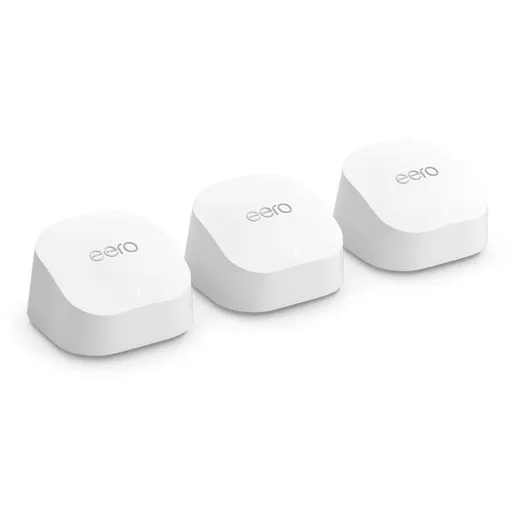
Idéal pour : Idéal pour couvrir simplement un logement étendu avec un abonnement inférieur ou égal à 1 Gb/s.
En bref : Les utilisateurs Reddit apprécient surtout la couverture étendue, l’installation simple et les performances suffisantes jusqu’à 1 Gb/s. Les avis sont toutefois partagés sur la stabilité après certaines mises à jour, tandis que le backhaul sans fil réduit nettement le débit.
Au-delà de ce modèle, la marque Amazon (toutes gammes) recueille 51 % d'avis positifs sur 520 utilisateurs Reddit. Ce signal marque ne compte pas dans la note du modèle ci-dessus.
Points forts
Excellente couverture Wi-Fi
8 1
« Yep same I have 3 x Eero 6+ in a long old double brick semi and it works a treat. » Voir l’avis
« Agree that two AP's will provide plenty of coverage. » Voir l’avis
« It sucked both for coverage and throughput when compared to eero 6+. » Voir l’avis
Backhaul efficace
7 1
« If you can get it hardwired get a 6+ as they are perfect for gigabit wired backhaul. » Voir l’avis
« The best solution not the easiest to keep your speed and have everything operate as previously, would be to run an ethernet cable from the main gateway (which should be the 7 pro you have) to the… » Voir l’avis
« Yes you can plug the first one directly in to your modem and the other two will work wirelessly. » Voir l’avis
Fiabilité éprouvée
7 2
« I used to have TP-Link but the Eeros are much easier to setup and more reliable. » Voir l’avis
« I upgraded from three-pack 1st gen to two-pack 6+ a couple years back and they've been great. » Voir l’avis
« It’s been rock solid but networking details are all locked behind a paywall. » Voir l’avis
Bon rapport qualité-prix
7 2
« Unless you really need the speeds of WiFi7, I'd save some $ and stick with the Eero6+. » Voir l’avis
« If your internet is no faster than 1 GB and will remain that way for the foreseeable future, I'd suggest you consider Eero 6+. » Voir l’avis
« Each unit is rated for 140sqm so if you spread them through the apartment evenly, you should never see another problem (approx 180 eur) » Voir l’avis
Points faibles
Connexion instable
3 6
« Same here also, eero 6+ previously reliable until 7.13.xx; various wifi clients just drop connectivity. » Voir l’avis
« Now, I have more settings control and no problems with WiFi internet drops. » Voir l’avis
« No kidding, I had the eero 6+ nodes - 4 of them and it wasn't cutting it - as soon as I added the Max7 bam - silence from the natives. » Voir l’avis
Fonctions limitées
2 3
« So, I have a TP-Link Archer BE9300 Router and replaced the eero. » Voir l’avis
« It’s been rock solid but networking details are all locked behind a paywall. » Voir l’avis
| Critère | Note /10 | Ce qu'en dit le consensus |
|---|---|---|
| Fiabilité | 7.3 | Les avis sont contrastés, de nombreux utilisateurs sont satisfaits, mais d’autres déconseillent ce modèle en raison de problèmes récurrents. |
| Backhaul | 7.4 | Le backhaul Ethernet ou MoCA offre les meilleurs résultats, tandis que le mode sans fil reste pratique mais réduit le débit. |
| Prix | 6.8 | Le rapport qualité-prix est souvent jugé intéressant en promotion, mais l’abonnement optionnel doit être pris en compte. |
| Débit | 4.8 | Les performances conviennent surtout aux accès inférieurs ou égaux à 1 Gb/s, mais diminuent avec la distance et le backhaul sans fil. |
| Stabilité | 3.1 | Les expériences vont d’un fonctionnement très stable à des pertes de connexion apparues après certaines mises à jour. |
| Fonctions | 3.6 | Les canaux de 160 MHz sont appréciés, mais l’absence d’interface web et les fonctions payantes limitent le contrôle. |
| Couverture | 8.9 | Les utilisateurs Reddit jugent la couverture généralement très bonne avec deux ou trois bornes bien réparties. |
| Installation | 9.8 | La configuration est jugée simple, y compris avec des bornes secondaires entièrement sans fil. |
Avis Reddit
36 avis analysés · Positifs 20 Neutres 4 Négatifs 11
avis pertinents ·
-
R8Rsince63 🇬🇧
1 commentaire analysé
-
RealBlueCayman 🇬🇧
2 commentaires analysés
r/Ubiquiti · Is Unifi Express a good replacement for Google WiFi Mesh Router? There was someone that recently posted either in this sub or r/HomeNetworking that they were using two Express routers in a similar configuration to what you're asking about. I suspect it depends on the devices, applications, network usage requirements, etc to truly know whether it will work. The Express are really meant for a smaller footprint, lower usage that some of the other alternatives like the UCG-Ultra and UCG-Max. Alternatively, you could look at Eero as a one-stop solution using the Eero Pro 6 or Pro 6E. I'd avoid the 6 and 6+. Too many issues with those models. And it should fit your budget.
r/amazoneero · Upgrade to 6e Pro, Eero 7 or another 6+ node? The higher the frequency range (ie: 2.4 > 5 > 6GHz) the more it is disrupted by walls and other obstacles. 2.4GHz is better to penetrate, but lower performance. 5/6GHz is better performance, but not as effective going through obstacles. So... in your case... depending on the size of your apartment, you probably only need one or two APs at most. The 6+ is woefully underpowered compared with the alternatives. My recommendation would be to take advantage of the sales currently going on and pickup a 2-node Eero Pro 6E setup. The Pro 6E is better than the Eero 7. Of course the Pro 7 and Max 7 would be better...but you've ruled them out. Even if you get two units, I would start with just one Pro 6E to start and see how that goes. IF you are still experiencing coverage issues after 24 hours, then add the second one to expand coverage.
-
IglooDweller 🇬🇧
1 commentaire analysé
r/amazoneero · Eero Pro 7 and eero 6+ together I don’t understand, so I’ve got questions for you. You mention that you kept everything the same, but the 6+ is now your gateway directly connected to the fiber ONT, yet, you mention that the IP addresses are coming from 2 different places. What exactly is your network topology? You seem to describe a situation were you have 2 separate networks which would make inter-network communication difficult. This is the first issue we need to tackle. Another thing of note is that the 6+ is used as gateway. This isn’t a good idea for a very simple reason: the 6+ only features 1Gbps port, and you’re paying for 2Gpbs. The extra bandwidth cannot be leveraged by this gateway. What should have been done is simple: simply go into your eero app, click on the little plus sign top-right corner and select replace eero. You then select to replace your gateway eero with the pro7. This will allow you to leverage more performance from you internet connection, giving higher performance to whatever device connects directly to your pro7 or connected via Ethernet. However, devices connected to other eero 6+ will still be limited to whatever performance their local node is able to provide.
-
wadewood08 🇬🇧
1 commentaire analysé
r/amazoneero · Eero 6+ and Pro 6E Thoughts? I have a 2500 sqft 3 story house with an Eero 6+ on each floor. Purchased them July 2023. They have been rock solid since day 1. They are all hardwired. I stream 4K TV services to multiple TVs with no issues. WiFi 6 is going away for years. Unless you really need the speeds of WiFi7, I'd save some $ and stick with the Eero6+.
-
_Hellcatman_ 🇬🇧
1 commentaire analysé
r/amazoneero · Upgrade to 6e Pro, Eero 7 or another 6+ node? I did away with mine completely! It was having too many internet drops.. So, I have a TP-Link Archer BE9300 Router and replaced the eero. Now, I have more settings control and no problems with WiFi internet drops.
-
SirSurboy 🇬🇧
2 commentaires analysés
r/amazoneero · Eero pro 6E - just not worth the $$$$ For your 250/25 plan the Eero 6 Plus is more than enough.
r/amazoneero · Upgrade to 6e Pro, Eero 7 or another 6+ node? Best way to solve this is getting additional 6+ node. Single router will not work that well.
-
abphotos 🇬🇧
1 commentaire analysé
r/nbn · What’s the best overall WiFi router for home use these days? Yep same I have 3 x Eero 6+ in a long old double brick semi and it works a treat. No need to hardwire anything. I used to have TP-Link but the Eeros are much easier to setup and more reliable.
-
ked913 🇬🇧
1 commentaire analysé
r/amazoneero · 6E or 7 or 7 Pro ???? What are the current speeds you are seeing? My vote is invest in hardwiring. It will pay dividends in the long run. Otherwise go for a 6E or ideally a 6 pro. If you can get it hardwired get a 6+ as they are perfect for gigabit wired backhaul. WiFi 7 mlo is pretty much borked and broken. You won’t really benefit from 2.5 gig either. Both have similar support times too.
-
kerser001 🇬🇧
2 commentaires analysés
r/amazoneero · Eero 7 or Eero pro 7 Not really locked no. The isp branding will show in the app and probably come with the free eero secure sub that my isp provides for free/included, lots of the isp are doing that in australia not sure about else where. If one moves to a diff isp after a month or two the isp releases the branding switch/secure sub and the branding disappears. Thats what happened on my old 6+ anyways.
r/amazoneero · Eero 7 or Eero pro 7 If you want very stable gaming performance go the eero 7 pro. Exp while most houses have very few wifi 6E/7 devices the experience is way better than even my old eero 6+ unless of course you mean console gaming which unless it’s a ps5 pro can’t make use of the 6ghz band this generation. But new gen is few years away only more than likely. With few devices on my pro 7 6ghz band my pc with wifi 7 feels so close to Ethernet it’s kind of crazy.
-
rxscissors 🇬🇧
2 commentaires analysés
r/amazoneero · is it worth it to upgrade to Eero 7 Pro, I currently have the Eero version 2 If your internet is no faster than 1 GB and will remain that way for the foreseeable future, I'd suggest you consider Eero 6+. I upgraded from three-pack 1st gen to two-pack 6+ a couple years back and they've been great.
r/amazoneero · Should I get 3 eero max 7 or just 1 eero max 7 and 2 eero 7 pro? Agree that two AP's will provide plenty of coverage. I'm using two 6+'s in a 3-floor \~2800 sq ft layout. One in the center of the main floor and the other in (walkout basement) office.
-
FuckinHighGuy 🇬🇧
1 commentaire analysé
r/amazoneero · Adding Eero Max 7 to an Eero Pro 6E? Good? Bad? Problems? Even when wired you’re still not gonna at full speed potential. ChatGPT does a really good job of explaining the bottleneck.
-
Extreme-Nerve3029 🇬🇧
1 commentaire analysé
r/amazoneero · Question on Max 7 Placement No kidding, I had the eero 6+ nodes - 4 of them and it wasn't cutting it - as soon as I added the Max7 bam - silence from the natives.
-
Garofalin 🇬🇧
1 commentaire analysé
r/Ubiquiti · Is a UniFi Express 7 overkill for just a regular household? Let me share my story. I’ve been using an eero 6+ with a unmanaged switch from Netgear for years. It’s been rock solid but networking details are all locked behind a paywall. Also, eero does not have a web interface. My condo is roughly 1,000 sq. feet with cable ISP 1 Gb DL and 50 Mb UL. I have 19 devices connected with a mix of wi-fi 5, 6 and 7 clients. Then I bought a previous version of Express 6 (I believe) and it sucked ass. Plus Unifi forces you to buy their unmanaged switch if you want to get details on wired connections. It sucked both for coverage and throughput when compared to eero 6+. I bit the bullet and got UX 7 with USW Flex Mini. I got the same coverage as eero but better insights and better throughput. I got this equipment before eero announced their most recent line of wi-fi 7 devices and I am happy. I would recommend reviewing some of the videos on YT that show what you can see about your network with Unifi and how scalable it is. Then compare prices with eero but factor in their subscription fee to compare apples with apples.
-
Sharp_eee 🇬🇧
1 commentaire analysé
r/eero · Eero Pro 6E and Eero 6+ Review: Fast and Easy Great review, thank you. I just bought a 3 pack of the 6 (one router and 2 extenders). I have 2 of the 6+ coming to compare against. I also bought an extra 6 router so I could try wired backhaul with 2x 6 nodes which would place the gateway router at one end of the house and then the other wired 6 in about the middle. With this 2 node set up I only just miss out on full coverage in a room I’m trying to get full bars. I plan to test the 6+ in the same wired configuration. Do you think the 6+ will offer a slightly better range and connection for wired back haul and are they worth it? For reference, here the 3 pack of 6s is about $50 aud cheaper than the 2 pack of the 6+. I have tried doing 2 of the wired 6s then an extender node in the problem room. While it does ensure full bars, the speed drops to about 150mbps. When just using the 2 wired nodes, connecting to the node in the centre of the house gives me 300mbps but I lose a bar of signal. I hate to lose more speed with the extra node, but that one extra bar is what I’m trying to achieve when in that room I have devices connected to my phone I need to stay connected.
-
iiPanda0615 🇬🇧
1 commentaire analysé
r/amazoneero · Is it worth upgrading from 6E pro to 7 when I was using the 1GB I had that issue. But when I change to 2GB when fios first released it I had that issue until I change the router to 6+, and the 6+ i couldn't take advantage of the 2G speed. And last year I change to Pro 6E. I was just wondering if upgrading to 7 would allow me to take advantage of the 2G. But I know the Pro 6E is capable of 2.3G/S.
-
threesixtyone 🇬🇧
4 commentaires analysés
r/amazoneero · Pro to Pro 7 "upgrade" has been a disaster That is likely way too many devices. I have 1GB fiber setup using two eero Pro 7's and three eero 6+ units in 4500 sq foot 3 level house with dense construction and that's already more than plenty for coverage. The Pro 7's are quite powerful and even with wireless backhaul, the network is fast and very stable. I suspect the echo's are creating issues for you; I would remove those first and see what happens.
r/amazoneero · Eero 7 vs 7 pro There is a difference between the eero 7 and the eero Pro 7. As others have mentioned, having the extra band will be helpful, especially if you have newer devices. I used to use stock Verizon Fios hardware until it started crapping out, then upgraded to 2 x eero Max 7's. The best buying advice I could offer is to wait for an eero sale. Amazon frequently puts their whole eero range on sale a few times/year, usually 20-30% off. If you're not in a rush to upgrade, I'd wait until then. For reference, I upgraded my parents' home wifi from eero 6+ to eero Pro 7 and the jump in speed and overall coverage was noticeable. If you are able to hardwire them together, even better. If you can provide more details about your home layout, size, number of floors etc. we can help steer you towards a suitable solution.
r/amazoneero · Eero Max 7 vs Pro 7 - speed and range on 5ghz I've used both Max and Pro 7s. What's more important is whether or not you can do wired backhaul to your nodes. That will have much more impact on overall speed and stability than anything else. If the answer is yes, then I'd get the 3-pack of Pro 7's, hardwire and you'll be fine. For reference, I setup a 2-pack of Pro 7's in my parents' 3 level house, with 2 of them on the top + ground floor, and a 6+ in the basement. The coverage down in the basement is noticeably slower, but still stable. Everywhere else in the house is pretty solid. They hav 1GB fiber coming into the top floor -- they get 450-700 Mbps there, about 350-500 Mbps on the main floor and 100-170 Mbps in the basement. You'll have to play around with placement too. Moving a unit a few feet in different directions can have a pretty significant impact on speed. I'd give it a solid week or so of tinkering before the eero network optimizes itself. Once it's done, it's pretty much hands-off and you don't have to touch anything.
r/amazoneero · Upgrading to Max 7 advice needed Personally, I upgraded from very old WiFi 5 Eero's to the Max 7 and the process was pretty seamless. I don't have any niche use cases and my needs are pretty pedestrian. I went straight from the fiber ONT to the new gateway eero, then added a node. First did it wirelessly, but then now have it properly wired. Looks like you can wire from the outset, so you'll be taking advantage of all of the bandwidth the Max 7 offers, which is tremendous. FWIW, I upgraded my parents' house to Pro 7's and also mixed in a couple of older eero 6+ units in. No issues at all. They also had some older eero (WiFi 5) units that worked but I eventually removed them as they weren't really necessary. If you have the 3 x Max 7's doing most of the heavy lifting and an older Pro 6 also wired in, I don't think you'll run into any issues. Eeros generally play well with each other.
-
B-Slo 🇬🇧
1 commentaire analysé
r/amazoneero · Upgrade to 6e Pro, Eero 7 or another 6+ node? i would get another of the router you have and put in room with bad reception, 7 not necessary for an apartment
-
Illustrious_Burner 🇬🇧
1 commentaire analysé
r/amazoneero · Eero Pro 7 and eero 6+ together The best solution not the easiest to keep your speed and have everything operate as previously, would be to run an ethernet cable from the main gateway (which should be the 7 pro you have) to the node (6+) that your printer connects to and take it out of bridge mode. As a previous user mentioned it sounds like you created a new network when you added the new eeros and didn't just add them to your existing network, hense the reason you have different network IPs. The Eeros when connecting to each other correctly will share the same network and assign IPs to individual devices as they connect to the one network.
-
GladSoup4783 🇬🇧
1 commentaire analysé
r/amazoneero · Pro 6E (x2) and 6+ (x2) - worth $200? I second the deco product I work for an ISP we use eero I was an early adopter pro 5 (i would use the pro 5 over any of the 6e 6+ ) but since I switched to the TP link Deco I have had zero drops or wifi issues every eero update and they happen non stop causes issues with every customer
-
Next_Scientist_6314 🇬🇧
2 commentaires analysés
r/HomeNetworking · Upgrading Wi-Fi for 80sqm EU apartment with concrete walls - WiFi 7 worth it at €300 or go proven WiFi 6? cool, wireless backhaul it is then. gona look into the eero 6+ pricing here in NL, hopefully its not marked up too much vs what youre seeing
r/HomeNetworking · Upgrading Wi-Fi for 80sqm EU apartment with concrete walls - WiFi 7 worth it at €300 or go proven WiFi 6? that placement logic makes alot of sense, amplify good signal not bad. never thought about it that way. does the eero still work ok if I cant run ethernet between the nodes tho? my apartment isnt wired and im not sure I can get cables across rooms easily
-
SourceOk8801 🇬🇧
2 commentaires analysés
r/HomeNetworking · Upgrading Wi-Fi for 80sqm EU apartment with concrete walls - WiFi 7 worth it at €300 or go proven WiFi 6? Yes you can plug the first one directly in to your modem and the other two will work wirelessly.
r/HomeNetworking · Upgrading Wi-Fi for 80sqm EU apartment with concrete walls - WiFi 7 worth it at €300 or go proven WiFi 6? An eero 6+ 3 pack mesh will likely solve your problem well. Each unit is rated for 140sqm so if you spread them through the apartment evenly, you should never see another problem (approx 180 eur)
-
venbollmer 🇬🇧🌐
2 commentaires analysés
r/amazoneero · is it worth it to upgrade to Eero 7 Pro, I currently have the Eero version 2 Yes. And they go on sale on a regular basis, I ran them until last week.
r/amazoneero · is it worth it to upgrade to Eero 7 Pro, I currently have the Eero version 2 Then a 6+ would do quite well.
-
Rag_kirk 🇬🇧
1 commentaire analysé
r/youfibre · WIFI 7 Hub VS ASUS ZenWiFi Pro ET12 (2000 gbps) 1000mbps or 2000mbps won't change anything. You have a bit of a mismatch of Eero's, so they are not going to be able to talk efficiently to each other on the mesh. If that's an Eero 7 it's a dual band router with 2.4 and 5 Ghz channel, it can use 160mhz channels. The Eero Pro 6e is a tri band with 2.4, 5 and 6 Ghz it's using 160mhz channels, the Eero 6 is 2.4 and 5 Ghz, but only 80mhz channels. I would suggest swapping the Eero 7 and Eero Pro 6e to see if that helps. Changing the Eero 6 to an Eero 6+ would allow 160mhz channels. Or preferably an Eero Pro 6e. I had an Eero 6+ and 2 x Eero 6, then 3 x Eero Pro 6. Now I have 3 x Eero Pro 6e. Currently the gateway Eero Pro 6e can manage around 1400mbps to a device with Wi-Fi 6e capability, and the mesh nodes manage around 400mbps, which is plenty fast enough for everything that connects to them.
-
6969TacoLover6969 🇬🇧
1 commentaire analysé
r/amazoneero · Adding Eero Max 7 to an Eero Pro 6E? Good? Bad? Problems? I'd read some reports of that. Would I be better off just using the Eero 6+ on the Wired backhaul? (Instead of the Pro 6E?)
-
FeeFit846 🇬🇧
1 commentaire analysé
r/amazoneero · 6E>7 Pro or 7 Max setup But they all (eero 7 series) have pretty much the same range? Why would the Max differ from the Pro's? I had the 7 Pro's and range sucked compared to my 6+.
-
dtowngambler 🇬🇧
1 commentaire analysé
r/amazoneero · Is the Eero Max 7 as bad as people say they are? Did eero max 7 get released recently? The reason I am ask is because I have eero 6+ and my connection has been AWFUL as of lately
-
stealthgeekjim 🇬🇧
1 commentaire analysé
r/amazoneero · Is the Eero Max 7 as bad as people say they are? Bought a max and 3 pro 7 to replace the 4 eero 6+, performance was same so started a return and boxed everything back up. Left it a few days and had a niggling doubt I’d missed something, unboxed them again and set them up, but this time disabled WiFi on the router. Difference was noticeable, 60-70mb upstairs to 200-300mb, and all the way to the roof (4 floors). 700mb if in the same room as the max (900mb connection). Couldn’t go back.
-
CitizenDik 🇬🇧
1 commentaire analysé
r/HomeNetworking · How would you setup this mesh network in my house? The general layout sounds solid. Everything is Ethernet backhauled. MoCA works fine/probably won't be a bottleneck in your setup. Think about placing the 7 in the living room or on the second floor. That prob gives you the best chance at Wifi 7-ish speeds. Apologies if I'm telling you stuff you already know, but it'll be hard for devices in the living room or second floor to hit 7 speeds if you put the 7 in the basement. Reducing the # of walls and obstructions gives you the best shot at fast speeds. Hitting max speeds gets even trickier with wider channels b/c that further reduces range and increases potential interference when you have multiple APs in a small-ish space. Same is true of 5 and 6. All three specs are built more for multi-channel and low-interference and not so much for range. Said another way, don't get too caught up in the theoretical speeds of WiFi 7 (or 6 or 5). Unless you've got a really open floorplan and you hang out close to the APs and you can place the APs far enough apart, you'll probably end up ~200-800 Mbps on any of the specs that use 5 or 6 ghz. Another 6+ probably gets similar throughput and saves some coin.
-
sadge_luna 🇬🇧
1 commentaire analysé
r/HomeNetworking · eero 6+ triple mesh or eero Max 7 Honestly either would be fine. It's a small house and FTTN has a maximum of 100/40 currently. They both would probably be decent even if you upgraded speed plans and got the FTTP later on. The 100/20 plan is getting upgraded to 500/50 in sep this year but I don't know if that would automatically make you eligible for FTTP. However WiFi 7 has a couple advantages like MLO allowing you to connect to multiple bands at once and channel puncturing to allow higher throughput with interference on the channel but honestly if you are keeping a 100mbit plan then you most likely won't know the difference.
-
Ceve 🇬🇧
1 commentaire analysé
r/amazoneero · Eero 6+ and Pro 6E Thoughts? I was a fan of my 6+’s and found a good deal on 6e’s. I’m starting to have more 6e devices and upgraded my home network backbone to 2.5 so it made sense. Very happy so far but agree with others, may want to look into the new 7’s for future proofing. Keep in mind the newest router gens are always super inflated price wise, so I always buy a little behind and it’s worked well for me.
-
amorde5 🇬🇧
1 commentaire analysé
r/amazoneero · Eero 6+ and Pro 6E Thoughts? Pro 6E might be overkill if you only have 500mb service. 6+ is only dual band. So the Regular Eero 6 Pro might be the sweet spot. Because it's discontinued, you'll likely buy it second hand at a discount. Just make sure it's not an ISP locked unit. Otherwise, if you're tech savvy, you can install OpenWrt on the TP routers and bypass their firmware.
-
fyodor32768 🇬🇧
1 commentaire analysé
r/amazoneero · Eero 6+ and Pro 6E Thoughts? I think that you can usually find adapters for $50-$60 each. FWIW, think that you would getter better and more reliable results with say a set of Eero 6+ and MoCA backhaul than a more expensive mesh with wireless backhaul.
-
therewillbelateness 🇬🇧
1 commentaire analysé
r/amazoneero · Eero 6+ and Pro 6E Thoughts? I would avoid them and get 7 or 7 Pro
-
shiteposter1 🇬🇧
1 commentaire analysé
r/amazoneero · Eero 6+ and Pro 6E Thoughts? With less than a gig service the 6+ is fine. I have it on my backup cable service provider which is 400/10 service and consistently get 300 plus down with wireless backhaul on a 3 unit set up in a two story 2800 sf house. When I had it on my symmetrical gig service the loss from the wireless backhaul was nearly half the speed. There I would qnd did opt for 6E with the tri band.
-
LetsGetCloudy 🇬🇧
1 commentaire analysé
r/amazoneero · Researching Buying Eero System Heads up. The pro 6e really needs to have good placement in your home to prevent interference. I have a pair and the Wi-Fi speed has not been all that consistent because of this. The 6ghz to support the 6e also doesn’t have good range. Get too far away and it’s going to drop to 5ghz. I’m actually considering returning them for a 3 pack of the 6+ as I don’t ever see me subscribing to anything over the 1gig fiber I have now.
-
PacerLover 🇬🇧
1 commentaire analysé
r/amazoneero · Researching Buying Eero System 2000 SF, three floors, with Sonic 1 GB up/down. 3 Eero 6+ units. The one in the basement and the one upstairs are both Ethernet wired. Had it a month or so and it's been fine.
Aucun avis pour ce filtre.
Souvent comparé à
Questions fréquentes
L’Eero 6+ convient-il à la fibre 1 Gb/s ?
Selon les utilisateurs Reddit, il convient globalement aux accès jusqu’à 1 Gb/s, surtout avec un backhaul Ethernet. En liaison sans fil entre les bornes, le débit peut toutefois être presque divisé par deux.
Peut-on utiliser les bornes sans câble Ethernet ?
Oui, les utilisateurs Reddit confirment que les bornes secondaires peuvent fonctionner avec un backhaul sans fil. Cette installation reste simple et peut bien couvrir un grand logement, mais elle pénalise davantage le débit qu’un raccordement Ethernet ou MoCA.
L’Eero 6+ est-il stable ?
Le consensus Reddit est partagé, certains le décrivent comme très stable pendant plusieurs années. D’autres signalent des déconnexions de clients et des redémarrages nécessaires après certaines mises à jour.
Faut-il un abonnement Eero ?
Le réseau fonctionne sans abonnement, d’après les avis recensés. Cependant, certains détails réseau et fonctions sont réservés à une offre payante, et aucune interface web n’est proposée.
Same here also, eero 6+ previously reliable until 7.13.xx; various wifi clients just drop connectivity. v7.13.2-50 update yesterday and seeing same symtoms of clients losing connectivity, ultimately reboot of eero mesh to resolve. Hasn't happened today yet, but waiting.....