Reolink Elite Pro Floodlight PoE
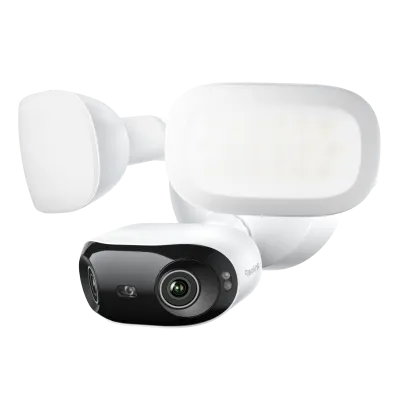
Idéal pour : Idéale pour surveiller une allée avec alimentation PoE, éclairage déclenché uniquement sur les zones ou personnes choisies.
En bref : Les utilisateurs Reddit apprécient surtout le déclenchement rapide et précis des projecteurs, notamment avec le filtrage des personnes et les zones de détection. Ils regrettent toutefois un champ vertical limité, des réglages inégalement accessibles selon l’application et un problème de connexion avec certains NVR configurés en sortie 4K.
Au-delà de ce modèle, la marque Reolink (toutes gammes) recueille 34 % d'avis positifs sur 886 utilisateurs Reddit. Ce signal marque ne compte pas dans la note du modèle ci-dessus.
Points forts
Application intuitive
3 1
« There's a button in both mobile and desktop apps. » Voir l’avis
« I have mine connected through POE with no NVR, my desktop doesn’t show the notification- light alert setting but it does on the iOS App. » Voir l’avis
Fiabilité éprouvée
2 1
« I have the Elite Pro Floodlight PoE and it's great, good amount of light for my use case. » Voir l’avis
« I'd swap them for 2 Elite Pro Floodlight PoE or wait until Reolink releases for xPro version if the place the camera overlooks is well lit at night. » Voir l’avis
Points faibles
Qualité d’image perfectible
0 6
« As I said there, you should submit a support ticket to Reolink about it, the more people mention it the faster it'll get fixed. » Voir l’avis
« Honestly speaking, I feel like the vertical FOV is really not great, especially comparing to a traditional camera. » Voir l’avis
« Yeah I use HA but I don't find it annoying enough to make an automation, but maybe if they never patch it I'll circle back and try what you did! » Voir l’avis
| Critère | Note /10 | Ce qu'en dit le consensus |
|---|---|---|
| Application | 6.0 | Les réglages sont complets, mais leur emplacement et leur disponibilité varient entre mobile et ordinateur. |
| Détection | 9.6 | Les utilisateurs Reddit apprécient le déclenchement rapide, le filtrage par type de cible et les zones configurables. |
| Image | 0.0 | Le champ vertical et les angles morts sont critiqués, avec plusieurs contournements logiciels évoqués pour d’autres problèmes d’image. |
| Prix | 0.0 | Un utilisateur Reddit estime que le surcoût est difficile à justifier si seul le projecteur réglable intéresse. |
| Fiabilité | 5.5 | Les retours sont globalement favorables, sauf un conflit de connexion signalé avec la sortie HDMI 4K d’un NVR. |
| Installation | 0.0 | Le format est jugé peu pratique pour une fixation sous soffite. |
Avis Reddit
16 avis analysés · Positifs 5 Neutres 4 Négatifs 6
avis pertinents ·
-
mblaser 🇬🇧
1 commentaire analysé
-
mesab0ogie88 🇬🇧
1 commentaire analysé
r/reolinkcam · 180 degree cameras on all 4 sides of house? Honestly speaking, I feel like the vertical FOV is really not great, especially comparing to a traditional camera. As you can see, I had to decide between viewing more of my deck or more of my garage. I chose to take the middle ground but instill have a sizeable blind spot below the camera. That being said, the floodlights are really great and the trigger times are almost as good as a traditional floodlight with PIR sensor. I also have it to only trigger on human detection so it dosent turn on when the random bird comes through. If you use this on the driveway you could set the motion detection zones so it only turns on the floodlights when something goes onto the driveway and not when other vehicles pass by(which is the case with traditional PIR floodlights) If you don't need the floodlights, I would say get something else, especially since you saily you were gonna run POE. That's about the only reason to get these. I have the OMVI 3i as well and would probably recommend them over the floodlights elite, but those have their own issues as well(my main grievance is that the 180 camera does not tilt down far enough but it does have a better vertical FOV) if not, I'd personally be looking at the cx820 or if U do need 180° maybe the duo 3v. https://preview.redd.it/09ewqkhsis9h1.jpeg?width=1920&format=pjpg&auto=webp&s=cf24e67300946678d3c98e737715066a684c924d
-
ToTouchAnEmu 🇬🇧
1 commentaire analysé
r/reolinkcam · POE elite floodlight stuck on B&W until late morning perfect, thanks!! Yeah I use HA but I don't find it annoying enough to make an automation, but maybe if they never patch it I'll circle back and try what you did!
-
scarparu 🇬🇧
1 commentaire analysé
r/reolinkcam · not finding new floodlight I think I know what may be causing your issue. I have several Reolink devices, including a Poe Doorbell, TrackFlex Floodlight Cam and Home Hub Pro. Everything worked properly until I added the Elite Floodlight Cam. After spending hours on the phone with Reolink support and days exchanging emails, I couldn't get a solution. I eventually figured it out myself. My Home Hub Pro is connected to a 4K monitor via HDMI. When the HDMI output is set to 4K, the Elite Floodlight camera loses its connection. Lowering the NVR's HDMI output resolution, then rebooting the NVR, resolved the issue. Give that a try and let us know if it works. Hopefully Reolink is monitoring this thread and can address the problem with a firmware update. I'm not happy running my 4K monitor at a lower resolution, but it's the only workaround I've found until the issue is fixed. I hope this helps.
-
Known-Advisor-2000 🇬🇧
1 commentaire analysé
r/reolinkcam · Elite Pro Floodlight PoE stays in Black&White hours after sunrise? Thanks, I'll submit a ticket as well. I do have HA actually, but I wanted to try to solve it on the Reolink side first. I like your idea of using another camera as the trigger. I was actually thinking of a simpler automation that switches the camera to Color a little after sunrise and then back to Auto a few seconds later, just to force it to reevaluate. Btw. Do you add both instances of you camera to HA (standalone and via NVR)? If so based on which one do you program your automations?
-
weendigo666 🇬🇧
2 commentaires analysés
r/reolinkcam · Elite Pro Floodlight - where's the Night Smart Mode? Anyway, you mean manually turning the light on? There's a button in both mobile and desktop apps. Also Home Assistant integration works and the camera lights can be controlled with it.
r/reolinkcam · Elite Pro Floodlight - where's the Night Smart Mode? Ah, right, you pointed me in the right direction. On desktop app, the option does not mention the motion part. Also on mobile app, there's a link to the Light Alarm section, which is not on desktop... So solved I guess, after setting up the light alarm it works the same as the old Night Smart Mode.
-
Inmate1024 🇬🇧
1 commentaire analysé
r/reolinkcam · Elite Pro Floodlight PoE light setting > all the settings related to this camera? To choose the color temp. it is under "Light - Floodlight." To set the floodlight to activate on movement it is under "Light Alarm - Detection." To have the floodlight activate on the newer Perimeter Protection, you have to set up one of them (or all) and that would be under Detection Alarm.
-
Pykmiin 🇬🇧
1 commentaire analysé
r/reolinkcam · Elite Pro Floodlight PoE light setting Hello, in my reolink application I don't have these settings (activation of the floodlight according to certain movements or even choose the warm or cool color) do you know how to get all the settings related to this camera?
-
jmaddr 🇬🇧
1 commentaire analysé
r/reolinkcam · Elite Floodlight WIFI Strange. It’s there on my floodlight pro poe. Latest firmware? I had the Wi-Fi version before and I don’t remember making any specific url changes in Frigate compared to my others.
-
scifitechguy 🇬🇧
1 commentaire analysé
r/reolinkcam · Which Reolink floodlight do you like most? None. I need a POE floodlight cam that can be mounted under a soffit, and the Elite Pro Floodlight PoE form factor sucks for that use case.
-
lantech 🇬🇧
1 commentaire analysé
r/reolinkcam · Which Reolink floodlight do you like most? I have the Elite Pro Floodlight PoE and it's great, good amount of light for my use case.
-
RiversideGuy92 🇬🇧
1 commentaire analysé
r/reolinkcam · Floodlight setting I have mine connected through [POE](https://support.reolink.com/hc/en-us/articles/48695160590361-Floodlight-Settings-Guide-for-Reolink-Floodlight-Camera-Series/) with no NVR, my desktop doesn’t show the notification- light alert setting but it does on the iOS App. Have my floodlight light set to close (because it kept going on to every single motion) and notification- light alert set to detection- person (can also use vehicle and animals). Works perfectly now.
-
shufflepoint 🇬🇧
1 commentaire analysé
r/reolinkcam · November 2025 Highlights – Reolink Camera Community Elite Pro Floodlight PoE is $100 more and only adds adjustable floodlight?
-
gusomatic 🇬🇧
1 commentaire analysé
r/reolinkcam · New NVR Firmware adds features for Elite Pro Floodlight POE? Looks like its got a specs page up now , 16mp and 2800 lumens on POE, https://m.reolink.com/product/elite-pro-floodlight-poe/
-
craptastickly 🇬🇧
1 commentaire analysé
r/reolinkcam · Reolink Elite Pro Floodlight PoE Live on Amazon US Market! I had Foscams spotlight xsm before, that light was much brighter than this one
-
Big-Sweet-2179 🇬🇧
1 commentaire analysé
r/reolinkcam · Which NVR? I'd suggest buying professional NVR from Reolink. You are future proofing with this. If you are located in an urban zone then you will definitely want the professional models, just because of the perimeter protection feature and other types of detection. Just note that the CX models are still better. So you want a combination of CX models where lighting is great and professional models where lighting sucks/pitch black. Also you only have CX820s in your setup? Just if you don't know these are color night vision cameras so you can only use them properly in places where there is exceptional good lighting at night. Otherwise it will look like crap. So all areas of your home better look like a christmas tree at night, including the streets in the area where you live... Same for the argus cameras... And I'd replace argus 4 pro with PoE cameras btw... Battery powered cameras or Wi-Fi cameras are no good. I'd swap them for 2 Elite Pro Floodlight PoE or wait until Reolink releases for xPro version if the place the camera overlooks is well lit at night. But you do you...
Aucun avis pour ce filtre.
Souvent comparé à
Questions fréquentes
La détection des personnes est-elle efficace ?
Le consensus Reddit est positif, le projecteur peut être limité à la détection des personnes, véhicules ou animaux. Des zones permettent aussi d’éviter son activation au passage de véhicules hors de la propriété.
Les réglages sont-ils disponibles sur ordinateur ?
Les utilisateurs Reddit signalent des différences entre les applications mobile et ordinateur. Certains réglages d’alerte lumineuse sont plus faciles à trouver sur mobile, mais les commandes essentielles semblent accessibles sur les deux plateformes.
Le champ de vision convient-il à une installation en hauteur ?
Un utilisateur Reddit juge le champ vertical trop étroit et constate un angle mort important sous la caméra. Le format est également considéré comme peu adapté à une pose sous soffite.
Fonctionne-t-elle correctement avec un NVR en 4K ?
Un témoignage Reddit rapporte des pertes de connexion lorsque la sortie HDMI du NVR est réglée en 4K. Réduire la résolution puis redémarrer le NVR corrige le problème, au prix d’une définition d’affichage inférieure.
This was brought up just the other day: [https://www.reddit.com/r/reolinkcam/comments/1v76svq/elite\_pro\_floodlight\_poe\_stays\_in\_blackwhite/](https://www.reddit.com/r/reolinkcam/comments/1v76svq/elite_pro_floodlight_poe_stays_in_blackwhite/) As I said there, you should submit a support ticket to Reolink about it, the more people mention it the faster it'll get fixed. If you happen to use HomeAssistant, or are thinking about using it, you can overcome the problem with that.