TP-Link Deco M4
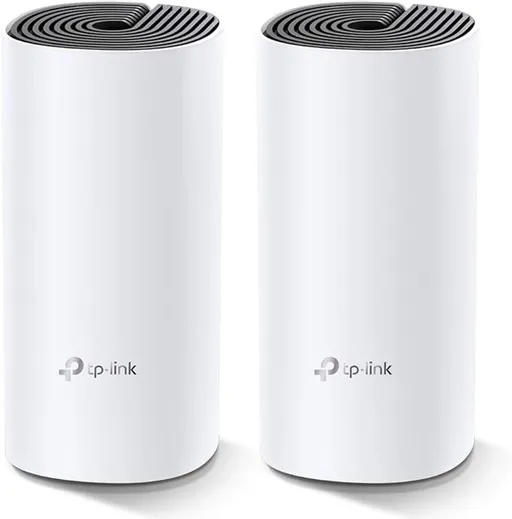
Idéal pour : Les utilisateurs prêts à bricoler un peu (reset occasionnel) en échange d'un mesh abordable.
En bref : D'après les avis, le backhaul filaire du Deco M4 tient mal : les nœuds repassent souvent en wifi sans prévenir et l'appli n'indique pas toujours le vrai statut de connexion. Le débit reste correct quand ça fonctionne, mais un reset occasionnel des unités est souvent nécessaire.
Au-delà de ce modèle, la marque TP-Link (toutes gammes) recueille 42 % d'avis positifs sur 311 utilisateurs Reddit. Ce signal marque ne compte pas dans la note du modèle ci-dessus.
Points forts
- Débit correct et stable une fois la connexion établie, selon plusieurs retours.
- Un simple reset du nœud suffit parfois à rétablir le backhaul filaire.
Points faibles
- Le backhaul Ethernet repasse fréquemment en wifi sans avertissement clair.
- L'appli Deco affiche parfois un statut de connexion erroné (Ethernet indiqué alors que ce n'est pas le cas).
- Certaines unités deviennent instables ou perdent totalement la connexion.
- Des soucis liés à des mises à jour de firmware sont rapportés.
| Critère | Note /10 | Ce qu'en dit le consensus |
|---|---|---|
| backhaul | 1.1 | Le backhaul filaire est signalé comme peu fiable : plusieurs utilisateurs voient leurs nœuds repasser en wifi malgré un câblage Ethernet, et l'appli ne reflète pas toujours l'état réel de la connexion. |
| stabilite | 0.0 | Des unités deviennent occasionnellement instables, ne répondent plus ou perdent la connexion, un point de friction récurrent selon les retours. |
| fiabilite | 2.0 | Avis partagés : certains utilisateurs n'ont jamais eu de problème et obtiennent des débits stables (environ 70 Mb/s en test), d'autres pointent des bugs liés au firmware et un comportement imprévisible. |
Avis Reddit
9 avis · 👍 2 😐 0 👎 7
-
Jolly-Ad-6534r/TpLink · Deco ethernet backhaul megathread →2025-07-31T18:26:03
Just wanted to add a datapoint. I bought two YuLinca G1204GP (8x GE PoE, 2x GE Uplink, 2x Gig SFP) from Amazon. Seems to be the same as this Mokerlink product, just rebranded: [https://www.mokerlink.com/index.php?route=product/product&product\_id=503](https://www.mokerlink.com/index.php?route=product/product&product_id=503) Yes, it's a cheap unmanaged switch but I wanted something simple and these things are cheap enough that I can have a few spares on hand. I tested with 3 Deco M4 and 1 Deco X50 Outdoor powered with PoE, operating in AP mode and one switch GE uplinked to a Netgear router. Everything worked fine when initially plugged in, except one of the M4 that just didn't want to backhaul via ethernet. I reset it, rejoined it and it worked fine after that. I connected the second switch via the SFP (1000BASE-SX) and switched the backhaul around to various ports on both switches over a week and everything continued to work. Eventual goal is to bring all this down to our other house and and add 3 more M4s. The difference there is that I'm running Starlink with the router in bypass mode and the main M4 in route. The Decos there are currently wirelessly backhauled but I want to move them to ethernet. Not the exact same scenario as my test but this gives me hope that it'll all work out.
-
NextExplanation8845r/TpLink · Deco ethernet backhaul megathread →2025-05-29T16:05:35
Pity I didn't find this thread a few weeks ago. I've had a TP-Link Deco M4 kit for about 4 years on my previous 70 mbps DSL connection. I never had an issue with it, anytime I did a speedtest, I always got about 70 megs. Both Deco units were connected via ethernet through several switches of various makes. A few weeks back, I got an FTTH (500mbps/50mbps) connection, so I decided to "upgrade" the mesh system and purchased an X1500 kit with 3 Decos. I connected up in the same fashion through switches. All went well for an hour or so, with speeds close to 500 megs upload and 50 megs download. After that, though, wifi speeds have varied from less than 100m up to the full 500mbps. I always get the full 50 megs upload. I found this thread once I went searching. I never knew these Deco devices had such issues. I rewired my system so that all the Decos are daisy chained directly to each other via cable and connected to the ISP router. All the other network devices are connected to other router ports. Unfortunately, this makes no difference. I'm still getting very inconsistent speeds (not related to traffic congestion BTW). Could the IEEE 1905.1 packets be causing a problem on the router or is there some other potential issue?
-
Ok3oomerr/TpLink · Deco ethernet backhaul megathread →2024-04-02T15:18:03
Does anyone have some issue with the Deco M4? I tried wiring one of them to the wall port but it still uses WB instead of EB, I'm using the TP-SG 1024 switch, you can check my latest post on my profile for further info, unfortunately I couldn't solve my problem there.
-
UNSW_PCSocr/TpLink · Deco ethernet backhaul megathread →2024-03-13T01:21:28
that's really scuffed. did you end up finding out how to fix it?
-
I_private_labelr/TpLink · Deco ethernet backhaul megathread →2024-03-05T08:17:08
Alright, I'm truly stuck. This is my current setup: ISP modem -> Deco M4 (main) -> TL SG1016D -> Deco M4 (2nd) When I hooked everything up in the networking closet, EB works fine on the 2nd Deco (which is connected via cat6 cable to the switch). After seeing EB working, I disconnected it and brought it upstairs to bedroom and plugged it into the wall w/ the same cat6 cable I used downstairs. I know the wall port works because I ran and tested the cables myself. The switch is also showing 1Gb connection to that wall port. After doing that, the 2nd Deco reverted back to using wifi to connect to the main Deco downstairs! What am I doing wrong here? If ethernet backhaul works while plugged into the switch downstairs, it should work while plugged into the wall upstairs. I know where are some comments saying the TL-SG1016D does not work w/ EB but I got it to work earlier. Confirmed EB via app.
-
UNSW_PCSocr/TpLink · Deco ethernet backhaul megathread →2024-03-05T07:15:56
oh god that's cursed. do see the above conversations describing the same or similar model of switch, and there's always the possibility of some "hidden feature" in Decos that throws everything
-
themadrixr/TpLink · Deco ethernet backhaul megathread →2024-02-28T11:28:05
Great thread, thanks a lot. My poltergeist is as follows: Configuration: - 3 Deco M4 set up as AP - Deco #1 (main) directly connected to the router. First floor. - Deco #2 connected via ethernet (cat6) to #1. Second floor. - Deco #3 with no ethernet. Third floor. - Deco #2 also eth connected (cat7) to switch TP-LINK TL-SG1005D, which is connected to a nas, a rpi and a laptop. Problems: 1. #3 almost always connect to #1 instead of #2, unless I restart first #2 and then restart #3. 2. #2 always fails in restart if I don't unplug the ethernet first. When restarting, if it is ethernet plugged, keeps the red status light blinking. 3. If I unplug the ethernet, restart again #2, connects properly. Only then I can plug the ethernet. 4. After step 3, I have to restart too #3, in order that topology gets updated, and connect to #2 instead of #1. 5. In spite of getting ethernet speed when plugged, the deco android app never shows that #2 is ethernet backhauled. I tried to switch decos, restoring defaults, and the result is the same. In the past I also tried to plug #1 and #2 both directly to router, but the problem is the same as now. Also tried to change the cables to the other ethernet port the M4 has, but same result. It's desperating, because it does not seem malfunction, but not expected behavior neither. I don't know if the problem is with the M4 models or with the TPLink in general. Support never gave me a valid solution. I'm doubting between purchasing a X1500 set, or change to google wifi or another brand.
-
Ambitious_Fortune_97r/TpLink · Deco ethernet backhaul megathread →2024-01-14T19:59:23
Hi to all of you! Great thread! I am currently doing a small two floor office for around 30 people setup and I am hitting my head to the wall with this deco M4 system. I got 2 x 3packs - total 6 deco m4 units (3 on each floor). My setup is - ISP Uplink -> Mikrotik RB760iGS Router -> HPE Aruba Instant ON JL812A 24 gigabit port managed switch -> patch pannel which is linking two floors of RJ45 wall mounted connectors -> 6 Deco M4 units setup in AP mode. My problems are the following: - Even when all units are wired to the switch and all showing as EB, sporadically some of them are switching back to WB after some time - When I run a speed test from the Deco wifi network several units are becomming totally unresponsive and loses connection and I have to wait several minutes for them to get back - When using the wifi normally there are sporadic looses of connectivity even when my connection to the deco is strong. I started to suspect the loop prevention earlier today, but after reading this thread I am almost sure about it. I will try to disable the loop prevention and STP on the deco ports of the switch. Flow control will be disabled also, I ams till wondering about storm control but will see. At one point I even though about connecting the decos first to a simple unmanaged tplink switch and then linking this switch with my 24G Aruba. This can be kind of debugging mode if those config changes does not help. I really want to to keep the current setup as I want the two floors to have single WiFi network covered by 6 devices with roaming.
-
firetotheboothr/TpLink · DECO BE85 mesh frustration →2023-09-27T06:01:30
I also reviewed posts regarding your M4 and new firmware issues. I have seen some TP link tech support on this subreddit so I am hopeful they will review both of our cases intimately.
Aucun avis pour ce filtre.
Souvent comparé à


Questions fréquentes
Le backhaul filaire (Ethernet) est-il fiable sur le Deco M4 ?
Les retours sont mitigés : le backhaul Ethernet fonctionne au départ mais plusieurs utilisateurs constatent qu'il repasse en wifi de façon intermittente, sans que l'appli ne le signale toujours correctement.
Que faire si un nœud Deco M4 perd la connexion ?
D'après les utilisateurs, une réinitialisation puis un nouveau rattachement du nœud suffit souvent à rétablir une connexion stable.
Le Deco M4 convient-il à une grande surface ?
Les avis analysés ne renseignent pas précisément la couverture en m² ; ils portent surtout sur la stabilité du backhaul et de la connexion.
Faut-il se méfier des mises à jour de firmware ?
Certains utilisateurs rapportent des soucis apparus après une mise à jour firmware, il est donc conseillé de vérifier les notes de version avant de mettre à jour.