Amazon Eero 6
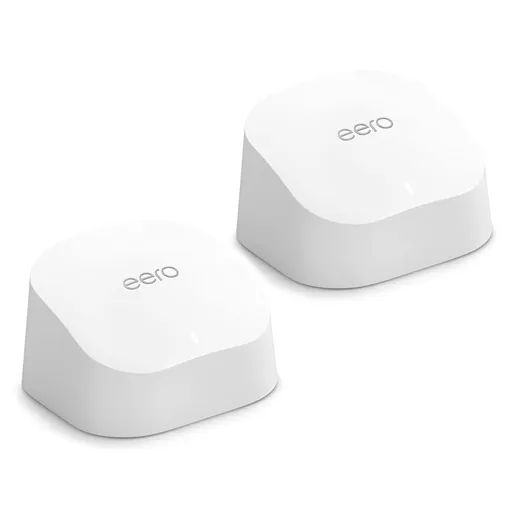
Idéal pour : Idéal pour couvrir simplement une grande habitation avec une connexion inférieure à 1 Gbit/s, surtout avec un backhaul Ethernet.
En bref : Les avis Reddit décrivent un système simple, abordable et souvent fiable, capable de couvrir de grandes habitations et de nombreux appareils. Le consensus reste partagé sur la durée, certains signalant des déconnexions après des mises à jour, des pertes de débit et des fonctions limitées.
Au-delà de ce modèle, la marque Amazon (toutes gammes) recueille 51 % d'avis positifs sur 520 utilisateurs Reddit. Ce signal marque ne compte pas dans la note du modèle ci-dessus.
Points forts
Connexion stable
4 1
« I have two eero 6 APs, both cabled, and everything roams between them without issue. » Voir l’avis
« Been rock solid with no issues for 3 weeks now. » Voir l’avis
« 3 tv’s in the house , one on the back porch and one in my shop and have had all 5 streaming via Wi-Fi at the same time without issue. » Voir l’avis
Bon rapport qualité-prix
2 1
« For reference, here the 3 pack of 6s is about $50 aud cheaper than the 2 pack of the 6+. » Voir l’avis
« I have 7 total units, all of them are eero 6 models, which were super cheap (~$70 each). » Voir l’avis
Backhaul efficace
4 1
« When I bought them some years ago and was looking at options, I remember some nodes allowed for wired backhaul but only had a single ethernet port, which wasn't helpful for my use case (where I only… » Voir l’avis
« If they’re cabled, they will work together over that unless the cable speed is slow or nonfunctional. » Voir l’avis
« Ideally you should definitely run wired backhaul to that if you can though but I know that can be tricky, or some people just don't want to run the cables messily, etc. » Voir l’avis
Fiabilité éprouvée
6 2
« 75+ devices, 4x TVs streaming, cloud cameras and during Covid we were running four zoom sessions at the same time, 300mb fiber. » Voir l’avis
« It's in the exact same location as the Eero 6, which worked perfectly. » Voir l’avis
« My Eero 6 devices were the best I’ve ever had, but the 7 is terrible for me. » Voir l’avis
Points faibles
Fonctions limitées
0 5
« I recently had issues with my Eero 6's having not working correctly with my work VPN. » Voir l’avis
« I could be wrong here but since the eero 6 doesn't support WiFi 7, MLO on your network is automatically disabled as an option. » Voir l’avis
« The Eero Pro 6e is a tri band with 2.4, 5 and 6 Ghz it's using 160mhz channels, the Eero 6 is 2.4 and 5 Ghz, but only 80mhz channels. » Voir l’avis
Débits décevants
2 5
« None of those supposedly gigabit capable systems will be able to handle actual gigabit speeds. » Voir l’avis
« While it does ensure full bars, the speed drops to about 150mbps. » Voir l’avis
« I notice it on the devices I use most such as laptop and streaming devices » Voir l’avis
Couverture limitée
2 3
« With this 2 node set up I only just miss out on full coverage in a room I’m trying to get full bars. » Voir l’avis
« Because having the router+ extender on the 2nd floor, once I get downstairs to first floor, the wifi signal would drop to 1-2 bar(if im connected to wifi) » Voir l’avis
« Could be a silly question mate but I’m not getting good coverage on the 1000 contract. » Voir l’avis
| Critère | Note /10 | Ce qu'en dit le consensus |
|---|---|---|
| Fiabilité | 6.7 | La majorité des retours sont favorables, malgré plusieurs expériences de pannes, de latence ou de redémarrages réguliers. |
| Backhaul | 7.5 | Le backhaul Ethernet est fortement recommandé, car le sans-fil peut être limité par la borne la moins performante. |
| Fonctions | 0.0 | Le système privilégie la simplicité, avec peu de réglages avancés, sans Wi-Fi 7 ni MLO, et quelques problèmes signalés avec le VPN ou le client steering. |
| Débit | 2.5 | Les débits sont jugés bons sous 1 Gbit/s, mais le gigabit réel et les extensions sans fil montrent leurs limites. |
| Installation | 9.7 | La mise en service par l’application est décrite comme très simple et demande peu de configuration. |
| Stabilité | 8.4 | La stabilité est souvent excellente, surtout en Ethernet, mais certains firmwares auraient provoqué des déconnexions sur plusieurs types d’appareils. |
| Couverture | 3.1 | La couverture peut être très étendue, mais certains utilisateurs rencontrent encore des zones faibles ou une baisse de débit avec une borne supplémentaire. |
| Prix | 7.9 | Le prix est souvent jugé avantageux, mais l’achat d’unités anciennes d’occasion est déconseillé par certains utilisateurs. |
Avis Reddit
26 avis analysés · Positifs 11 Neutres 1 Négatifs 14
avis pertinents ·
-
RealBlueCayman 🇬🇧
1 commentaire analysé
-
kenckar 🇬🇧
1 commentaire analysé
r/orbi · Plz recommend between Orbi 870, 970 or Eero Max 7 I recently bought an orbi 770 to replace an eero 6. Sadly, the 6 never worked well. Periodically like once a month, I had to do a soft reset on all the devices. Recently, that stop fixing the lag. I had had enough. The 770 is fast and working fine after 2 months. Best move I made this year.
-
Teenage_techboy1234 🇬🇧
1 commentaire analysé
r/wifi · Budget, 1 gig mesh system None of those supposedly gigabit capable systems will be able to handle actual gigabit speeds. Gigabit ports cannot sustain full gigabit speeds due to overhead, and Wi-Fi five and six, especially on the 2.4 and 5 GHz bands, can't really do it either. Therefore, I would take a look at the Tp-Link Deco BE25 for what is probably the cheapest option for a system that'll be able to handle your speeds competently. The BE22 might also be able to do it.
-
ElderberryHamlet 🇬🇧
1 commentaire analysé
r/amazoneero · Adding a 7 pro to existing 6 network 7 pro has the same wifi 1 though 6 and 2x2 antenna array on each band as the 6 vanilla except also 6GHz band and wifi 7 on each band.
-
FuckinHighGuy 🇬🇧
1 commentaire analysé
r/amazoneero · Will adding an eero 6 to my 7 max network slow it down? Yes it will. Ask me how I know
-
ClearK9 🇬🇧
1 commentaire analysé
r/amazoneero · Is the Eero Max 7 as bad as people say they are? I recently had issues with my Eero 6's having not working correctly with my work VPN. Seems to have been client steering. Not a big deal, but just addressing that like most things, they're not perfect in every situation.
-
Sharp_eee 🇬🇧
1 commentaire analysé
r/eero · Eero Pro 6E and Eero 6+ Review: Fast and Easy Great review, thank you. I just bought a 3 pack of the 6 (one router and 2 extenders). I have 2 of the 6+ coming to compare against. I also bought an extra 6 router so I could try wired backhaul with 2x 6 nodes which would place the gateway router at one end of the house and then the other wired 6 in about the middle. With this 2 node set up I only just miss out on full coverage in a room I’m trying to get full bars. I plan to test the 6+ in the same wired configuration. Do you think the 6+ will offer a slightly better range and connection for wired back haul and are they worth it? For reference, here the 3 pack of 6s is about $50 aud cheaper than the 2 pack of the 6+. I have tried doing 2 of the wired 6s then an extender node in the problem room. While it does ensure full bars, the speed drops to about 150mbps. When just using the 2 wired nodes, connecting to the node in the centre of the house gives me 300mbps but I lose a bar of signal. I hate to lose more speed with the extra node, but that one extra bar is what I’m trying to achieve when in that room I have devices connected to my phone I need to stay connected.
-
kschang 🇬🇧
1 commentaire analysé
r/amazoneero · Eero 6+ and Pro 6E Thoughts? Most people don't need 7 or 6e. If your pipe is less than 1gbps you're fine with 6 or 6 pro, maybe even 5 or 5 pro (not called that but you know which one I mean)
-
su_A_ve 🇬🇧
2 commentaires analysés
r/HomeNetworking · Home mesh WiFi recommendation - narrowed to 2 options I do networking for a living. They are set and forget, not designed for anyone that likes to make changes. 75+ devices, 4x TVs streaming, cloud cameras and during Covid we were running four zoom sessions at the same time, 300mb fiber. They’ve been great and have zero reason to upgrade, until they go EoL.
r/HomeNetworking · Home mesh WiFi recommendation - narrowed to 2 options Make sure the equipment you get, all nodes allow for wired backhaul, and they have two ethernet ports. This way, you can wired them, but also feed additional devices. Typically a home may have a single ethernet wire available. My experience is only with Eero. I have Eero 6 and all nodes and very happy with them. When I bought them some years ago and was looking at options, I remember some nodes allowed for wired backhaul but only had a single ethernet port, which wasn't helpful for my use case (where I only had one drop).
-
Blackdogaudio 🇬🇧
1 commentaire analysé
r/amazoneero · Devices Struggling with Eero 7 Pro after working with Eero 6 I could be wrong here but since the eero 6 doesn't support WiFi 7, MLO on your network is automatically disabled as an option. eero Support could confirm if someone here doesn't.
-
darkeagle03 🇬🇧
1 commentaire analysé
r/amazoneero · Devices Struggling with Eero 7 Pro after working with Eero 6 All of the above except not away from electronics. It's in the exact same location as the Eero 6, which worked perfectly.
-
iiPanda0615 🇬🇧
1 commentaire analysé
r/amazoneero · Is it worth upgrading from 6E pro to 7 Oh also my house does have huge interference. I have 1 reg 6 on the 1st floor living room. Because having the router+ extender on the 2nd floor, once I get downstairs to first floor, the wifi signal would drop to 1-2 bar(if im connected to wifi)
-
TkachukMitts 🇬🇧
1 commentaire analysé
r/amazoneero · Eero 7 802.11r, k and v support I have two eero 6 APs, both cabled, and everything roams between them without issue. If they’re cabled, they will work together over that unless the cable speed is slow or nonfunctional. With a gigabit network speed they always use it on my network.
-
ThingUnable 🇬🇧
1 commentaire analysé
r/amazoneero · Eero 7 max and bufferbloat I notice it on the devices I use most such as laptop and streaming devices
-
Rag_kirk 🇬🇧
1 commentaire analysé
r/youfibre · WIFI 7 Hub VS ASUS ZenWiFi Pro ET12 (2000 gbps) 1000mbps or 2000mbps won't change anything. You have a bit of a mismatch of Eero's, so they are not going to be able to talk efficiently to each other on the mesh. If that's an Eero 7 it's a dual band router with 2.4 and 5 Ghz channel, it can use 160mhz channels. The Eero Pro 6e is a tri band with 2.4, 5 and 6 Ghz it's using 160mhz channels, the Eero 6 is 2.4 and 5 Ghz, but only 80mhz channels. I would suggest swapping the Eero 7 and Eero Pro 6e to see if that helps. Changing the Eero 6 to an Eero 6+ would allow 160mhz channels. Or preferably an Eero Pro 6e. I had an Eero 6+ and 2 x Eero 6, then 3 x Eero Pro 6. Now I have 3 x Eero Pro 6e. Currently the gateway Eero Pro 6e can manage around 1400mbps to a device with Wi-Fi 6e capability, and the mesh nodes manage around 400mbps, which is plenty fast enough for everything that connects to them.
-
Interesting_Owl8733 🇬🇧
1 commentaire analysé
r/youfibre · WIFI 7 Hub VS ASUS ZenWiFi Pro ET12 (2000 gbps) Could be a silly question mate but I’m not getting good coverage on the 1000 contract. Am wireless with eero 7 as main router, eero 6 pro e in livingroom and a eero 6 in kitchen and in hut in manhunt in garden. I’ve got an engineer to come have a look on Friday. Would I be aswell asking about putting me onto the 2000 contract?? Would that definitely help with the coverage for the rest of the eeros??
-
birdclan09 🇬🇧
1 commentaire analysé
r/amazoneero · Eero Max 7 and Eero 7 mesh issues Just last week I switched to a Unifi system for this exact issue and returned my newly purchased eero 7 routers. My Eero 6 devices were the best I’ve ever had, but the 7 is terrible for me.
-
venbollmer 🇬🇧
1 commentaire analysé
r/amazoneero · Adding a 7 pro to existing 6 network I have run them blended with no issues.
-
BinkyX 🇬🇧
1 commentaire analysé
r/amazoneero · 7 Pro or Max any more stable than 7? I have 3 eero pro 7s and an eero 6 node. Att 1 gig fiber. I put the BGW320 in pass through mode and turned off the WiFi antennas in it. Then plugged one of the eeros into the 5ghz Ethernet socket on the BGW, and turned it all on. Then added the two pro 7 and one 6 node. I changed absolutely nothing on the eeros, just took them out of the box and connected them using the eero app. Been rock solid with no issues for 3 weeks now. You have a complicated system, maybe simplify it down for a day, reset everything and reconnect to provide nothing but WiFi and see if the issue goes away. Then start adding switches and Ethernet devices one at a time and see if the problem comes back.
-
Ok_Brain4307 🇬🇧
1 commentaire analysé
r/tmobileisp · Review after two days of use Random, but did you try turning off the parental controls/profiles to see if that solves the issue? I don't have T-Mobile fiber Internet but I do have their cell-based home internet, with eero 6 devices (not the newest) running the routing/WiFi distribution and have no problem loading websites whatsoever. I'd guess it's not the fiber install itself but something with the eero setup. I'm a fan of my eeros (enough to have installed them at 3 family members houses), but that speed test and slow websites loading don't add up to it sounding like a fiber problem.
-
Stellatank 🇬🇧
2 commentaires analysés
r/amazoneero · will replacing gateway Pro 6 with Max 7 improve set up if there are older Pro 6 connected by wireless I think so if it in the same network because it is a lower spec than the Max 7's.
r/amazoneero · will replacing gateway Pro 6 with Max 7 improve set up if there are older Pro 6 connected by wireless As I understand on wireless backhaull the speed is restricted by the weakest link. The eero Max 7 is a top spec 3 band and if you have a eero 6 that isn't 3 band then it will limit speed over wireless backhaull.
-
_ahrs 🇬🇧
1 commentaire analysé
r/amazoneero · Will adding an eero 6 to my 7 max network slow it down? With it being located in a black spot? It shouldn't do. Ideally you should definitely run wired backhaul to that if you can though but I know that can be tricky, or some people just don't want to run the cables messily, etc.
-
pman1891 🇬🇧
1 commentaire analysé
r/HomeNetworking · Best mesh WiFi system for a large house with dead zones and multiple floors? As several have stated, you can use practically any of the mesh brands, but don’t use the mesh feature. Instead use wired Ethernet backhaul to connect the satellite units to the main router. I’ve had good experiences with eero for this purpose. Super simple to administer and the speeds are great. I have 7 total units, all of them are eero 6 models, which were super cheap (~$70 each). Ubiquiti is like CrossFit.
-
Which_Dog_5765 🇬🇧
1 commentaire analysé
r/amazoneero · Researching Buying Eero System I can only speak about the eero 6’s that I own and they have served me well. I have 1 gateway and 4 slaves across 1 acre lot and 3000sqft house. Everything works perfect. I’m on 500mbps service and about 40-50 Wi-Fi devices. Only issue I ever had was a gateway that went bad, so I replaced it and it operates as a slave with no issues. 3 tv’s in the house , one on the back porch and one in my shop and have had all 5 streaming via Wi-Fi at the same time without issue. Various Mac devices, iPad’s, phones, cameras, pool equipment, light switches, plugs, security equipment, etc all online with no issues. If/when I have issues I’ll probably still go with the cheapest available option of Eero. FWIW, I bought refurbished equipment initially about 5 years ago and still going strong. Maybe I got lucky after hearing about all of the issues. Good luck!
-
Tsax6010 🇬🇧
1 commentaire analysé
r/amazoneero · Would you recommend moving from Eero Pro 6 -> Eero Max 7? One of my base stations is the Ring Alarm which is eero 6 internals. Not much of a point in upgrading the mesh until they release a new Ring Alarm too.
-
ChesKat_pf 🇬🇧
1 commentaire analysé
r/amazoneero · Pro 6E (x2) and 6+ (x2) - worth $200? Personally, I wouldn’t pay for used eero systems (especially since they’re older now). I had eero 6 for 3 years. 3100 sq ft. 3 floors. Only needed 2 devices. Worked great until last year. Firmware updates weee being pushed all the time, but right after firmware updates, my devices would drop and wouldn’t stay connected. For example, tv would just drop connection and it was unusable. This spread to computers, speakers, etc. We have 20+ devices on our mesh. Some apple, speakers, windows devices, etc. All were affected. I would have to forget the network. Clear network cache on each device, and reconnect. Unbelievable pain with so many devices. When that didn’t work, eero support asked I turn off IPv6, turn off client steering, turn off mesh. And then reset the network as a whole. It just got to be too much. They didn’t know whzt was wrong. Asked to try to go to an older firmware. No permanent fixes. I switched to deco 7 pro. 2 units for around $250. Personal opinion, you don’t need 4 eero devices for the size of your home. Eero actually also asked me to disconnect a device to see if it would help. That said, I’m 2 months into deco and they work great! Eero support was friendly in most cases, but when they can’t diagnose and issue without stripping my internet down and turning off features… just not gonna work. Hope this helps. I know I’m gonna get some hate from eero fans. Again, it worked great for a couple years, but something went wrong in their firmware. Hope no one else shares my experience, but this is what happened. Hope this helps
Aucun avis pour ce filtre.
Souvent comparé à

Questions fréquentes
L’Eero 6 couvre-t-il une grande maison ?
Plusieurs utilisateurs Reddit rapportent une bonne couverture sur trois étages ou de grandes propriétés avec deux à cinq bornes. D’autres constatent toutefois des zones faibles ou doivent choisir entre un meilleur signal et un débit inférieur.
L’Eero 6 convient-il à une connexion gigabit ?
Le consensus Reddit indique qu’il convient surtout aux accès inférieurs à 1 Gbit/s. Les utilisateurs ne s’attendent pas à obtenir un gigabit réel en Wi-Fi, et l’ajout d’une borne sans fil peut encore réduire le débit.
L’Eero 6 est-il stable ?
De nombreux utilisateurs Reddit décrivent un réseau stable avec beaucoup d’appareils et plusieurs flux vidéo simultanés. Quelques témoignages rapportent néanmoins des déconnexions persistantes après des mises à jour de firmware ou la nécessité de redémarrer régulièrement les bornes.
Faut-il relier les bornes Eero 6 par Ethernet ?
Les utilisateurs Reddit recommandent le backhaul Ethernet lorsqu’il est possible. Il améliore la stabilité et évite que le débit dépende de la borne la moins performante, notamment dans un réseau mêlant plusieurs générations d’Eero.
There was someone that recently posted either in this sub or r/HomeNetworking that they were using two Express routers in a similar configuration to what you're asking about. I suspect it depends on the devices, applications, network usage requirements, etc to truly know whether it will work. The Express are really meant for a smaller footprint, lower usage that some of the other alternatives like the UCG-Ultra and UCG-Max. Alternatively, you could look at Eero as a one-stop solution using the Eero Pro 6 or Pro 6E. I'd avoid the 6 and 6+. Too many issues with those models. And it should fit your budget.