TP-Link Tapo C120
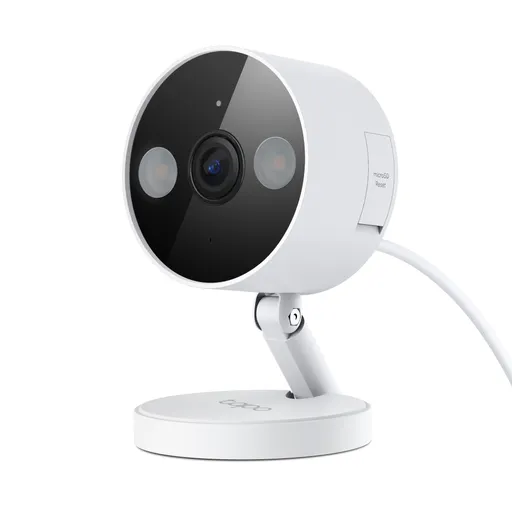
Idéal pour : Idéale pour une surveillance économique avec enregistrement local, alimentation disponible et bonne couverture Wi-Fi.
En bref : Les utilisateurs Reddit jugent la Tapo C120 très compétitive pour son image, son large champ de vision et ses fonctions locales sans abonnement. Le consensus est toutefois nettement plus réservé sur la stabilité Wi-Fi et la détection des animaux la nuit, avec des résultats variables selon le réseau et le firmware.
Au-delà de ce modèle, la marque TP-Link (toutes gammes) recueille 42 % d'avis positifs sur 243 utilisateurs Reddit. Ce signal marque ne compte pas dans la note du modèle ci-dessus.
Points forts
Bon rapport qualité-prix
24 5
« I'm really happy with the Tapo cams I've installed from the recent sale on Amazon, but the C120 is by far the best bang for the buck. » Voir l’avis
« They truly are the best little cheap cam I've ever seen if you just do this one thing...🤣🤣 » Voir l’avis
« I think this is perfectly acceptable for a $25 camera » Voir l’avis
Utilisable sans abonnement
31 8
« My Wyze Cam Pro V3 that's in my living room window doesn't miss a thing in colour at night vs the Tapo C120 that's outside 1 foot in front of my front stoop's light..and I pivoted away from Wyze to… » Voir l’avis
« Thankfully they haven't decided to put it behind a pay wall like some others have out if nowhere. » Voir l’avis
« As far as I'm aware, Tapo works great with or without a subscription. » Voir l’avis
Bonne qualité d’image
25 13
« It's customizable, good image quality... » Voir l’avis
« It never misses and the quality is great 👍. » Voir l’avis
« Still, impressed with the quality of the camera for the money though, I have to say. » Voir l’avis
Points faibles
Application perfectible
27 40
« I don't own any SD Cards, I just want to use Tapo Care with RTSP but apparently that's not possible. » Voir l’avis
« It says right here above the big "understand and agree" button when you enable the RTSP account that cloud and rtsp doesn't work simultaneously... » Voir l’avis
« The Delete option is only for clips saved to the cloud. » Voir l’avis
| Critère | Note /10 | Ce qu'en dit le consensus |
|---|---|---|
| Fiabilité | 4.1 | Les retours Reddit sont très contrastés, de nombreux exemplaires sont stables, tandis que d'autres subissent déconnexions, gels, redémarrages ou problèmes audio. |
| Image | 5.9 | Les utilisateurs Reddit apprécient la netteté, le champ large et les performances en faible lumière, mais signalent une baisse marquée dans l'obscurité et sur les mouvements rapides. |
| Prix | 7.6 | La C120 est largement considérée comme une caméra très bien équipée pour son faible coût, même si une carte mémoire augmente la dépense. |
| Installation | 4.0 | Le format compact, la base magnétique et l'alimentation USB-C facilitent la pose, mais le support est peu sécurisé et exige une alimentation filaire. |
| Application | 3.1 | L'application permet alertes, direct et lecture à distance, mais son ergonomie, ses limitations et ses performances suscitent des critiques. |
| Détection | 3.7 | La détection est riche et souvent efficace en journée, mais les faux positifs et les animaux manqués la nuit reviennent fréquemment. |
| Utilisation sans abonnement | 7.5 | Le consensus Reddit confirme un usage étendu avec carte microSD, détections et RTSP sans abonnement, malgré certaines limites d'accès distant. |
| Autonomie | 0.0 | La C120 n'est pas adaptée aux emplacements sans prise, puisqu'elle doit rester alimentée. |
Avis Reddit
214 avis analysés · Positifs 91 Neutres 32 Négatifs 89
avis pertinents ·
-
OXRoblox 🇬🇧
2 commentaires analysés
-
talormanda 🇬🇧
2 commentaires analysés
r/Tapo · BEWARE TAPO C120 FIRE HAZARD You're complaining about a fire hazard when you're putting indoor rated electronics OUTSIDE. Does not matter if the outlet is covered. That power adapter is not rated for outdoor use. Period. Humidity, condensation, and rain driven by wind will seep in. .. You even said you're in a tropical climate man. Once moisture gets it can also electrical arcing...leading to what you see before you. It's also not rated for vast temperature changes which are rougher outdoors. This will degrade the components in the adapter even quicker. You also run the risk of bugs getting in and causing a short. Need I say more? You are the cause of your problems. Run power from inside or get an outdoor rated power adapter.
r/Tapo · BEWARE TAPO C120 FIRE HAZARD The point stands which you cannot prove otherwise, the power adapter is not outdoor rated. If you want to stick it in a plastic box outside, more power to you. But you / OP shouldnt come into this sub to cry when it catches fire. OPs tropical climate is accelerating the rate of failure. Make sure you have home owners / renters insurance.
-
Blue-Thunder 🇬🇧
22 commentaires analysés
r/Tapo · Do Tapo cameras upload video and/or audio if user does NOT use Tapo Care? Anker said the same thing and yet they were caught uploading user data to their servers. At time moment we should presume that there is always the possibility they will collect this data.
r/Tapo · Do better than this Tapo you're expecting a $25 camera to be 100% accurate? bruh.
r/Tapo · Tapo H200 event recordings are too short and play in fast forward See in my use case it's not as I have to use a motion box for pet detection at night as the C120 sucks, period. During the day it's phenomenal, but at night, a skunk or cat or raccoon or bear (bear was last year) could walk right in front of the extremely well lit camera, not even 6 feet away and it doesn't register as a "pet". It just misses them completely. I only found out as I have a wyze cam covering the same spot and it had every single pet detection while the C120 missed everything. I'd get a C246D, but my H200 doesn't have access to the firmware that will allow it to work..so I'd be back to SD card only recording. Does anyone know of any of the Tapo cameras that work with a concrete driveway and pets at night? You'd figure white background with plenty of light it would be able to see, but no..
r/Tapo · Generic Sound Detection No. You want a different mfg. This was already discussed as someone demanded to know when any sound was made, like a fart, and the community joked it was so they could keep an eye on their victims.. Apparently they used a third party app to get the notification they wanted.. https://www.reddit.com/r/Tapo/comments/1txoygh/why_are_you_blocking_the_detection_of_all_sounds/
r/Tapo · Do Tapo 4k cameras and H500 hub have sufficient quality and reliability to serve as home security camera system, when it really matters? You want to store everything 24-7 as motion triggering and AI triggering can still miss events. I have a C120 in my front and I had to setup a special motion box as the camera 100% misses pets at night if they are in a certain area. I have gone back and forth with support and they have tried multiple firmwares, but have come to the conclusion that the C120 has troubles with pets at night and there is nothing they can do to fix it. During the day the C120 will capture pets as far as 50 feet away, but at night, it stops detecting pets at about 35 feet. Friend also has a C120 in their driveway and the camera missed a coyote kill that happened in their driveway. They have the camera setup for motion events only, and they woke up one morning with a bloody carcass in their driveway with no video evidence of how it got there..
r/Tapo · Observations after moving from Wyze v4 to Tapo C120 I have more than enough light. My Wyze Cam Pro V3 that's in my living room window doesn't miss a thing in colour at night vs the Tapo C120 that's outside 1 foot in front of my front stoop's light..and I pivoted away from Wyze to Tapo because of the pay wall. My V3 Pro has cam unlimited till August so I'm tying to see what is better, and sadly, Tapo just sucks for night time detection. I have fought with support for months, and as mentioned, I even had a custom firmware from them to "resolve" this. Which it did not. Support even said "we know the cameras have a hard time detecting cats and other small animals at night". But it's missed foxes and coyotes and last year it missed a bear..How the hell can you miss something as large as a bear..
r/Tapo · Observations after moving from Wyze v4 to Tapo C120 I wish ha. It has no problem during the day, but at night I can only get it to detect things if I use a detection box, otherwise nothing is detected by the AI. You know how the new firmwares have different colour boxes for items they detect? Green for Motion, yellow for pets, etc? Well just checked, had a massive raccoon walk right in front of my car last night at 3AM, and camera only detected it as motion, nothing else. The spot is maybe 8 feet away from the camera..
r/Tapo · Tapo H200 event recordings are too short and play in fast forward But the animal does not match the background colour. A raccoon does not blend into white concrete, nor does a black bear, a skunk, a fox or a coyote, etc..It will see them if they are on the grass (I might get the motion detection box to become a pet detection box), but will absolutely refuse to see them if they are on the concrete. I'm just so frustrated that Tapo refuses to fix this issue that they know exists. As for the generic motion events, it doesn't make sense that only they are limited to 15-20 seconds on the H200 as people, vehicle and pet detection are not.. thanks for listening. We frustrated users need to stick together so Tapo listens to us.
r/Tapo · H500 vs Micro SD Nah, relying on just motion detection is asking for you to miss events. I had my C120's set to 24-7 with all notifications except for motion turned on, and the "AI" would miss pets at night time. I had to create a special box for motion detection and put the sensitivity to 10 for pets to be seen at night time, as the onboard AI refuses to acknowledge them. If I drop it below 10, it also refuses to see motion of cats and skunks at night time. I've been through multiple firmwares with support and they just basically came to the conclusion that the C120 sucks at detecting pets at night, period. If I hadn't been recording 24-7, or had a competitor's camera covering the same area that showed me what was going on at night, I would never know..much like my friend who has a C120 and woke up one morning with a coyote kill in their driveway that their camera 100% missed as they have it set to motion detection only..
r/Tapo · Do Tapo 4k cameras and H500 hub have sufficient quality and reliability to serve as home security camera system, when it really matters? At night the detection zone for people is cut shorter, obviously. The cameras do not detect people at the very edges of the field of view, ie in the corners or the upper edge, like it can in the daytime. If they are completely in frame, it 100% catches them. As I do not have the C575D yet, I can't comment on how it's night detection would be, but with it's massive field of view, it should be considerably better than the C120, specially if you have enough light. The camera has colour night vision, but I see no mention of it having a Starlight Sensor or ColorPro sensor..(I still want at least 2, maybe 3) https://www.tapo.com/en/document/114555/ Infrared Night Vision (98 ft / 30 m) Color Night Vision (65 ft / 20 m) For reference, my C120 is limited to a mere [30 feet, or 9m at night time.](https://static.tp-link.com/upload/product-overview/2024/202410/20241031/Tapo%20C120%201.0&1.6_Datasheet.pdf)
r/Tapo · Observations after moving from Wyze v4 to Tapo C120 The thing is though, they miss nothing during the day. They can detect coyotes and foxes upwards of 60 feet away or more..
r/Tapo · Observations after moving from Wyze v4 to Tapo C120 I hate that the C120 sucks at pet detection and appears to have a blind spot. I still have a wyze cam pro V3 in my front window as my C120 that is mounted outside has missed numerous pets and other animals to the point I had a custom firmware from support to try and resolve it. They could not resolve the issue. I've had to create a box in the dead zone for motion detection to ensure I don't miss any foxes, or coyotes, skunks, racoons and the very rare bear. All of which were seen and tagged by my Wyze Cam V3 Pro..
r/Tapo · C120 non ai version on amazon? This is a C120, which is. https://www.tp-link.com/ca/home-networking/cloud-camera/tapo-c120/ Tapo C120 Tapo Indoor/Outdoor Home Security Wi-Fi Camera Indoor & Outdoor 24/7 Monitoring - Place it in your living room, bedroom, baby's room, backyard, or front door for round-the-clock coverage and **IP66 weatherproof construction: day, night, rain, or shine** 2K Color Night Vision - With an integrated starlight sensor, the C120 captures low light images in incredibly high definition colorful detail up to 98 ft. away—see beyond what the naked eye can see! 2K Clarity During the Day - When it comes to your home's protection, the details matter! 2K QHD clarity goes beyond traditional FullHD 1080p resolution so that no details will go undetected or blurred Built-In Dual Spotlights - With Tapo C120's dual spotlights, pierce through the darkness and low light conditions for an enhanced viewing experience at night while still being displayed in full color Ultra Easy & Hassle-Free Installation - Installation and mounting are a breeze with the C120's strong and adjustable magnetic base while its 9.8 ft. power cord grants you the flexibility to place it virtually anywhere Optional Invisible Infared Lights - If the red IR LEDs are a distraction to you, your children, or your pets, you may switch to invisible IR mode to continue monitoring throughout the night but without the red IR indicator FREE Smart AI Detection - Smart AI technology detects and identifies people, pets, and vehicles, sending you only relevant notifications while effectively avoiding unnecessary alerts Customizable Sound & Light Alarm - Record your own audio to use as an alarm and adjust the brightness of the spotlight to suit your preferences for a completely customized alarm system to deter intruders Full Duplex Two-Way Audio - Listen and speak to guests, delivery drivers, and pets on the other side of the camera with enhanced clarity thanks to Tapo C120's premium microphone and speakers Secured Local & Cloud Storage - Keep up to 512 GB of footage stored continuously on a microSD card (sold separately) or choose our Tapo Care Cloud subscription service, which not only saves your 30-day video history but also provides additional benefits such as activity notifications with snapshots Compatibility with Amazon Alexa & Google Assistant - Take command with voice control capabilities through popular third-party devices like Amazon Alexa and Google Assistant, allowing you to effortlessly manage your Tapo C120 and enjoy true hands-free operation Cross-Line Detection - Manually set no-go zones through the free Tapo Care app then be immediately alerted when movement is detected within or around this restricted area
r/Tapo · Indoor Tapo CCTV C120 and battery powered C425 i would suggest you get a smart plug as well just in case you need to power cycle the camera if something happens..
r/Tapo · presale question; will tapo-c120 event notify me for free? These cloud based systems use the cheapest onboard AI possible. If you want real AI, you need to self host and run the models yourself. https://frigate.video/
r/Tapo · presale question; will tapo-c120 event notify me for free? Yes but prepared for stuff to not work, like pet detection at night, or worse, shadows being detected as pets at night.. There is also no way to cool it off, so if you're shovelling snow, or working in the view of your camera, you will be inundated with notifications..
r/Tapo · Tapo C120 pet detection refuses to work at night I have setup a motion box in the path that the animals like to use..and the motion detect works, but for "pets" it never changes to pet, it's always motion and ends as soon as they leave the detection box. When a person crosses the barrier, they get detected as a person before and after they leave the barrier. I'm at the point where I am thinking these were a waste of money as they absolutely can not do what I need them to do. So I ask the community again, do any other Tapo cameras suck this badly at detecting pets at night? This is a core feature that absolutely refuses to work, and support has pretty much ignored it and said that "we know it's problem it can't detect cats"... If Tapo would set it up so that the detection boxes showed up in the downloaded videos, like their competitors have, it would make it far easier for us to prove to support that we aren't lying and would make it easier for their support to understand what our videos are showing them.
r/Tapo · Tapo C120 pet detection refuses to work at night I have enough light for colour in the front, but not in the back. I have a Wyze cam located inside at the front and is looking through a window so it's not using infrared, and has colour as there is enough light. It catches every single thing the C120 located at the front misses, which is "pets", while the one in the back catches no animals at night at all. I have tested it with people detection and it will detect people at about 30 feet. (Yes I have the cameras setup in regard to what their light situation is) Tapo support said "the cameras only detect cats and dogs", yet they have no problem during the day tagging squirrels, chipmunks, ravens, raccoons, etc. It just really seems that the night detection on these is completely broken and the team is refusing to admit it. That is why i am asking if all the cameras have this problem, or if it's just the C120. I bought a C120 for a friend, and the night his neighbour's dog was attacked by coyotes, their camera recorded everything, but refused to notify them about anything. They had blood all through their driveway and had to go through their camera sd card to figure out wtf happened. It was rather disturbing. I don't understand how a bright light could break the detection, as the detection of these is phenomenal during daytime. It also has no problem detecting people at night. But pets and motion, they refuse.
r/Tapo · C120 and C210 cameras motion detection has become unreliable It might be your sd card. I have several cameras and I've noticed that the camera I did not put a high endurance card in, lags behind the ones that do have high endurance cards.
r/Tapo · Wyze Cam v4 vs Tapo C120 Which Offers Better Value? I moved over from Wyze recently and the Tapo cams are better. No pay wall, AI that actually works, integration with their light bulbs and other smart devices, 4k pan camera that actually works.. I still have a wyze cam setup as I have a year of service left on it, and it misses things my C120 picks up, like animals.
r/Tapo · Use wyze cam light socket V1 or V2 with Tapo C120? I am making the switch over to Tapo from Wyze, and I was able to use the current V1 light socket I have with a C120. You will have to file down the rubber on the connector a little bit as it's larger than hole on the light socket adapter. You will also need the Wyze app to ensure that the light socket is set to always on.
r/Tapo · C120 event durations are too long I would rather too long than too short. I have 2 C120's and don't have this problem personally.
-
nechronius 🇬🇧
4 commentaires analysés
r/Tapo · C120 disassembly pics Disassembled a C120 after the previous excellent post about converting one into a closeup camera for a bird feeder. As always, discretion advised, not supported by Tp-Link, decide risk for yourself. https://www.reddit.com/r/Tapo/s/wafOXG7v5F Getting the black bezel off is a bit tricky. The bezel is snapped onto the camera assembly itself, so isn't quite as easy as separating the bezel from the black plastic body. I used several thin strips of metal to wedge around the body and bezel and used a other piece to slowly pull it up. Given its design it's just a bit of brute force. Once the bezel is off, you still need to pop the camera assembly free from the body. Those are considerably easier, just use a small flathead to pop the assembly from the outer body. Hopefully the closeups and black marks are enough for anybody looking to try this.
r/Tapo · C120 firmware. Is 1.3.3 better than 1.3.2? It's what I figured was the actual case. But when I had one camera on 1.3.3 (the rest on 1.3.2) initially when viewing that camera on the app the audio "pops" were almost intolerable when checking it from two different devices. I want to say I revisited the camera a day or two later and the issues were gone. I very frequently update the app and firmware on all my devices whenever public releases are made available, so if 1.3.3 is more stable than 1.3.2, then I just assumed that an app update addressed the issue. Of course I could be wrong and it was just a coincidence, but it was just odd that I didn't have an issue with any of the other cameras when they were still on 1.3.2.
r/Tapo · C120 firmware. Is 1.3.3 better than 1.3.2? Initially I had some issues with 1.3.3 when only one of my cameras has updated to it. I had really bad audio pops when live viewing in the app, though I didn't look much more than that. I think they might have fixed the issue with a minor app update as well and I haven't experienced any issues since maybe the first day or two of having one camera with 1.3.3. Anyway I haven't had any issues with all cameras on 1.3.3 now. In terms of stability and audio quality, also no issues for me and I have several setups recording to SD cards, to a third party NVR using RTSP, and also now a setup using the H500 homebase.
r/Tapo · C120 disassembly pics I honestly don't know. But I do have a spare C120 that has failed and I was just about to throw out today, but before I do I'll see if I can't take it apart and have a look. Basically you're trying to figure out if the gasket around the lens is form fitted specifically to the lens?
-
MyStoopidStuff 🇬🇧
1 commentaire analysé
r/Tapo · C120 vs C425 - Surprised I agree, which is why I designed a wall wart style mount for my C120 cameras (3D printed). I'm really happy with the Tapo cams I've installed from the recent sale on Amazon, but the C120 is by far the best bang for the buck. https://preview.redd.it/g1qcre18efvd1.jpeg?width=1200&format=pjpg&auto=webp&s=804bb92e40fbb100b267fbf498aa2085728d384a
-
dorset_is_beautiful 🇬🇧
3 commentaires analysés
r/Tapo · Do better than this Tapo According to my C120 I'm a 'pet' whenever I go out to my car. I choose to believe it was programmed by someone from the north of England 😅
r/Tapo · Do better than this Tapo I've seen lots of people ranting here and elsewhere that people should just fix the ai by telling it it was wrong. I haven't seen anyone be helpful enough to explain how to do it though, I guess ranting is just more fun. After spending some time trying to find out if it is possible, I finally found how to do it, I've not managed to find any reference to it in tapo documents or FAQs however.. Basically on the C120 / android app at least , go to playback and download, find a recording with incorrect identification, tap the three little dots, scroll down and select "correct event type". You can then hopefully tell the camera what it really saw within reason.
r/Tapo · Do better than this Tapo No idea, only discovered it yesterday so trying to train it from now on. What happens if it learns to ignore too much though ,and misses real events? No way to un-train it as far as I can see, if it doesn't detect something how do you tell it that it should have? Still, impressed with the quality of the camera for the money though, I have to say.
-
mynameisatari 🇬🇧
1 commentaire analysé
r/Tapo · C120 Lens replacement? It's probably easier and cheaper to just buy a new one.
-
Bills56 🇬🇧
1 commentaire analysé
r/wyzecam · Deep in Wyze, but considering Tapo I had Wyze. Switched to tapo. Resolution is higher, they don’t require a subscription, the exterior cameras work well. Home assistant integration is fair. The c120 cameras are inexpensive. No time lapse which made me take out an old Wyze v2 to film a recent snow storm. They need decent WiFi 2.5 ghz
-
maxrebo82 🇬🇧
1 commentaire analysé
r/Tapo · Wyze Cam v4 vs Tapo C120 Which Offers Better Value? I ditched Wyze a few years ago after their two "data breaches" (which were more like bad coding on their part than an actual breach) which allowed others to see your videos, at least in notifications. Granted I had v3 cameras, I enjoy the functionality and slightly better reliability the C120 has. Tapo natively includes RTSP stream capabilities, so if you want to roll your own NVR, etc, they are there without hacking the firmware. Also better integration into Home Assistant, if that's your thing.
-
drm200 🇬🇧🌐
25 commentaires analysés
r/Tapo · Are there any Tapos out there that actually have high bitrate? I have 2 C120’s. The video is set for 2K QHD. I have never noticed pixelation. The video feeds typically run 350 kb/sec. But I typically do not have fast moving objects to capture and my low bitrate shows that. The C120 runs at 20 fps (frames per second). That is good for steady movement but inadequate for fast moving objects. I think if you want less pixelation due to movement you should focus on cameras that have the capability of at least 30 fps. There are a number of Tapo cameras that support 30 fps but I have no experience with them. At 30 frames per second you have 50% more frames to capture motion per second than 20 fps. I would expect these cameras to cost more because it takes a lot more processing power to handle the higher frame rate In
r/Tapo · C425 Sound Activation? Tapo C425 only supports Motion Detection, Person Detection, Pet Detection, and Vehicle Detection. There is no sound detection. It is not uncommon for some dogs to go nutso when left home alone. A friend of mine had the nicest and quietest dog. But when left alone the dog would start barking incessantly and tearing up furniture. Everyone found this hard to believe the dog was tearing up the furniture until they placed a video camera in their home. Then they found the dog was also continuously barking. I have also seen episodes on cesar milan “dog whisperer” where he was addressing this problem of the dog barking when left alone. Just plug your 425 into the charger so it is continuously charging. Then turn on pet detection and motion detection and set the sensitivity to high and place the camera where the dog is most likely to be barking. Enable audio recording. This should give you some insight on what your dog is doing You should believe your neighbor, they gain nothing by inventing this story. The c120 camera has dog barking detection built in, but i have not tried it. It is about $30
r/Tapo · What is a good RSSI number for wifi connectivity? Doorbell camera and ability to converse. If you have a good wifi signal to your device in comparison to the background noise, then your linkspeed will be based on the hardware compatibility of the router and the device. Older routers may not offer the same linkspeed as they were built to older wifi standards. Newer routers are capable of much higher linkspeeds but are limited by the Asus hardware. Asus cameras do not use 5ghz wifi. All 36 of my Tapo devices are limited to wifi “n” and do not support wifi “ac”, “ax” or wifi 7. They also support only one data stream. So that limits linkspeed to my router which offers multistream faster connections. But in reality, my c120 and c325wb cameras work well.
r/Tapo · What is a good RSSI number for wifi connectivity? Doorbell camera and ability to converse. -47 is a stronger signal than -62 My c120 has a -49 signal and my c325 wb has -43. Both work well and reliably. In general, if your RSSI is -65 or better, you have a good signal. But a better estimation can be made by comparing your RSSI signal to the background noise on that channel. if you live in a crowded wifi neighborhood, you want your RSSI to be at least 20 dbm better than the background noise. My Asus router tells me that the current background noise is -93 dBm. So my c120 signal is 44 dBm better (93 - 49) than the background noise. That means that my wifi signal is much much stronger than the background noise (I live in residential area). So if your wb has a -62 and your background noise is -82, then your signal is marginal because it is more difficult for your devices to separate the signal from the noise as their is only 20 dBm difference in the signal and the noise
r/Tapo · Low-profile mounting options for C120? The arm can be completely removed. I removed it from mine. As I remember it was a very small screw (or maybe pin) that holds it in place. It was easy to remove. In my case, I mounted the camera face to a window using two sided nano tape. The usb power cable sticks out the back. I can think of many ways to easily mount this under a cabinet using magnets or velcro. A simple “L” bracket could be attached to your cabinet using 2 sided nano tape (This stuff is super sticky but can be removed without residue). Then attach a small round magnet to the side of bracket hanging down (you can buy these on amazon with 3m adhesive tape on the back). Then attach a small round steel plate to the back of the camera (again you can get 1mm thick small round plates on amazon with adhesive on the back .. these are made for exactly this purpose). Now you can magnetically attach your camera to the bracket. The USB power connection enters the bottom of the camera so it will not interfere with your bracket. In my case, I installed the camera upside down (because i wanted the usb power on top) and then just inverted the image in the app. The alarms/spotlights can be controlled as you want in the app. I have the tapo app on 4 different devices. Each device is able to access the live feed and playback stored video.. but i have not used the sharing feature. My understanding is the sharing feature allows others to view both live view and playback mode. I also understand that there is no “view only” mode … meaning that people you share with can also delete videos
r/Tapo · Tapo C120 I have two c120’s with version 1 hardware and no connection issues. Both cameras are running 1.2.2 firmware. But, one camera wants to update to firmware 1.2.3 Build 241119 Rel.41818n for over a week now (I have autoupdate disabled). The other camera says 1.2.2 is the latest firmware and does not push me to update to 1.2.3. I find it strange that only one camera is pushing for update …
r/Tapo · Observations after moving from Wyze v4 to Tapo C120 I have 4 c120 cameras. I have the same audio “clicking” problem with all 4 cameras. Several others have reported the same problem for the last 6 months. Although the c120 is very good at video, if you need audio it is not the camera to buy. All of my Tapo cameras were working with HA (using the TP Link integration), but the c120’s stopped working a couple of HA updates ago. I have not tried the HACS integration.
r/Tapo · Can I change the FPS of Tapo cameras? I checked my c120 and it has no adjustment possibility
r/Tapo · Tapo C210 false person detection alerts I have a C211 camera which is a black version of the C210. I have a large family room space it monitors. I had the exact same problems as you describe … Small changes in sunlight outside (the sun being blocked/or unblocked by a cloud would repeatedly trigger false alerts. Reviewing the video would only reveal small changes in my home ambient daylight. The home is a vacation home with all the shutters and curtains closed … yet these small ambient light changes would trigger alarms. Changing sensitivity did not help. Additionally, the camera would give false alerts at day or night … Reviewing the video, I would see a point in the video where the camera video would seem to flicker for one frame … almost like two videos had been spliced .. Just a small change in the video feed that affected the entire picture (no movement in the room, no lights on … just a barely noticeable video flicker from one frame to the next). I was getting several false alerts nightly. This defeats the value of a camera because receiving so many false alerts that could be an intruder turns out to always be “nothing” to see. I did not enjoy waking up to repeated false alerts. I also had a C120 camera. So I replaced the c211 with the c120. The c120 turned out to work perfectly (I did not really need the pan feature). The picture quality is better and I have never had a false detection after more than 1 year. I now have three c120’s and the c211 is collecting dust in a drawer.
r/Tapo · tapo c120 or Tapo C320ws I have a c120. The picture quality at night is great if there is some light available. For example from my front door the night picture quality is outstanding (and in color) since there are a number of street lights providing some background light. However, if I move the camera to the backdoor where there is no street lights the picture quality is not as good. Not enough light to capture the video in color and as the distance in the picture goes beyond 8 or 10 feet everything just becomes dark. Closer than 8 or 10 feet, the picture is in graytone and objects are clear. Both the c120 and c320ws use a starlight sensor, so i think you will not have any difference in night vision quality. There is also a c325wb. This camera has the colorpro sensor that captures considerably more light (as it is bigger) and provides much better night capability. I have one on order, but have not received it yet. There is lots of reviews on youtube. This guy has a nice review comparing 320ws vs 325wb https://m.youtube.com/watch?v=7sjFpMoHWGw
r/Tapo · C120 Firmware Update broke my security system I understand your position. But when there are known firmware hacks that have been fixed then there is a real dilemma to update or not. I always have autoupdates off. But I tend to manually update after the update has been out for some time
r/Tapo · Tapo C200 or C210? I am not using it now. I am using c120’s inside. I do not need the pan-scan as the c120 has a pretty wide field of view. The c210 has a visible “red eye” infrared light for night vision. The c120 infrared light is not in the visible spectrum, so it’s infrared light is not visible like the c210. I prefer not to have the “red eye” light from the c210. However, the c210 has a weird background crackling sound in the audio. I have four c120’s and they all have this problem. Some others on reddit have also complained of this problem. I have two of my c120’s stuck directly to a window pane. They work great for that. And i have enough yard light at night that I get color video with the infra red disabled. I could not do that with a c210. I disable “motion detection” on all my Tap cameras. I find too many false events due to lighting changes, frame changes etc. Person detection works good inside. I do not have pets so can not really comment on that except that neither camera would reliably detect my robot vacuum moving around. So for my situation, I prefer the c120.
r/Tapo · C260 Window Mount Options I used a C260 through a window for a while. It is not ideal because any background light in the room will reflect off of the glass and add reduce the overall acuity. I ended up creating a paper “shroud” around the camera and the window to reduce some of this reflection. In the end, I switched to a C120. The C120 is perfect for me. I have two C120’s mounted directly to the window glass using “nano tape” between the window glass and the camera face. This is an extremely solid connection and is removable. It also eliminates the glare as the camera face is next to the window pane. I have a third c220 that needed to be angled (and not butted against the pane). For this, i bought a 3D printed c220 window mount from amazon. This also works great as the mount shrouds the camera from background reflection. Regarding mounting the c260, I would recommend doing this: Attach the C260 to the provided mounting bracket. The attach the bracket to a longer piece of wood or plastic. The point here is to provide a better/smoother surface area for attaching to the window frame using nano tape. Then affix this assembly to the window frame using nano tape or some other non permanent adhesive. You can even attach the camera at the top upside down.
r/Tapo · How exactly is it possible to have remote access to cameras with no cloud account? I have never paid for that option. The ability to view clips using the tapo app meets my needs. Some people are using either homekit or the h500 hub to provide more features without subscription.
r/Tapo · Tapo C120 pet detection refuses to work at night I have two c120’s looking through the window. Both have enough light for decent color video. One is situated in a location where there is no lamps/lights in the direct field of view. It never fails in detection of people/vehicles. The other is in the same general area as the other cam but has two yard lights directly in the field of view (one is about 35 feet away and the second maybe 100). This camera fails to detect anything at night (cars/people) but never fails during the day. The only difference in the two cams is one has bright lights in the field of view. I have two other c120’s in dark locations at night and are using infrared. Both work well for detecting people at night. I do not think the animal detection is reliable. I have an irobot vacuum the cleans the floor. It is black and about 12 inches in diameter. It is running back and forth on a white floor in the center field of view of a c120. When we away from home, we turn the camera on for security. I would expect the camera to detect this as a “pet” during the vacuum daytime runs. In reality, the camera detects it maybe 1% of the time. Makes no sense to me.
r/Tapo · Tapo C120 pet detection refuses to work at night At night do you have enough light to have color video? I have a few thoughts: Do you have a bright light in the view? I have noticed a bright light in the view kills most detections for me on my c120. For example my front yard light is only 30 Watts, but when it is on, my camera fails to view cars entering/leaving my driveway. I have no solution but am going to try a 20 watt bulb next to lower the brightness I have a c120 inside my home for security when we are away. At night the light level is very low and the camera auto-switches to infra red mode and the video feed changes from color to gray. The C120 is using 940nm infrared LED’s. These LED’s are quite small and not powerful and have very limited range. So if your camera is operating in infrared mode, I suspect that this is limiting the detection. In this case, I think the only solution is to add much more powerful 940 nm LED arrays to light your area. I have found several of these on Amazon but have not purchased/tried out yet. I am looking at 3 to 5 watt infrared LED arrays that claim to reach out 10 meters or so. Most of the LED arrays on Amazon are of the 850 nm wavelength. These have a red glow and are not compatible with the C120. You need the 940 nm LED’s
r/Tapo · Low-profile mounting options for C120? The camera in the photo is attached using 3 small pieces of two sided nano tape. To remove, just pull it off. The tape leaves no residue on glass, ceramic or metal when pulled off. The tape is extremely strong and the camera has never moved or fallen off. If you use nano tape on a painted surface, or paper surface, removing it will tear off the paint or paper.
r/Tapo · Is there an upgrade for the C120? 5ghz+ with same or better features? The OP specifically asked if there is an upgrade for the c120 with 5 ghz. So are you saying there is a 5 ghz coming for the 120 range of cameras? I can find nothing. The c260, c460 and c660 are a different range
r/Tapo · Tapo C120 night vision suddenly terrible My C120’s night vision is very good/crisp/clear when there is sufficient ambient light. However, there is a point when the ambient light is not sufficient and the night vision becomes greyed and grainy.
r/Tapo · Tapo C120 keeps enables privacy mode each night without an automation to do that Well if you know how automations work and privacy mode functions, you can create an automation to disable privacy mode so that the camera continues to function And I would troubleshoot by creating some automations to detect exactly when this happens. Easy to do.
r/Tapo · Low-profile mounting options for C120? If the alarm is turned off, it still appears in the UI but pressing it only brings up an option to enable the alarm. To accidentally set off the alarm when it is OFF you would need to click on alarm, then click on “manual” to set off the alarm. The alarm cannot be turned on with one accidental click. There is no option to remove these from the UI. https://preview.redd.it/fzlws1rrp61f1.jpeg?width=1536&format=pjpg&auto=webp&s=40f76d45cac5bc1bc938c89971f058c4664fa187
r/Tapo · How to mount Tapo C325WB to a window? I have a tapo c120 mounted to a window. The camera works great. My solution was to completely remove the mounting hardware to cut out extra weight. Then I bought some double sided “nano tape” from Amazon. This stuff is rather amazing. It sticks extremely well to ceramic, glass, metal. And peels cleanly off if later you want to remove it. If you use it on paper or paint, it will pull off the paint or tear the paper if you try to remove it. To attach, I took one of the nano tape “dots” and cut it into 4 pieces.(the “dot” was too large without cutting it smaller). I then removed the protective covering from one side of the tape and attached each of the 4 pieces to the front face of the camera being careful to not cover up the lens, the LED’s and infra red sensor. I then removed the protective layer from the other side of the tape and pushed the camera into position on the window. The connection is rock solid and the camera has never moved over the last 6 months. Your camera is heavier but you also have space for more tape on the face. So I think it will work. There are people that sell 3d printed plastic window mounting brackets for Tapo cameras on Amazon. Not sure if it exists for your camera. But they are expensive and also use double sided tape to hold the bracket this is what i bought. There are many brands on Amazon: Msccea Double Sided Tape Heavy Duty Nano Tape
r/Tapo · tapo c120 or Tapo C320ws The C120is a good camera. i use one outdoors and one indoors. ihave no experience with the 320ws. From looking at the specs the two cameras seem identical except the 120 has an IR LED’s good for 9 meters and the 320 has IR LED’s good for 90 meters. They both use the same sensor. So I would assume the 320 would have better clarity at a distance at night than the 120. And in fact, I noted my 120 video starts to not illuminate anything when the distance gets beyond 10 or 15 feet
r/Tapo · Low-profile mounting options for C120? See the attached photo. I use two sided nano tape. This stuff is really sticky but completely removable on glass or the camera face if you want to reposition. Don’t use this tape on painted walls or painted wood as removing it will probably pull the paint off. I mount the tape near the edge as there are some other sensors you can not see on the camera face I have has two cameras mounted that way for a couple of years now and they have never moved. If you find the right size hex key you can also remove the camera stand. Also with the camera attached in the window you need to turn off “Night Boost Mode” as the infrared light will reflect back from the window. This is the nano “dot” stickers I used. $4.99. Amazon sells all kinds of nano tape rolls also. I first cut a nano dot in 4 pieces like you would cut a pie. Then attach the sticky side of each piece to the camera as shown in red. Then i take an exacto knife or similar to peel off the protective film on the top of each piece (this is not as easy as it sounds.) Then just stick the camera to the window. Done. (You probably want to experiment with camera position first before applying the tape so you find the right spot.) If you want remove you will need to use a knife between the window and camera to pry it up. Then you can remove the tape with your fingers Nano Dots: https://a.co/d/000ZlGVH https://preview.redd.it/ejmekd039l0h1.jpeg?width=1032&format=pjpg&auto=webp&s=20097c45d9060412767e4027152878c1cc638eb8
r/Tapo · Tapo app question Yes its possible
-
plump-lamp 🇬🇧
9 commentaires analysés
r/Tapo · Tapo C120 Camera Experience – A Cautionary Tale for RTSP Users It absolutely does not. I record 24x7 to SD and have RTSP with home assistant dashboards.
r/Tapo · My honest review about Tapo camera I have most models ranging from both of the 4k models running on Ethernet to the basic c120 for a baby monitor. Higher bitrate doesn't necessarily mean better image that's just part of the formula. Your tapo is one of the oldest and cheapest tapo you can buy outside of maybe the c100 and c120
r/Tapo · C120 event durations are too long FYI I got this back from support. It's "expected" behavior "Based on our knowledgebase, the length of a detection video clip on Tapo cameras depends on the camera type and storage method: 1. For cameras powered by a power adapter: - If the detection video clip is stored on a microSD card, the camera records when an event is triggered and continues recording for 1 minute after the detection activity has ended. The maximum length of a detection video clip is 3 minutes."
r/Tapo · Tapo C120 Offline issues are on you and your wifi network. C120 is insanely solid. No there is no option to deliver data over Ethernet to it, just some options for power delivery
r/Tapo · Need help deciding on an indoor camera I have the c260 (4k ptz) c246d (dual ptz) and c120. Any should work just fine. It's more field of view. The c246d can have the ptz camera on a side door while the ultra wide can watch an entire house/room. The c120 has a nice wide FOV and cheap so you could get more. The c260 has the best image of them but the narrowest field of view by a little bit and no spotlight alarm
r/Tapo · Tapo app question Just favorite the camera, it'll show on your home page. Tap it, boom. There's only more pages if you swipe the live view... Don't swipe it....
r/reolinkcam · Too many Unanswered Questions on Home Hub Pro + Battery Cameras/Doorbells (Wired Mode) Tapo integrates just as well. The c120 is a superior camera just as compact with a magnetic mount for less. Records 24x7 to a hub and RTSP support and light/siren.
r/Tapo · New to Tapo and I have a couple questions Yup. But no reason to get a hub. If it's all internal just get SD cards, it all will work exactly the same unless you really want your doorbell clips stored on the hub and not on a local SD card
r/Tapo · What’s the difference between c113 and c120? what is confusing? It's a lesser version (hence typically the lower number). C120 is 2k, C113 is budget.
-
VanillaEvery8944 🇬🇧
2 commentaires analysés
r/Tapo · Tapo C120 Camera Experience – A Cautionary Tale for RTSP Users I have Tapo C120 with SD card. I'm satisfied with it. It's customizable, good image quality... For 39 euro it's ok.
r/Tapo · Tapo C120 Camera Experience – A Cautionary Tale for RTSP Users I didn't use Tapo Care or Cloud storage. I can see live view or recorded videos remotely trough Tapo app.
-
Virtual-Gold8274 🇬🇧
1 commentaire analysé
r/Tapo · Tapo C120 I have h500 too. And 2 c120s with none of your problems. And definitely none of your rudeness. I would go over EXACTLY what I did to NOT have your problems, but, I don't like your nasty little 'tude. I hope you never get it fixed to work right. They truly are the best little cheap cam I've ever seen if you just do this one thing...🤣🤣
-
Comfortable-Spot-829 🇬🇧
1 commentaire analysé
r/homeassistant · Tapo C120 Support? Discovered after updating to core 2024.12, OS 14.0. Login issues. This is due to be fixed this month by an update to the Tapo app that introduces a toggle to allow this. See this thread: https://github.com/JurajNyiri/HomeAssistant-Tapo-Control/issues/551
-
Cryptxzz 🇬🇧
10 commentaires analysés
r/Tapo · Tapo C120 Camera Experience – A Cautionary Tale for RTSP Users Have you been able to use RTSP while the SD Card is installed? The issue arises when using Tapo Care + RTSP at the same time. I'll have to resort to SD Card + RTSP if TP-Link cannot resolve this issue. I'll also recommend them to change their misleading FAQ.
r/Tapo · Tapo C120 Camera Experience – A Cautionary Tale for RTSP Users I've heard that RTSP + SD works fine, but having No SD does not. I don't own any SD Cards, I just want to use Tapo Care with RTSP but apparently that's not possible. I find It crazy that you cant use TP-Links own premium features along side the cameras basic streaming functionality. Especially considering the FAQ clearly states I should be able too.
r/Tapo · Tapo C120 Camera Experience – A Cautionary Tale for RTSP Users Well, I expected for the TP-Link staff to atleast know their own FAQ, and I expected the Camera to function how it was described. If you've been able to use the SD Card recording while using RTSP that's great and that's what I'll have to resort too until I find a new surveillance system.
r/Tapo · Tapo C120 Camera Experience – A Cautionary Tale for RTSP Users Hey my apologies for the late response, I don't use Reddit all that often. I did cancel Tapo Care. After canceling I went ahead and purchased a few 128GB SD Cards (I'll admit this was purely because I couldn't bring myself to continue too support the company after being lied too, or so I believe I was lied too) I have not attempted RTSP Viewing again as I've been incredibly busy with 12 hour days working but I have the summer off now and will be looking into this more. SD Cards are already installed and confirmed working, I'll setup RTSP with a software based NVR tomorrow evening and update you with my findings if you haven't already figured it out on your end. Once again, my apologies for the late response.
r/Tapo · Tapo C120 Camera Experience – A Cautionary Tale for RTSP Users It's not even actually that bad, I can live without both. It's more frustrating to purchase the product under the impression It'll do what I expected after reading the FAQ and finding out the FAQ is quite literally incorrect. It got even worse when the support team incorrectly cited their own documentation.
r/Tapo · Tapo C120 Camera Experience – A Cautionary Tale for RTSP Users That is fantastic news, thank you!
r/Tapo · Tapo C120 Camera Experience – A Cautionary Tale for RTSP Users I appreciate the confirmation that RTSP and Local Recording work simultaneously, I'll be switching to it soon. I've only been using Tapo Care because It's nice to be able to playback any footage from anywhere with either my cellular data or a wifi connection.
r/Tapo · Tapo C120 Camera Experience – A Cautionary Tale for RTSP Users It says to restart recording on an NVR, you must remove the SD card. Which implies Tapo Care DOES work along side RTSP.
r/Tapo · Tapo C120 Camera Experience – A Cautionary Tale for RTSP Users The app disclaimer is the least of my concerns, I've been told 3 different things by TP-Link staff, and the FAQ does not line up with information on the app. At the end of the day this thread is purely a documentation of my experience (not a great one) and the lack of competence on TP-Link's part which I'm sure we can all agree on here.
r/Tapo · Tapo C120 Camera Experience – A Cautionary Tale for RTSP Users Are you reading the same FAQ I am? Please highlight where you're reading that. I will quote it for you in a way that is impossible to misinterpret: "Due to the limited hardware performance of the camera itself, Tapo Care, SD card, and NVR/NAS/ONVIF software cannot be used simultaneously to watch the live view or record videos. You can only choose two of them at the same time. For example, if you are already using an SD card and Tapo Care for recording, the NVR/NAS/ONVIF software recording will be disabled automatically. To restart the recording on the NVR/NAS/ONVIF software, it's recommended that the SD card be removed from the camera." As you can clearly see, it explains 2 out of the 3 methods are available simultaneously. If using all 3, NVR will be disabled, it then explains that removing the SD card will restart NVR recording.
-
slob-press1 🇬🇧
1 commentaire analysé
r/wyzecam · Wyze sucks more every day. Need an alternative As much as they are reported to have security issues, they work. Tapo C120 is my go-to camera
-
TN_REDDIT 🇬🇧
4 commentaires analysés
r/Tapo · Do better than this Tapo I think this is perfectly acceptable for a $25 camera
r/Tapo · How exactly is it possible to have remote access to cameras with no cloud account? Your cameras are sending their footage to the cloud in addition to saving it to the sd card. A number of folks don't care for this because of privacy issues. I think a closed captioning type system might work for you, but I'm not sure any of the inexpensive WiFi type cameras will offer a solution for you
r/Tapo · Silly Q: Tapo C120 - can you delete clips off the SD card in app? I just tried to do that and could not figure it out. It appears to let me change the type of event (person pet, etc), but even if I reclassed it as a non event, it was still bookmarked.
r/TpLink · TP link security camera android software I'm not sure if any of their "indoor only" pan n tilt cameras have a LED on them. The c120 does (it's indoor/outdoor), but it does not pan n tilt. A number of their outdoor pan n tilt cameras do have LED on them. You might need to mount them onto a wall or build a mount for them.
-
M_Six2001 🇬🇧
8 commentaires analysés
r/Tapo · Best Tapo Outdoor Cameras I have a C520WS, a C310, and four C120s. The C520WS and the C310 are hard wired (Ethernet). The C120s don't have that option. I can tell you that you'll need a really good wifi signal where you mount your cams. I tried the C520WS outside the back of my house and it was slow and largely useless. But that's was most likely due to a so-so wifi signal. I have a C120 out there in the same place and it goes offline fairly often. Today I set up a new wifi node near the back of the house, so I'll see if the C120 there stays connected. My other C120s are all in good wifi areas and are much more dependable. Check your wifi signal where you are planning to mount your cams. Try a speed test using something like Fing or other phone app.
r/Tapo · C500 or C120? I have 4 C120s and a C520WS. The 120s work ok, although they have intermittent connection issues which are supposedly fixed in the newest firmware (v1.2.3). The C520WS is pricier than the C500 and is 2k as opposed to 1080p, but if the controls and options are the same on the C500, that would be a plus. The pan/tilt can be set to specific locations and the tracking works surprisingly well. That said, the C500 is considerably larger and heavier than the C120, if that makes a difference to you. A lot will depend on where you are thinking of mounting it. Both of these cams will require a solid wifi connection. I have a C120 outside the back of my house and it works fine with my wifi. The C520WS was iffy at best in the same location and was so slow to respond, it was virtually unusable. I moved it inside and hard wired it to my network, so now it works fine. The C500 has no option to hard wire it to a network, so you're stuck with wifi. If you don't need to cover a large area, then the pan/tilt on the C500 may not be much of an advantage over the C120's coverage. And keep in mind both of these cams are dirt cheap, so don't expect too much out of them. ;-)
r/Tapo · C120 disconnects. I have 4 C120 cams ad I put them all on smart plugs so I could have them power cycle every morning at 2AM. That's kept them connected, but it's still sad that it needs to be done that way. Mine are still on 1.2.2 and show it as the latest firmware, so no update for me yet.
r/Tapo · Tapo c120 offline I have four C120 cams and have connected them all to smart plugs so I can have them power cycle every day at 2AM. I was having connection issues like you and found that a daily power cycle keeps them online. The Tapo app is also a bit flaky. I can look at the app and see one or two cams offline, but after 30 seconds or so they show as online.
r/Tapo · C120 vs C425 - Surprised I've been impressed with the C120. I just wish it had a more secure mounting option. It's not a worry where I live, but in a higher crime area, it could easily be twisted off its mount. I also have a C520WS. The tracking option on that camera is pretty cool. I set it up in my walkout basement because it's a large area. It'll pick up a person the second they hit the bottom of the stairs and track them across the room.
r/Tapo · Does the C120 have a screw hole on the base? The C210 mount would work for most uses. But it still allows anyone to twist the camera off the mount and walk away with it. Although if it comes down to that, the camera itself can be twisted off the support arm easily, so I suppose it's a moot point. Don't get me wrong, I like the C120. I have 3 in use now. And I understand that for $25, you're not going to get a robust camera housing and mount.
r/Tapo · C120 Too much of a dumpster fire to be saved at the moment? Sometimes I wonder if it's certain wifi/device combos that just don't work well together. I've had issues with wifi devices that other folks claim are rock solid (Meross, Eve, Logitech). And then I've had good luck with devices that get panned for reliability or connectivity. The C120 falls into that category. I have 2 of them running and they're solid, but I also run a Deco wifi, which is also made by TP-Link. So maybe that combo works well because they're both TP-Link devices. That said, I have a C120 out on the back of my house that streams seamlessly. I mounted a C520WS right near it and that cam couldn't hold a decent connection for anything. Same brand, but different results. So who knows.
r/Tapo · C120's in a horse barn At less than $30 a pop, they're pretty decent cams. They sure beat the heck out of Logi CircleView cams or the Eve cams that cost 4 or 5 times as much. I use Scrypted to bring them into HKSV.
-
thegamer36 🇬🇧
1 commentaire analysé
r/Tapo · Tapo C120 I have 4 C120 cameras and have no connection issues. I am on firmware 1.2.2
-
FantasyMaster85 🇬🇧
4 commentaires analysés
r/selfhosted · For those of you self hosting (or looking to self host) a security camera NVR, the latest release of Frigate is blowing my mind (well, it's a release candidate...0.17 RC1). Used to use Arlo (paid for the pro) and it's just got nothing anywhere near what this is capable of. It's absurd. I was not able to reuse the Arlo cameras, no. We’re in the process of building a house so I didn’t want to invest in running Ethernet for PoE cameras in the townhouse we live in now, or invest in high end cameras, waiting until we move for that. So for the time being I’m using lower end WiFi Tapo C120’s. They work well enough for me, though their WiFi chip isn’t great and I had to get two mesh WiFi extenders to help stabilize their connections (have five of the cameras).
r/selfhosted · For those of you self hosting (or looking to self host) a security camera NVR, the latest release of Frigate is blowing my mind (well, it's a release candidate...0.17 RC1). Used to use Arlo (paid for the pro) and it's just got nothing anywhere near what this is capable of. It's absurd. I won’t say it’s difficult, but it definitely requires a time commitment. They rolled out their own AI (trained, presumably, exclusively on their support requests) on their site and it works remarkably well. Their devs are also incredibly active (to the point that I’m “this close” to believing they don’t sleep lol). I’m also using lower end WiFi cams (Tapo c120). We’re in the process of building a house and in the townhouse we live in now, I’m not dumping money into running Ethernet cables for hardwired cams and so on. With regard to how much I can store, whatever space you’ve got. I save 20 days of recordings based on motion (any/all motion), 20 days of chosen detected objects and 20 days of chosen alert items. This is obscenely configurable (5 days motion, 20 days objects, 90 days alerts or whatever else). With regard to how well it all works, for me it works as well as my server does. If my server is up, it’s up…there hasn’t been a time when I went to view a recording and it wasn’t there, or noticed footsteps in the snow and wasn’t able to find what made them. There is one exception here, and it’s because of my WiFi cameras and not frigate. If I try to scrub through a full days worth of motion events in the viewer I will occasionally find “dead spots” (and the logs will reflect it) that my camera lost connectivity or had an error. That’s my lower end cameras. Luckily those moments have yet to coincide with any real security event…and I’m hoping to not have to worry about that much longer hahaha
r/selfhosted · For those of you self hosting (or looking to self host) a security camera NVR, the latest release of Frigate is blowing my mind (well, it's a release candidate...0.17 RC1). Used to use Arlo (paid for the pro) and it's just got nothing anywhere near what this is capable of. It's absurd. I will echo what u/blueacid said. I’m not even using great cameras (we’re in the process of building a house and I didn’t want to dump a bunch of money into running Ethernet lines into the townhouse we live in now). I’m using wireless Tapo c120’s which are are the lower end of the camera scale.
r/frigate_nvr · For anyone using a WiFi Tapo camera (or maybe even any WiFi cam), or anyone experiencing the flood of "Non-monotonic DTS" or "timestamps" errors in their Frigate logs Yeah, the only conclusion that I can come to without deliberately digging in further is that it’s some kind of a bandwidth issue or somehow the occasional opening of an additional stream…I’m not sure (and I don’t intend to dig since it’s now working correctly and I was absolutely able to pinpoint the issue…at least for my setup…and despite my curiosity to investigate further. If I had more time, I’d probably dig lol).
-
karantza 🇬🇧
1 commentaire analysé
r/homeassistant · Very disappointed with Reolink right now I have both C120s and Reolink cameras, and they work great *if you don't use the HA integrations*. I have them going into Frigate with RTSP, then frigate into HA, and that's been flawless.
-
TekWarren 🇬🇧
7 commentaires analysés
r/Tapo · Tapo C120 Camera Experience – A Cautionary Tale for RTSP Users https://preview.redd.it/4nof7lszfpqf1.png?width=1280&format=png&auto=webp&s=f9fc5776f7130e0d3cab142ee35b5ce81a54cc4f It says right here above the big "understand and agree" button when you enable the RTSP account that cloud and rtsp doesn't work simultaneously...
r/Tapo · Do Tapo cameras upload video and/or audio if user does NOT use Tapo Care? No. And this is why I moved here from Wyze. Wyze won't comment or even admit they collect video clips even when a subscription is not in use despite my having proven it...that eventually got banned me for posting about this and other practices they try to keep hush hush. If you are still stuck with a few Wyze cameras like me, best thing I've found is to disable any motion detection and enable 24/7 recording. This is the only way I've found to make their cameras stop constantly uploading. Funny how they took away their free tier but still collect video clips... They can't seem to pivot from their dependency on the cloud and paywalls. I'm hearing they are about to double down on paywalls too 😄
r/Tapo · Wyze Cam v4 vs Tapo C120 Which Offers Better Value? C120 hooked me as well! Amazing what you can get out of that little camera that can be had for $25 pretty regularly.
r/Tapo · Tapo C120 Camera Experience – A Cautionary Tale for RTSP Users It literally says that cloud storage cannot be used simultaneously with NVR or cloud storage.
r/Tapo · Tapo C120 No issues here, have several c120 on latest fw.
r/Tapo · C120's in a horse barn I just upgraded from some 1080 resolution wyze cams so these look pretty decent to me even when zooming in towards the end of the aisle.
r/Tapo · C120's in a horse barn It looks fine to me honestly. A curved lens is how most cameras provide a larger field of view.
-
dinosuitgirl 🇬🇧
3 commentaires analysés
r/Tapo · Stuck between C325WB and C425... The image isn't the problem, it's the battery management... It picks up slower, has a smaller trigger field and the IR isn't as crisp. I own both (and several other models) and it's funny I think the cheaper tapos are better my absolute favorite is C120
r/Tapo · Delay in recording trigger C425 I have a pretty big mixbag of tapos (I've got rid of all but one Eufy, because tapo don't make a 4g camera, and I can't throw wifi to the end of my drive which is 1.5km from my house) I'm on 26 acres with a small lodge (8 buildings) so I have a lot of ground to cover. Weirdly I'm most impressed with the C120 it's a wired indoor/outdoor USB-c cam. Next fav is the C310 outdoor barrel 12v it's actually a little toooo sensitive, and rain and wind in the trees will set it off. I like the C210 indoor pan and tilt barrel 12v but I've had them go offline more than I'd like... I admit that might me a me problem as they are all situated on the edge of my 2.4gz wifi coverage. The ones I don't love are the C410 and the C425 that I have in places I haven't run 12v/USB to... Even on solar panels, set to max sensitivity they are too conservative and don't catch as much as I'd like and at the same time send too much erroneous notifications 🙄 So I'm working out which of those to upgrade in time. Hope that helps
r/Tapo · Looking for a indoor security camera that detects pets C120 does pets (and cat meows and dog barks)
-
BadSquishy86 🇬🇧
2 commentaires analysés
r/Tapo · Tapo C120 Camera Experience – A Cautionary Tale for RTSP Users I have tqo of these, picked up at Costco in a two pack. I have an SD card inserted, with RTSP setup. I did use the Tapo Care when I was away to get the rich notifications and when it ended all in had to do was go in and disable, then re-enable the camera account and re-enter the password I setup. Haven't had an issue.
r/Tapo · Tapo C120 Camera Experience – A Cautionary Tale for RTSP Users I also used the RTSP without an SD card as well. No issue. I do agree, it's insane you can't use both. It is what it is. Thankfully they haven't decided to put it behind a pay wall like some others have out if nowhere.
-
StormTrpr66 🇬🇧
5 commentaires analysés
r/Tapo · New Tapo Hybrid cams? What's the difference between them and their other cams? Why are they called Hybrid? >HybridCam seamlessly secures both indoors and outdoors. So do my C120s and C225s. I'm not seeing the difference other than the ugly rectangular box on the bottom of the pan/tilt models.
r/Tapo · C120 firmware. Is 1.3.3 better than 1.3.2? I can assure you it's not my network. I have cameras from Ring and MyQ and have several other wireless devices. I have tested the other devices at the exact same moment I'm having an issue loading a Tapo cam and have yet to have any issues with anything else.
r/Tapo · New Tapo Hybrid cams? What's the difference between them and their other cams? Why are they called Hybrid? The pan/tilt cam I have mounted outside is a C510W which is rain-proof. They also make a few different models that look like the C510W but with different features, most of which are also rain-proof. Their product description is identical to how Tapo is describing the new Hybrid cams. I hope that they at least improved the wifi connectivity on these because wifi strength on the C120s absolutely sucks. The C225s and C510 seem fine. Ironically, literally as I'm typing this post one of my C120s seems to have died.
r/Tapo · New Tapo Hybrid cams? What's the difference between them and their other cams? Why are they called Hybrid? Ok, but like I said, that is no different than their other cams like the C120 and C225. The C120 can be mounted anywhere and is weather-proof. I have several mounted outdoors with no shelter or protection from the sun, rain, wind, etc... Some are mounted on a railing, some are screwed into a wall, etc. I also have a few C225s indoors and one outdoors. They pan/tilt and look like a cylinder, one piece, no ugly rectangular box. So I'm still not seeing how these "Hybrid" cams are any different or what the name Hybrid means. As someone else mentioned, it sounds like just a marketing term to justify new models and make it appear that these new models are somehow different than their other models, when they're really not, other than their physical appearance. But they don't do anything that their other cameras don't already do. The only one that's any different is the Hybrid Duo which does look very cool with the two separate cameras, although it looks like only one of the cameras can pan and tilt and the other one is fixed pointing horizontal. If both cameras could be aimed independently I would probably buy a couple of them
r/Tapo · C120 firmware update to 1.3.1 messed up Pet detection. Anyone else notice this? Just wanted to add, a couple of my C120 cameras are now almost non-responsive when I try to connect to them. One in particular is about 25' from the wireless access point, 100% line of sight with nothing in the way, and RSSI varies between -50 and -60. It can take 15 to 20 seconds to connect, viewing videos that are on the SD Card is a pain, it stutters, pauses, and is basically unviewable. Other times it seems to work a little better. I've rebooted it a million times, even pulled the power and it hasn't made a difference. This new firmware kind of sucks.
-
DanielRoderick 🇬🇧
1 commentaire analysé
r/homeassistant · Tapo Care camera feed issues with HA > Any ideas what is going on here Don't quote me on this, but my understanding is that Tapo cameras have a certain number of feed streams they can "serve", and Tapo Care will be taking one of them. It might be the C120 and C100 just happen to be able to handle one more than the other cameras. > and how to fix this to work with Tapo Care and HA? I know the obvious answer is to deactivate Tapo Care, but I like the person/motion detection previews in my notifications. I'm not sure what the route other people take on this, but I am using [Frigate](https://frigate.video/) w/[go2rtc](https://github.com/AlexxIT/go2rtc) setup. The cameras don't have an SD even. go2rtc takes a single camera stream and can re-stream it (to Frigate, HA, or whenever). Frigate handles recording as well as people/cat/whatever detection locally.
-
Volxz_ 🇬🇧
1 commentaire analysé
r/SecurityCamera · How exactly is it possible to have remote access to cameras with no cloud account? The videos aren't uploaded per-se but TP-Link is acting as a middle-man. Your camera reaches out to TP-Link and says "hey I'm here and I'm a camera" then when your phone opens up the app it does a rendezvous with your cameras in TP-Links cloud . If you download a video, it would stream from your camera through the TP-Link cloud and to your smart device. So it is using the cloud and as such TP-Link could snoop on your videos the same way the mailman could see your letters. But since TP-Link does not pay to store the videos it costs them basically nothing, hence why it's free.
-
mrbmi513 🇬🇧
1 commentaire analysé
r/homeassistant · Tapo Cameras no Sensors Have you tried the integration from HACS? That seems to be much more fully featured than the built-in one.
-
AardvarkFit1682 🇬🇧
1 commentaire analysé
r/Tapo · Silly Q: Tapo C120 - can you delete clips off the SD card in app? The Delete option is only for clips saved to the cloud. If the local storage is used (microsd) then there is no way to delete an individual clip through the app.
-
I_ROX 🇬🇧
2 commentaires analysés
r/Tapo · Has anyone used their Tapo cameras in a vehicle situation? e.g. a campervan for outside surveillance? I have a C120 mounted on my slip for my boat. The dock has shore power, so using a 40' usb cable was no problem. I've thought about adding a solar option, but there's too much shade, I think. The C120 says its water proof but I put a little dab of eletric tape over the side slot.
r/Tapo · Looking for USB C outdoor cable This cable isn't compatible with the C120. It shows to be a USB type micro whereas the camera needs a type C.
-
Legitimate_Carob_198 🇬🇧
2 commentaires analysés
r/homeassistant · Highly mounted Tapo cam with Frigate not detecting cat? Here is my full config, my camera is about 6 feet 6 inches off the ground and detects cats/dogs. Hope this helps. objects: track: - person - bicycle - cat - dog cameras: FrontDoor: ffmpeg: #hwaccel_args: preset-vaapi output_args: record: preset-record-generic-audio-aac #Insert this if your camera supports audio output inputs: - path: rtsp://(REMOVED)/stream1 #Change as per your camera documentation for high quality feed roles: - record - path: rtsp://(REMOVED)/stream2 #Change as per your camera documentation for low quality feed roles: - detect live: stream_name: FrontDoor detect: height: 720 width: 1280 fps: 5 zones: front_yard: coordinates: 0.066,0.409,0.456,0.271,0.569,0.288,0.703,0.33,0.871,0.4,1,0.465,0.997,0.997,0.802,1,0.557,0.806,0.612,0.61,0.575,0.518,0.498,0.454,0.378,0.438,0.225,0.447,0.067,0.49 loitering_time: 0 front_porch: coordinates: 0.379,0.446,0.505,0.462,0.574,0.524,0.607,0.608,0.554,0.795,0.782,0.994,0.122,0.995,0.06,0.689,0.19,0.629,0.17,0.492,0.244,0.473,0.349,0.588,0.392,0.619,0.422,0.554 loitering_time: 0 review: alerts: required_zones: front_porch labels: - person - dog - cat - bicycle detections: required_zones: - front_yard - front_porch labels: - person - dog - cat - bicycle
r/homeassistant · Highly mounted Tapo cam with Frigate not detecting cat? I have the same cameras and struggled with this a bit. Did you add the below you can copy this as I just typed it here. Can get you my config later if needed. You need to list everything you want to track using the documentation for naming. Objects: Track: - cat
-
Life-Initial5081 🇬🇧🌐
4 commentaires analysés
r/Tapo · Tapo C425 Motion Detection Events I think you made a great decision! However, next time, consider buying the Tapo C120, Tapo C325WB, or their latest models instead of older versions. The newer ones are more reliable with significant technological improvements. One major drawback of Tapo cameras is their low bitrate, which causes a noticeable drop in video quality. Additionally, the motion detection feature is just average, with around 70% accuracy. For instance, it sometimes misidentifies pets as humans or vehicles. On the bright side, detection is free, which is a great benefit. While the accuracy isn’t perfect, it’s still much better than most cheaper alternatives and can be relied upon for general use
r/Tapo · Anyone with Tapo C120 experiencing false alarms? Does it detect pets as humans? If I lower the sensitivity, I stop receiving notifications, which means I might miss important alerts. I've already contacted Tapo support and hope they'll provide a solution. Maybe this issue will be addressed in the next firmware update.
r/Tapo · tapo c120 or Tapo C320ws I will go for the C120 since the WiFi router is close to the camera. I don’t think I’ll have any connectivity issues, so it should work fine for me
r/Tapo · Anyone with Tapo C120 experiencing false alarms? Does it detect pets as humans? same with me :(
-
dogshelter 🇬🇧
1 commentaire analysé
r/Tapo · Anyone with Tapo C120 experiencing false alarms? Does it detect pets as humans? https://preview.redd.it/m2noiqy9w8ge1.jpeg?width=1320&format=pjpg&auto=webp&s=5e9e31a59882c501e593b01f6dd09a387382e700 You could say so….. every time the street cats walk around. This is 4 notifications in the past 44 mins. Continues all day and night.
-
GetyourPitchforks01 🇬🇧
1 commentaire analysé
r/Tapo · Tapo C120 I have 1.2.3works like a charm.
-
w1r3di0 🇬🇧
2 commentaires analysés
r/Tapo · Tapo c120 offline Oh thank you for this....I have had issues starting with 1.2.2
r/Tapo · C500 or C120? I haven't had issues with frame loss on full resolution. Picture quality is clear, night vision is also good. Scypted records all day, with the only break when either the NVR or camera is rebooted. Streaming just required a local user/pass under advanced settings and tapo just enabled local network support so I recently blocked Internet access. I was nervous about wireless as I wired my previous cameras, but once they fixed the firmware it's solid again. I bought these for $22 on sale so it exceeded my expectations, but ymmv...buy one to try it out.
-
PFeezzy 🇬🇧
1 commentaire analysé
r/Tapo · Tapo c120 offline I can’t remember the source, but I heard firmware version 1.2.2 is causing these issues. Apparently if you contact Support, they can push version 1.2.3 to fix it.
-
_V_A_L_ 🇬🇧
5 commentaires analysés
r/Tapo · C120 vs C425 - Surprised Can't say for anyone else, but it's the best camera from them I've ever used. It never misses and the quality is great 👍. Def gonna buy a few more. It's not really a new camera though. Picked up the first one I had last year I think, and the other 2 today. But I guess why change it if it ain't broken 😂
r/Tapo · Blink Mini 2 v Tapo C120 setup for outdoors Hey man, don't have experience with the Blink Mini, but I have 2 of the doorbells, and I also have a couple C120's. Off the bat, my Blink (doorbell) cameras without subscriptions make no sense. There is a cool-down time before motion can be detected after the initial capture (which is terrible for security). As far as I'm aware, Tapo works great with or without a subscription. The two blink (doorbell) cameras I have are okay with regards to image quality in the daytime, but the night vision on both are extremely poor. Now compared to my C120's, the C120's are far superior day and night. Sometimes the C120 doesn't even need to switch over to night vision mode due to how sensitive the sensor is to light. This might or might not be a fair comparison, as they might have different sensors and subscription packages for their doorbells vs mini cameras, but for what it's worth, if it were me buying, hands down I'd take the C120.
r/Tapo · Offline system Hey there, I'm not very techy, so forgive me as I attempt to help where I can. I have some Tapo cameras and even when I lose internet due to an outage, I can still monitor through the Tapo app (once my phone or tablet is on the same network as the cameras)... So I would THINK that it would work if viewed locally. I have C110, C120 and C425. They all show, and my network is made up with a bunch of Eero devices. Can't answer to whether it will run on a the Android TV, sorry. None of the camera models that I have, have an audio specific port, but the quality is decent. My C120's are far from the action, but the C110's and C425's and very clear with audio.
r/Tapo · Offline system Oh, no problem man. Apologies for the delay. Phone got damaged haha. You should be good with the setup my friend. If you want to know more about how the Tapo devices work offline, I had made a post last week (or so) saying my cameras were still streaming to my phone even after the Internet was down. Many people chimed in to give technical details on how it works because I had no clue it worked like that 🤣. Cheers bud! 🍻
r/Tapo · C120 vs C425 - Surprised Yea I agree on the mounting option for sure. Other than that it's fantastic! My space isn't big enough to be a tracking camera, but I've heard lots of good things about the C520WS too. Does it make mechanical noises when tracking?
-
yuckypants 🇬🇧
1 commentaire analysé
r/homeassistant · Best camera options https://frigate.video/ If you're using HA, then recommend going with something that is easily integratable into frigate. I use Amcrest with a combination of the dahua integration for camera info and frigate integration for full-blown NVR.
-
qoatzelcoat 🇬🇧
1 commentaire analysé
r/googlehome · Tapo camera FINALLY showing live feed on Google Home app My C120’s and C210’s are confirmed working too!!
-
BoBSMITHtheBR 🇬🇧
4 commentaires analysés
r/Tapo · H500 questions - will it help me The processing power available to cameras or the hub is tiny compared to what’s available for models running in the cloud. Local facial recognition pretty much works only under ideal scenarios. If you really wanted better facial recognition you would have to run Frigate or something and hook it up to a RTX graphics card.
r/Tapo · C260 Window Mount Options A c120 might have been a better choice since they a low profile and people make window mounts for them on Etsy. Being flat they can actually sit flush on the window to reduce glare. Setting zones probably wouldn’t work well for a pan tilt camera because the zones are static so it will remain in the same spot of the image even if the camera has moved.
r/Tapo · Glass break detection on several of my Tapo cams suddenly going nuts! WTH is going on?? Yeah it doesn’t work well for whatever reason. It’s a shame.
r/Tapo · tapo c120 or Tapo C320ws I tried out the C320WS for a driveway camera and it would be decent as an outside camera but it’s missing some key features that made me go with another C325WB. The C320 is currently unable to play alarm sounds through smart actions which reduces its functionality as part of an alarm network. The C320 is missing some AI detection that the C120 and C325 have (animal, vehicle and I don’t remember but maybe even line detection). The C320’s alarm function only flashes the spotlight instead of turns it on for a set time (5-30 seconds) like the other cameras. The C120 is seems to have a better feature set probably because it’s newer but it’s not as well suited to be an outside camera due to not having external WiFi antennas and being powered by usb-c. I use PoE splitters to power my outside cameras with long Ethernet cables. I do use a C120 inside the house looking out a window and it works good for that purpose.
-
Stardustone1 🇬🇧
1 commentaire analysé
r/Tapo · Do better than this Tapo You can correct the event as the machine learning is happening on camera
-
BootleggerBill 🇬🇧
1 commentaire analysé
r/Tapo · Worth upgrading C120 to C560ws? Low light and field of view is what I value most. I've read the 4k versions have a narrower FOV as well but have not confirmed. I really am impressed with the C120 so maybe I should just leave good enough alone. I don't really need pan/tilt in this location, but I enjoy the PTZ camera in my backyard.
-
fanofmets12 🇬🇧
2 commentaires analysés
r/Tapo · Wyze Cam v4 vs Tapo C120 Which Offers Better Value? I have one C120 and really like it. Everything that’s included for free is great. I still have 4 Wyze cameras though that I need to replace and I have other Wyze ecosystem items. After their security breaches I decided not to give them anymore money.
r/homeassistant · Tapo Camera Link Integration gone I got it working again with the Generic Camera Integration
-
Over_Ideal_6707 🇬🇧
2 commentaires analysés
r/Tapo · presale question; will tapo-c120 event notify me for free? You can definitely get phone notifications through the app. I have a number of c120s around the outside of my house and I have to put them in privacy mode when cutting the lawn to keep from blowing up my phone with notifications
r/Tapo · Observations after moving from Wyze v4 to Tapo C120 I was doing the same until the most recent firmware update for my c120 cameras. Now the HA connection is broken. Are you using the tapo camera control integration from HACS or the official tp-link integration?
-
rvH3Ah8zFtRX 🇬🇧
2 commentaires analysés
r/Tapo · C120 event durations are too long Thanks for the info. I guess I can mentally just ignore the last 60 seconds of each clip, but it's still poor design.
r/Tapo · C120 event durations are too long >having too much video vs too little or something cut off is not a bad thing either. With an SD card installed and set to "constant recording", there's no risk of that. It'll capture everything, and you can just keep watching as long as you want. The "Events" are just bookmarks on the timeline. So there's no advantage to extending the event. It ends up being misleading, suggesting there is more action coming when there isn't. If you're using "Event only recording" I can see the argument for extending the recording just to be sure you get everything. But like you said, I wish it was customizable.
-
Puzzled_Hamster58 🇬🇧
1 commentaire analysé
r/homeassistant · Tapo Camera Link Integration gone Just use frigate and you can block tp/tapo etc.
-
FearlessFerret7611 🇬🇧
1 commentaire analysé
r/wyzecam · Wyze captured night time incident while Tapo / Eufy missed event Record continuously 24/7. Period. That's the **only** way to do security cameras properly. If you're not recording continuously then it's only a matter of time before **any** camera brand misses an event. If you're only doing motion based recording then all you have are toys, not security cameras.
-
x21wing 🇬🇧
4 commentaires analysés
r/SecurityCamera · How exactly is it possible to have remote access to cameras with no cloud account? They must be talking about smart functions not basic scheduled recording. You really don't lose anything except for motion notifications when you're disconnected from the internet. I know this because every now and then our internet will go down and the only thing I lose is notifications to my phone. The event detection still happens when recording to the SD card, and I record continuous 24/7
r/SecurityCamera · How exactly is it possible to have remote access to cameras with no cloud account? Tapo has the equivalent of what is called a P2P connection. In Amcrest cameras, there is a specific enable button for this function, which can be turned off so the camera will be 100% local LAN only (unless you configure manual routes or port forwarding on your home network). P2P is like dynamic dns in a router but for a camera. Tapo also has the option to enable rtsp as others have mentioned, but that's as separate thing unrelated to your concern. Back to the P2P thing, its just a way to track the IP and port to get to your camera. A networking method that does not rely on any sort of cloud storage.
r/SecurityCamera · Camera w/ app access & wifi trouble If you're saying that you put the tapo camera inside the window in the same room where your Wi-Fi router is, and the signal was bad, then you have some other issue with your wi-fi. The outside mountains have absolutely nothing to do with it and the Tapovcamera has nothing to do with it. In your situation, SD card storage is exactly what you want (if wired and poe are not options) because you are not going to get sketchy wifi to send video to the cloud reliably. Set the camera up like you wanted and set it for continuous sd card 24/7 record and motion detect. If you're having trouble accessing the footage and just move the camera next to the router plug it back in and then access the footage, then move the camera back to where you need it. But again it sounds like something's also not right with your wi-fi.
r/SecurityCamera · Reliability Go spend 30 bucks on a Tapo c120 and $10 on a 64 gig micro SD card and see how well that camera does at detection. They have AI detection, so they differentiate between pets Vehicles people General motion etc, and they even do things like dog barking and Cat meowing. They do all of them very well. You do need a poser wire, but place the camera where you have power. These camera detect at great distances. Remember that a higher resolution camera at a distance is going to give you just as good of a picture much of the time as a lower resolution camera closer up. In other words maybe you can mount the camera somewhere that has power
-
SMEARYTHROWER 🇬🇧
3 commentaires analysés
r/Tapo · BEWARE TAPO C120 FIRE HAZARD Try getting a refund, I got the product refunded while being told to keep the camera, so I just replaced the adapter with a ugreen one, haven't had any problems since.
r/Tapo · BEWARE TAPO C120 FIRE HAZARD Oh, here we go again with the "you used it wrong" fanboys. TP-Link literally markets the C120 as an outdoor camera. Outdoor. As in, where rain, humidity and temperature swings exist. You don’t get to slap "outdoor security camera" on the box, then ship it with a fire hazard adapter that’s allergic to, well… the outdoors and don't get me wrong leaving a adapter in the outdoors exposed to rain is stupid but when a device is in a weather proof enclosure and is sealed from the elements it should not self destruct under normal load. Don’t even start with your lecture about "humidity" like you’ve discovered the laws of physics. The adapter was in a code-compliant outdoor-rated box, inside its stated operating range, exactly as per TP-Link’s own specs. Still the adapters caught on fire. That’s on the poor quality of the adapter, not because I didn’t run a 50-foot extension cord through my living room. For context: a 5V 1A adapter only pushes out 5 watts. Even with dog-tier thermal design, that’s barely enough to warm your hands, let alone become a flamethrower. Low-voltage adapters survive inside sealed containers all the time without spontaneously combusting. So if TP-Link’s adapter manages to cook itself to death at that load, the only explanation is it being a faulty adapter. So yeah, keep white-knighting for TP-Link like you’re on their payroll. But pretending it’s normal for a camera thats supposed to be on 24/7 and which is normally plugged in behind curtains and furniture to come with a faulty adapter that sets itself on fire in real-world conditions? That’s not smart. That’s clown logic. And here’s the kicker, I’ve got a ton of Tapo cameras running. I’ll keep buying TP-Link gear because the cameras themselves are solid for the price. But pretending the adapters aren’t faulty? That’s pure brand-worshipping nonsense. I’m still a customer, but I’m not going to delude myself into defending a design flaw that literally turns into a fire hazard.
r/Tapo · BEWARE TAPO C120 FIRE HAZARD Why? It is in a ipx5 electric box, not exposed to any direct rainfall and has been running for about a year in tropical weather.
-
Chicken-LoverYT 🇬🇧
1 commentaire analysé
r/Tapo · BEWARE TAPO C120 FIRE HAZARD Bro I just plugged mine in for the first time to charge a tablet and it started smelling weird and getting hot. Insane how this is allowed by TP Link…
-
TimmyTalkalot 🇬🇧
1 commentaire analysé
r/Tapo · Struggling with firmware update on c113 and c120 I also have C121 cameras. Other than the color, the C121 comes with a different USB power supply (9V vs. 5V with the C120). I’m not sure if there are additional differences in hardware, but if so then maybe that’s why they update with a different cadence…?
-
ggfsdfdgfdgf 🇬🇧
3 commentaires analysés
r/Tapo · C120 Camera Bird Feeder That is true, the issue is, those cameras go for $150+. Also, I definitely wanted it to be integrated within my existing Tapo infra, since in the family we all already have the app, w/ other cameras in it and etc. I didn't want yet another app, w/ yet another subscription.
r/Tapo · C120 vs C425 - Surprised you'd need to open the camera and adjust the focus using the top screw though.
r/Tapo · C120 Camera Bird Feeder I don't think it's auto-focus. See below for manual focus "adjustment" instructions [https://www.reddit.com/r/Tapo/comments/1o1avm6/comment/nifg0pw/?utm\_source=share&utm\_medium=web3x&utm\_name=web3xcss&utm\_term=1&utm\_content=share\_button](https://www.reddit.com/r/Tapo/comments/1o1avm6/comment/nifg0pw/?utm_source=share&utm_medium=web3x&utm_name=web3xcss&utm_term=1&utm_content=share_button)
-
Reasonable-Will-504 🇬🇧
1 commentaire analysé
r/Tapo · Audio crackling I bought them both on Amazon and was just going to hold onto them. We are going to be moving to a larger property soon and I may have some use for them. I went through Tapo’s claim process to get an RMA to swap one out, yikes! What a nightmare.
-
imakesawdust 🇬🇧
3 commentaires analysés
r/Tapo · C120 and C210 cameras motion detection has become unreliable At the risk of sounding like an idiot, where in the settings is that dialog? I've looked twice in the settings for both cameras and don't see it? I'm running Android if that makes a difference.
r/Tapo · C120 and C210 cameras motion detection has become unreliable Replying to my own comment... This morning when I opened those windows, both cameras generated motion events within a few seconds.
r/Tapo · C120 and C210 cameras motion detection has become unreliable Hi. So both cameras are set to record motion events to sd card (no continuous recording). There should have been some motion events this morning when I opened those windows and turned on a fan. In my experience, after registering a motion event, there seems to be a "dead-time" of about 60s where it won't register another one. Based on this, my presence should have triggered 2-3 events per camera. Instead, the C210 registered a single event. There was no phone notification but it does show up in the app under the alarm bell icon and I confirmed that the corresponding video clip did get saved to the sd card. The C120 didn't register any events today until this evening when a car headlight aimed at the window triggered an event. It's all very odd. Since both cameras are behaving weirdly and since they're different models, it suggests that maybe something has become misconfigured. Maybe I'll delete the cache then uninstall and reinstall the app.
-
Riley_TP-Link 🇬🇧
9 commentaires analysés
r/Tapo · C120 and C210 cameras motion detection has become unreliable The subscription mainly adds Rich Notifications and Cloud Storage, along with a few other minor app features. The typical function of the camera will be unaffected by whether or not you have a Tapo Care subscription. I would double-check your detection sensitivities in case they were changed accidentally. I would also recommend making sure that the camera and surrounding sensors are clear of any dust that could affect the sensor. Is the app still making the recordings on time and it is just the notifications that are delayed? If so, consider reinstalling the Tapo App to clear any settings that could be affecting the delivery. I would also check the permissions granted to the app, as settings related to low-power or priority notifications can result in delayed notifications.
r/Tapo · C120 firmware. Is 1.3.3 better than 1.3.2? The 1.3.3 update was supposed to be the update with the fixes. Our teams were surprised when you had previously mentioned that 1.3.3 was still experiencing problems with one of your cameras and had begun to investigate. The update should have fixed the reported audio behaviors from 1.3.2, but I am unsure of whether there was an app update to accompany it. I do not remember having an update, but I also have to uninstall and reinstall all the time for device testing.
r/Tapo · Tapo C120 - viewing 2K recording with 1080p phone screen Yes, the set resolution is for the recorded video as a whole. Viewing the footage on other devices or zooming in on the part of the image will improve with a higher-quality recording option. This is also true for your recordings and SD Card, where you will likely want to have a higher-quality image in case something occurs.
r/Tapo · Tapo C120 Not particularly, I would assume that it would need some sort of data communication with an adapter. I would also assume that the USB-C port is only used for power and not data, as is. Your experience with your C120 also varies greatly from what we tend to see, along with our own team's experience with the C120. I run two C120s, and they are incredibly stable. It may be a network configuration or setting that is causing the disconnects. * Have you tried going through your network settings to disable the common culprits, such as Fast Roaming or Beamforming? * Have you tried setting a Static IP/IP Reservation for the Camera? * If using a mesh network, trying to force the camera to use a specific node or band? * Does the signal strength of the camera indicate that it may be having trouble with the Wi-Fi distance? * Camera > Device Settings > Device Info > Tap the Icon for 'Signal Strength'
r/Tapo · How exactly is it possible to have remote access to cameras with no cloud account? It has been a long time since I dealt with this exact situation, but presuming there has been no changes - the footage would be lost to the cloud but would be accessible locally. Tapo Care operates by using one of the camera's networked live streams and starting to record when an event is detected.
r/Tapo · How exactly is it possible to have remote access to cameras with no cloud account? When you are away from home you may view the live view of the camera *through* the Tapo app, but all the server is doing is relaying the communication with the camera, not storing it for later access. This also applies to your settings and your recorded clips. When you are away from home, TP-Link servers are only relaying the video feed and data from the camera's SD Card - meaning if your home loses its internet connection, you would not be able to connect to the camera through the cloud. The only time that footage is stored on the cloud is when you sign up for, or enable the trial for Tapo Care. Between Home vs Wi-Fi, there are two differences when accessing your cameras. * You are unable to download clips from the SD card, this can only be done while connected to your home network. * When not on the same network as the camera, you will only be able to view the livestream for a set amount of time before it times out.
r/Tapo · Can I mount tapo c210 I feel like it may be something that you would want to keep outside of the enclosure if possible. No matter what, it is still an environment that could take an eventual toll on the device. \- It is not an outdoor camera, so it does not have any Dust/Water protection. If the enclosure is dusty, this may take a toll on the camera - especially since it will have moving parts. It could also just dirty the lens and require cleaning. If you have a heating source, you would also want to ensure that it will be safely distanced from it. \- The IR lights will also reflect off of glass, so it may be difficult to get a good night-vision view of the room if the camera is surrounded with glass and the lights are reflecting directly back at it or bouncing around within the enclosure. For your enclosure, if a camera was going inside - I would ideally recommend a C120. Its pretty small, magnetic, an outdoor/indoor camera, and has color night vision beyond IR. Unfortunately it is not a Pan/Tilt Camera so you would lose the view of your room, but as an enclosure camera I think it would be the ideal option. Also, Keep in mind that we only officially support mounting the device to a wall or ceiling with the included mount. If the device breaks from another mounting method, it would fall outside of our warranty policy.
r/Tapo · Does the C120 have a screw hole on the base? Price or not, I still like to pass the feedback along in case there is something that can be improved in at least a future model. I believe that our teams did performance testing for wind and the magnetic mount was able to withstand significant wind speeds. In your opinion what would be more useful, the additional screw options on the camera, or having a mount that can lock into the camera (like a Tapo C210 mount)?
r/Tapo · More camera compatibility with the H200 hub 100% Planning to Expand its Compatibility! The C425 was the very first to receive the feature last month and compatibility should follow for the other C4XX cameras first. Based on observations, I would anticipate the feature being focused on battery-wifi cameras first - as the wired cameras such as the C120 have extra features such as 24/7 recording to deal with and RTSP to accommodate most external recording needs. Saying that, keep an eye on the upcoming Tapo Hubs (H500/H900). These are now getting closer to a release. When they were announced, they supported RTSP and ONVIF, along with multi-TB storage options, so it could operate as an NVR of sorts - but there hasn't been enough info given to make a determination.
-
lionlazycat 🇬🇧
1 commentaire analysé
r/Tapo · Wyze Cam v4 vs Tapo C120 Which Offers Better Value? This. I had a few Wyze v3 pro. I ditched them all after trying Tapo C120. I hate Wyze paywalls. Without subscription, Wyze camera is so bland and restricted. I now have several of C120, C246d, C460, C200 and doorbell
-
Smooth-Scholar7608 🇬🇧
3 commentaires analysés
r/Tapo · BEWARE TAPO C120 FIRE HAZARD I’ve had 3 C120s running with the power adapter outside, and 2 inside, for over a year now. You can always count on Reddit to give authoritative information without knowledge or experience.
r/Tapo · BEWARE TAPO C120 FIRE HAZARD It’s an outdoor camera, why would the adapter not be rated for outdoor use?
r/Tapo · Tapo C120 Clearly fucking not if the main stream goes off with the substream on and vice versa Obviously I’m aware it’s not an option, which is why I’m asking if it’s possible to add it as an option
-
XprofQ 🇬🇧
2 commentaires analysés
r/Tapo · C120 disconnects. Firmware version 1.2.3 fixed it for me. The beta update was pushed to me as the result of opening a support ticket and working with their support agents. First it was my two C720s that weren’t working, then my C120 too. All of them work well again now without any issues. Until this recent issue, I’ve never had a problem with any Kasa or Tapo cameras. I’ve owned probably a dozen cameras (about 8 or 9 models) for as long as they’ve been making them.
r/Tapo · Tapo C120 Camera Experience – A Cautionary Tale for RTSP Users Using the SD Card disables RTSP. I think theft mere act of installing the card causes this to happen (even if you don’t select to store recordings to the card in settings).
-
Any_Onion_7275 🇬🇧
1 commentaire analysé
r/Tapo · I will never purchase another TP product and neither should you yea that's unfortunate. I've had my c120s going on a year and half with no issues. router been longer than that.
-
DifferentSpecific 🇬🇧
2 commentaires analysés
r/Tapo · C120 vs C425 - Surprised It's tough to argue against. The image is crisp, even the night vision is pretty good. They can be had for $28 and support RTSP, have on camera detection, etc.
r/Tapo · C120 firmware. Is 1.3.3 better than 1.3.2? Hate to say it but likely your network. Have no issues loading within 2 seconds from widget or app.
-
GTR8000 🇬🇧
3 commentaires analysés
r/Tapo · Looking for USB C outdoor cable The USB-C port on the C120 is for power only. It carries no data, therefore it has zero relevance when it comes to USB 2 vs USB 3 or anything to do with the recordings. The only relevance it would have is that if there's no power, there are obviously no recordings.
r/Tapo · Looking for USB C outdoor cable Yup, no protection at all, mounted right to the wall in direct sunlight and rain and whatever else out there. Just note that if you have the IR LEDs on for night vision it's going to attract spiders, so I would try to mount the camera where you can reach it to clean it off once in a while. I use a static duster to brush them off when a creepy crawler spins a web across them.
r/Tapo · Looking for USB C outdoor cable I'm using these with two outdoor mounted C120s. I run these from the power brick inside out through the window, then I plug the USB cable that came with the cameras into them. That's the trick, you're still using the Tapo USB cable to make a good snug connection into the camera's USB-C port, then these flat extension cables to get inside through the window. [https://www.amazon.com/dp/B0CFLKDHMV](https://www.amazon.com/dp/B0CFLKDHMV)
-
bennyt10 🇬🇧
3 commentaires analysés
r/Tapo · H200 Hub Compatibility With Tapo WiFi Cameras? I have a few C120 cameras, and the latest firmware says will work with the H200 hub, I am just waiting for the hub to arrive to test it out. One has a poor Internet connection, so I am hoping this will help the stability of connected to the hub instead of directly to the router. I will try and update back once the hub arrives.
r/Tapo · Tapo C120 My C120 cams have terrible WiFi connectivity. I have a very solid WiFi signal, and cameras only 10-20 ft away will lose connection all the time, or take forever to connect. I also have the H5000 hub set up as the fallback network, and still have constant camera disconnects.
r/Tapo · H200 Hub Compatibility With Tapo WiFi Cameras? They are not able to connect directly to the hub. I can save video there, If I had an SD card, but the camera does not directly connect.
-
mocelet 🇬🇧
1 commentaire analysé
r/Tapo · New Tapo Hybrid cams? What's the difference between them and their other cams? Why are they called Hybrid? In fact the C120 has IP66 rating while the spot HybridCam is IP65 which is slightly worse when it comes to water resistance. HybridCam seems just a marketing name with no meaning other than being suitable for both outdoors and indoors.
-
alajmii 🇬🇧
1 commentaire analysé
r/homeassistant · Issues adding tapo c120 camera to HA it's a camera account, you can make one in the Tapo app under advanced settings then camera account.
-
n0_n4m3_666 🇬🇧
1 commentaire analysé
r/homeassistant · Issues adding tapo c120 camera to HA Use the Tapo Camera control from HACS. You can directly connect to a camera acc without having to use the cloud.
-
ActiveRepulsive5832 🇬🇧
1 commentaire analysé
r/EufyCam · Upgrading TP-Link Tapo cameras. Stuck between Eufy vs Ring? I love my Tapo cams, but the bit rate is horrible. I’m guessing it’s because 2 out of the 5 I have are from Walmart and not a frequently updated model (TC82), the other pan and tilt is 1080p, and the only good quality one is the C120 that plugs into the wall
-
Cysleng 🇬🇧
1 commentaire analysé
r/Tapo · Tapo C510W vs C120? I appreciate your comment. I purchased both of them. However, despite the C120's superior image quality and features, I returned it since it overheated excessively. The C510W also experiences overheating, but not as much as the C120. Hopefully, it will be reliable long-term. In the country where I live, Tapo is the best option when it comes to value for money. Also, I didn't know the Tapo H200 could record locally. That's wonderful to know, thank you.
-
Special_Temporary_45 🇬🇧
2 commentaires analysés
r/Tapo · How exactly is it possible to have remote access to cameras with no cloud account? Cloud was good for me when a thief knocked down and stole my camera with the sd card in it. Only way I could see video of what happened.
r/Tapo · How exactly is it possible to have remote access to cameras with no cloud account? Yes they can, video clips can only be downloaded when you are on the same network but they can be streamed from everywhere and you could screen record the video if needed when not home.
-
rem1473 🇬🇧
1 commentaire analysé
r/SecurityCamera · How exactly is it possible to have remote access to cameras with no cloud account? If you want to isolate your cameras from the cloud, create a VLAN and don't specify any gateway on that subnet. If you're savvy with VPN's, you can allow yourself the ability to VPN into that VLAN. Which allows you to view the cameras remotely, but the cameras have zero capability to "phone home" to the corporate servers. Which keeps the cameras 100% private.
-
CMDR_TREMAN 🇬🇧
1 commentaire analysé
r/Tapo · Who has secured an outdoor Tapo camera that's within arm's reach and how did you do it? IR will bounce off the plexi at night and blind it
-
PowerfulTart2518 🇬🇧
1 commentaire analysé
r/Tapo · Silly Q: Tapo C120 - can you delete clips off the SD card in app? I don't think it can be done. Last time I tried, I had to format the card.
-
Key_Fill_4857 🇬🇧
13 commentaires analysés
r/Tapo · Tapo c120 offline Yep, one of the cameras was one that was less than 10 feet with zero walls in between. lol I think the connection on that one is -29 rssi which is excellent. Definitely a firmware problem
r/Tapo · Tapo c120 offline I just ordered a bunch of smart plugs. I have most plugged in but not all. The cameras also have a auto reboot feature built in as well, I enabled that. Apparently, per another user, the current firmware is what's causing it but it's supposed to be fixed soon.
r/Tapo · Tapo c120 offline Yep. Ignore the tapo fanboys. I switched back to Wyze and haven’t had any issues other than a v4 going out because the cord stayed kinked. The tapo customer service was excellent though, it just didn’t fix the issues unfortunately.
r/Tapo · Tapo C120 Mine were worse on 1.2.2. So I kinda had to. Haha hopefully the next one does fix it. I reinstalled smart switches on all of them so I can negate the issue.
r/Tapo · Tapo C120 I very much enjoy the cameras! It's just the issue they have. Once it's fixed these cameras will be considered perfect. I came from Wyze. I had zero issues with Wyze but in comparison of base functions, C120's are better. In comparison of how these are functioning though, Wyze is better. They're not disconnecting from the network anymore since 1.2.3, they're just fully shutting off. They'll work perfect for a week and randomly do it.
r/Tapo · Tapo C120 Mine was working well for awhile. (It still works better than 1.2.2 for the most part) Before they would still be working but disconnect. Now they all hard shut off and require a hard reboot. It's shut off only twice since I upgraded firmware. They advised me to contact them if anymore shut offs occur. I did and they advised they would be pushing out new firmware to fix soon. For now, I put smart switches back on everything.
r/Tapo · Tapo C120 They basically confirmed to me that it was.
r/Tapo · Tapo C120 I unfortunately can't connect the C120's through a cable
r/Tapo · C120 disconnects. Id still have quick access to the video though, sometimes the app would just error and I'd have to restart the app. Occasionally a stream would be slow loading. I can say the new update has cars smoother driving by my house as well. I think the 1.2.2 firmware has something seriously wrong causing the internet issues. I'd try to live contact support and tell them you're getting disconnected randomly. It took about an hour running through the steps but I got upgraded firmware the same day
r/Tapo · C120 disconnects. They only work with 2.4ghz so id turn off smart connect in your router and set up different channels like they suggested. You can set them the same name and password but make sure you have different channels. It shouldn't cause issues but I've read where some people have them too. I'm curious because your problems i had with nest cam and wyze when I wasn't getting enough upload to the devices. What is your rssi connection to the ones doing it? I can say since 1.2.3 my cameras stay snappy so far so that's nice. (We'll see as the days go by)
r/Tapo · C120 disconnects. I'll try that for sure. I like the camera but man 1.2.2 sucks.
r/Tapo · Tapo c120 offline Yeah I know, but some people were stating that it fixed their disconnecting issues by disabling it. I know it doesn't make sense but somehow it must've been attempting to do something with it on their end. (Or maybe they did something else as well and blamed it on that. Idk, I just leave mine off) I also attempted to turn 40mhz off and turn it to channel 11 (per the tapo website instructions) I also set each camera to static ip in the app (also a recommendation) We'll see if that fixes it and if it doesn't then I'll try your recommendation. Good cameras, just weird app issues.
r/Tapo · Tapo C120 That was the one that they forced the update for. They ran diagnostics and pushed me (and a few others) to 1.2.3. It was better for a bit
-
Mostly_Curious_Brain 🇬🇧
1 commentaire analysé
r/Tapo · Tapo C210 - shorter clips Thanks so much! I feel I had a special use case and you explained it so well! I’m going to pull the trigger on the C120. I’ll try the local storage option first, then switch to the cloud option for a bit if that doesn’t work. I was also considering the Waze Cam v4, but the local storage option seems to be quite defeatured. From lurking on this sub, Tapo seems a good choice. Thanks again!
-
Carl_TP-Link 🇬🇧
3 commentaires analysés
r/Tapo · Tapo C210 - shorter clips The 24/7 local recording of the C120 may still work in your favor. What you would want to do is increase the motion detection sensitivity, likely to maximum. From there when you review the recordings in the Playback and download menu you will be able to go directly to the callout(s) below the timeline. These callouts act like clips as they take you directly to that particular capture. A battery-Powered camera would not be ideal as you would either need to leave it plugged in or constantly charge the battery. Heavy activity can drain a battery substantially. For example we had a garage sale this weekend and my camera's battery was nearly drained because of all the activity. The other option would be TapoCare's cloud storage. Cloud storage is clip based and they store in a separate submenu under the playback and download menu.
r/Tapo · Tapo C210 - shorter clips Recording on a MicroSD on wired-powered camera like the C120 is different then when recording to a battery-power camera. This is because the Wired-Powered cameras record 24/7. The clips you see are call outs from the constant timeline from where activity was detected. Because they are only call outs there is no way to trim their length.
r/Tapo · Tapo C210 - shorter clips Clip length for the C120 is available if you are doing cloud recording through TapoCare. The length can be changed by going into the settings > Storage and Recording > Clip Settings. For playback you would simply tap on Playback and Download from the live view screen, Tap on the clip you want to view to have it played in the player in the app.
-
puzling3videnc3 🇬🇧
1 commentaire analysé
r/Tapo · Looking for firmware C120(US)_V1.6_1.2.3 Build 241119 So two things. 1- I found If you disable hardware acceleration under advanced settings / video settings, it solves 95% of the issue. 2 - If you search on GitHub for "Downgrading Process of TAPO Cams #625", you'll see various notes and links from people. Haven't tried it yet, bc I wanted a recent firmware version and can't find it.
-
omglifeisnotokay 🇬🇧
2 commentaires analysés
r/Tapo · Tapo C120 I ended up making a separate account and it’s working again for now. I think it’s a software issue on their end because I already spoke to my internet provider and ran tests and my internet is fine. I live in a small apartment and the camera is like 15ft from the router… hopefully they can fix the issue soon. I’m going to get a WiFi extender to see if that helps if it does it again.
r/Tapo · Tapo C120 I’m literally having the same issue. Just posted about this. It must be something wrong on their end.
-
Ollyghuhl 🇬🇧
1 commentaire analysé
r/Tapo · Tapo C120 I have two on 1.2.3 and they've been great so far. I came from using nooie cameras so for me it's night an day
-
Sheermun88 🇬🇧
7 commentaires analysés
r/Tapo · C120 disconnects. Your delayed access description sounds similar to mine - wording is different. The footprint of the C120 works for my basic needs. I've considered Eufy and Reolink as possible replacements. Anyhow, hopefully Support will deliver 1.2.3 at some point in the near future. I really want to like the camera, but as I stated earlier, my camera is not what I would call a "stable" device.
r/Tapo · C120 disconnects. FYI - I read about this someplace in regard to cameras /devices disconnecting or not being able to connect. New routers use Auto Channel for both the 2 and 5 Ghz networks. This person suggested doing a manual channel selection on the 2.4Ghz channel for cameras. There was a discussion on the pros/cons of this, but it was an interesting idea to play with. It did not seem to make any difference for me, but for others, something else to consider.
r/Tapo · C120 disconnects. I've opened 2 tickets with support. One on the freeze issue that seems to have gone stagnant. The other with notifications on the Tablet using the new Beta s/w. That one may be a tablet s/w issue using PUSH notifications. I told Support I'd work with them, but I've run out of information they want on my end. I've requested 1.2.3 as my other options RMA the C120 and get a replacement. Or, go with a different Tapo device. Or, go with another product. I am just watching the front yard for deliveries and such. I don't need anything fancy. And iIndon't mind playing around. But I am spending way more time on this $2x.xx device than any other 10 devices in my house. Perhaps this is why it is a $2x.xx device.....
r/Tapo · C120 disconnects. I've been testing the C120 for a month in a very simple setup. 1 camera, only person detection enabled, writing events to the SD card. RSSI is always in the -5x range. The camera will actually disconnect the odd time, but my real issue is the Live Feed constantly freezes. I don't know if this would qualify as being disconnected, but nothing appears to be going on as far as the Live feed is concerned. Sometimes it will freeze for up to 2 minutes, then try to catch up. Other times, it will just freeze until I pull up the config stuff, check things out and do nothing, go back to the Live feed, and it starts up. The other day, my neighbor came into my house to drop off something, and as he left, his picture appeared on the Live Feed coming into the house. Trying to watch the playback from the SD card if also irregular. I have tried using the Live Feed viewing on a Fire 8 tablet, Samsung 14 and iPhone SE - all with the latest software. Same goes for the TP router I am using. Nothing else in the house has connection issues. I don't know what the difference is with the App s/w on my different devices, but the problem with the freeze appears on each. Sorry to ramble......
r/Tapo · C120 To start, yes, there have been reported issues of the C120 freezing up on the Live feed and during playback. **Camera and Software** * **Camera Software Version:** Ensure that your C120 camera's software is updated to the latest version (v1.2.3). * **Tapo App Version:** Check the version of the Tapo App installed on your iPad. * **Uninstalling and Reinstalling Apps:** Have you uninstalled and then reinstalling both the Tapo App on your iPad and the camera's software. **Freeze Specifics** * **What Freezes:** Determine precisely what freezes during the issue – is it only the Live Feed, the entire Tapo App, or both? How is the Playback affected? * **Recovery Process:** Observe how the camera and/or app recover from the freeze. Does it resume automatically, require a manual restart, or something else? * **Time Stamp Behavior:** If the time stamp feature is enabled, note whether it freezes or changes when the camera freezes. * **Screen Color Changes:** Observe if the screen changes color during the freeze. * **Time-Based Freeze:** Note if the freeze tends to occur at a particular time of day. **Device and Network** * **iPad Functionality:** When the Live Feed or App freezes, check if the rest of your iPad remains operational. This can help isolate the problem to the app or camera. * **WiFi Network:** Ensure that both your iPad and the C120 camera are connected to the same WiFi network (SSID). * **Router:** Does the router use a feature called smart connect? This means using the same SSID for both the 2.4 and 5Ghz networks. **Additional Information** * **Tapo App Updates:** Be aware that Tapo App updates are released regularly. Version 3.8.104 was released for iPhone on December 18th, and version 3.8.115 was released for Android phones and tablets around the same date. Check for the latest version compatible with your iPad. * **User Experience:** Many users have reported that installing the latest Tapo App and C120 camera software updates resolved many of their issues. If you contact Tapo customer support for further assistance, they will be asking many of the same questions above. I’ve opened several tickets with Support since I bought my C120, and they are pretty good at getting back with you.
r/Tapo · C120 disconnects. My camera will lag just as you described. My disconnection issue is separate and does not necessarily follow the lag issue. Your setup is way more complicated than mine. I just have the one camera and a variety of smart devices and laptops - most idle. Thanks for your input. Keep us posted on the results now that you have the new s/w.
r/Tapo · C120 disconnects. You are absolutely correct in your description of the problem. It could be a router issue, as anything is possible. I have a relatively new AX3000 with the latest software, and it currently has 14 clients connected. Most of these are smart devices that are either idle, sleeping, or in waiting mode. A few of these devices are close enough that I can hear or see them if they go offline, and none of them have had any issues that I'm aware of. Your comment about the camera going offline and then being resolved by rebooting the router made me curious. What exactly causes the camera to go offline in the first place? A brief freeze is one thing, but a freeze/disconnect is another. Could it be router overload, interference, congestion, or a power issue? I was also thinking about variables like programs running in the background on the camera that could consume bandwidth or conflict with network settings, potentially causing disconnections. Could there be programs running in the background that might be using bandwidth or network capabilities that could result in disconnects? Tapo seems to be adding a lot of features, and background programs could be a factor. This morning, I turned on my tablet, started the app, and watched it bounce from online to offline for several hours. I reinstalled the app, cleared the cache, and reset the router (back to auto-channel), but it didn't change anything. It seems to have settled now and is consistent with what has happened to me in the past. The camera tends to misbehave in the late morning/early afternoon, and there's no logical reason why. None of the other devices in my house have connection issues. When it was having issues today, I was watching the timestamp of the Live feed. It would freeze, catch up, and freeze again, just as you described. I'm still waiting for the v1.2.3 software if Engineering ever responds.
-
Even_Ad_3879 🇬🇧
1 commentaire analysé
r/Tapo · C500 or C120? Thank you. It will need to be wifi based. However, we have starlink, so we rarely have connection issues regarding wifi. Based on your feedback, I will look more into the c120 as the option. Only needing something cheap at this stage while we are in the rental.
-
classthree1 🇬🇧
1 commentaire analysé
r/Tapo · Tapo c120 offline Had the exact same issues with my C120's when I first installed. I reset the cameras several times and still same issue with flashing red light. I installed some cheap Tp-Link $15 wifi extenders and the cameras have not gone offline since. The cameras are at a reasonable distance from the ATT wifi router and other cameras have worked at the same locations without a wifi extender. I guess the Tapo cameras need a stronger wifi signal. One way you can check if this is the issue is remove one of the cameras and plug into a charging cable (no need to mount) in a room closer to your wifi router and see if the problem persists
-
Responsible-Paper457 🇬🇧
2 commentaires analysés
r/Tapo · Tapo c120 offline I run into offline issues yesterday in two different homes/networks , somehing should happened i guess. First time.
r/Tapo · C120 light usage? unafirtuntelly Tapo missed how important its derrent lights.
-
bkacz88 🇬🇧
1 commentaire analysé
r/Tapo · C120 Too much of a dumpster fire to be saved at the moment? With the quantity of devices these companies manufacture there are certainly lemons, and quality control is a joke nowadays. These cameras, and their hardware/software are designed to be easy to use for the most tech illiterate people out there. I would have chalked it up to a lemon and exchanged the unit long before going through multiple access points and everything else you tried to troubleshoot. The 120 I mentioned is on a shit backup router because I haven't moved into that house yet, but I've never experienced any issues and I'm on the latest firmware. My other 120s at my current house, on a much more modern WiFi 6 network also haven't had a single networking issue. They're so cheap it just seems easier to have bought another one and If you can replicate the same issues at least determine it's not the camera.
-
andyw141014 🇬🇧
4 commentaires analysés
r/Tapo · C120 cameras offline/disappear Thank you. I’ve now changed the router channel and also another routers channel so they are not the same. So far it seems to have worked…if this is the solution or not only time will tell if that is the solution! I have the cameras set to local only (this is an issue with Tapo not working with HA). Thank you again for your time. Fingers crossed!
r/homeassistant · Best camera options Yeah I’ve tried changing channels on the router etc and nothing has really changed. The signals for them are great as they are only about 1 and 3 meters away from the router. They seem to go offline every hour. Running locally using the Telstra router
r/Tapo · C120 cameras offline/disappear That’s what got me. I bought some Arlec (Tuya) ones. Had 5, 2 went bust within about 12 months and thought I would try the next level up with Tapo. Already replaced one but I suspect it may be an issue with the router and/or signals etc
r/Tapo · C120 cameras offline/disappear Yeah already set to static IP. Thank you for the advice. Randomly they are both working again….not sure how long that lasts for
-
petai 🇬🇧
1 commentaire analysé
r/Tapo · C120 Keeps disconnecting I bought a C120 and C111 recently, also to test transitioning from Wyzecams. I'm very happy with both my Tapos - very stable and no disconnections.
-
zebra0dte 🇬🇧
1 commentaire analysé
r/Tapo · Safe to wall mount Tapo C120 to outside brick with just the adhesive? I use hot glue gun. plaster the base with hot glue. I live in Phoenix and no issues.
-
SizzlingPotato 🇬🇧
3 commentaires analysés
r/Tapo · Safe to wall mount Tapo C120 to outside brick with just the adhesive? I don't think double sided tape will stick well on brick. Especially if the brick is porous/powdery. Maybe treating that patch of brick first to make it non porous will give better results.
r/Tapo · Tapo C120 - viewing 2K recording with 1080p phone screen Thanks, didn't know about bit rates of different cameras and configurations playing a part in video quality. In my case here I decided to do a simple test to compare the live stream when the C120 was set at FHD and 2K. I pinched and zoomed in maximum on the tapo app at a number plate, then took a screenshot. The 2K livestream was clearer. Don't know why I didn't think of using the photo capture button on the app itself doh. https://preview.redd.it/dsz95fiudlrd1.jpeg?width=2880&format=pjpg&auto=webp&s=673da0f0fce4c970818c69f5e8fd01b0a152ce0f
r/Tapo · Tapo C120 - viewing 2K recording with 1080p phone screen Thank you that makes sense. I'll keep to the higher resolution recording then and get larger memory card. 👍
-
almondking621 🇬🇧
1 commentaire analysé
r/Tapo · multiple playback streams on the tapo app? Thanks man! My current system does not allow simultaneous playback of multiple streams. Expecting it to be slow, so it's ok!
-
Gullible_Low_1742 🇬🇧
1 commentaire analysé
r/Tapo · Generic Sound Detection You're not missing anything — Tapo's audio detection only covers the pre-trained events, and there's no generic sound trigger with a threshold on the C110/C120. Alternative: pull the audio off the camera (Tapo's local RTSP stream carries audio) and classify it elsewhere. [https://grablo.co/reflex](https://grablo.co/reflex) does this — set the source to Sound Classification, set the sound type to *beep*, then attach whatever action you want (push notification, logging, relay, etc.). A USB mic near the tank works too if the camera audio isn't usable. It needs separate hardware, but you can test on a Windows PC first and move it to a Raspberry Pi once you confirm it picks up your alarm.
-
Successful_Food_2423 🇬🇧
1 commentaire analysé
r/Tapo · Tapo app How to view events I have both tapo c120 cameras and wyze cameras. I favor the tapo but in my experience the wyze v3 pro 2k has a stronger antenna and better night vision than the c120. I think you would have to get the tapo colorpro to get the same night vision performance . Also tapo did an update at one time that reduced audio performance on the c120s. The tapo hybridcam duo is interesting it has a fixed and a telephoto camera.
-
Fine-Look-1394 🇬🇧
1 commentaire analysé
r/Tapo · H500 Screen recommendations I have a C120 camera connected to my H500 hub that is set to record events. Screen mirroring gives the live feed of the camera on the HDMI. I haven't figured out how to watch recordings via the HDMI yet. Still watching those on my tablet via the app.
-
EthridgeBham 🇬🇧
1 commentaire analysé
r/Tapo · C120 Firmware Update broke my security system That has also been my experience over the 31 years I've been using tech. Not even one firmware update allowed by any manufacturer -- ever. For future reference, I've had them sneak in an update even when updates are turned off. If I can find the web address of the update site, I block it in my Windows hosts file and in my router. They cannot bypass that.
-
jplw7 🇬🇧
1 commentaire analysé
r/Tapo · C120 Firmware Update broke my security system Thank you. I have already turned off automatc updates, but the damage is done and TPLink will not let me roll back.
-
FarBox400 🇬🇧
2 commentaires analysés
r/Tapo · C120 Lens replacement? Thanks, worked for me. Not sure if it's necessary but I made sure to let it cool before turning the camera on
r/Tapo · Do Tapo 4k cameras and H500 hub have sufficient quality and reliability to serve as home security camera system, when it really matters? It doesn't need to be all-or-nothing, as long as your hub supports standard ONVIF cameras you can mix-and-match the $30 Tapo C120s with a $300 Dahua if you need better reliability and image quality in a certain area
-
Novel-Pumpkin7476 🇬🇧
1 commentaire analysé
r/Tapo · How to get RTSP link after add Tapo Camera to H500 Hub? Wow so thats mean even it connect to the hub but we can use each camera RTSP link just like standalone camera? Sweet
-
AlienMoon 🇬🇧
2 commentaires analysés
r/Tapo · Tapo C120 Camera Experience – A Cautionary Tale for RTSP Users I'm not a daily visitor myself, but I installed the free version of AgentDVR on my laptop for testing. AgentDVR displays your TAPO cameras and allows simultaneous recording to both the SD card and the laptop. If an SD card fails, everything is still backed up on the laptop. Granted AgentDVR was a little finicky setting up as it detects three streams from the camera, but once set up it's amazing for free.
r/Tapo · Tapo C120 Camera Experience – A Cautionary Tale for RTSP Users I use the Tapo C120 with SD Card, I can still view the stream on my laptop via VLC as well, though i can't record with VLC at the same time. I've thought of setting up my own cloud storage so i can use SD and personal cloud storage. Did you get anywhere with this, did you cancel Tapo Care?
-
Timmy_Run 🇬🇧
1 commentaire analysé
r/Tapo · Do better than this Tapo I currently have a cement mixer on my drive, that my front door is convinced is a person whenever it catches the light in the right way
-
Mx772 🇬🇧
2 commentaires analysés
r/wyzecam · Wyze sucks more every day. Need an alternative Unfortunately I went through quite a few forum posts trying to resolve them before taking them down and going back to Wyze. From dedicated 2.4ghz network, misc network settings, nothing really helped. I had plenty of bandwidth on my router; so not sure what was happening. I still *have* them, so might test again in the future.
r/wyzecam · Wyze sucks more every day. Need an alternative I bought a whole fleet of these to replace my Wyze ones, and for some reason they just destroy my network. I have a ubiquiti setup and everything. As soon as i get more than 2 going, my whole network slows to a crawl.
-
monsoon1977 🇬🇧
1 commentaire analysé
r/wyzecam · Wyze sucks more every day. Need an alternative I’ve been replacing my wyze cams as they fail with these. They do work quite well and I haven’t had nearly any of the “drama” I’ve had with the wyze cams. It’s sad, I really liked wyze but they started to cheap out over the years.
-
HeadFullOfSquirrels 🇬🇧
1 commentaire analysé
r/Tapo · Do better than this Tapo According to Tapo, I have a very short, four-legged, black-and-white furred person in my apartment that keeps drinking from my cat's water bowl, and howling at the apartment door.
-
borderline1107 🇬🇧
2 commentaires analysés
r/Tapo · Do better than this Tapo But how many times to adjust until it gets it right ?
r/Tapo · Do better than this Tapo I did but I still get the same results
-
Kokoclearskinjourny 🇬🇧
1 commentaire analysé
r/Tapo · Do better than this Tapo And my trash is labeled pet
-
ozzmosis 🇬🇧
1 commentaire analysé
r/Tapo · Do better than this Tapo Mine identifies crows as vehicles. Granted they are big.
-
Schlegelnator 🇬🇧
1 commentaire analysé
r/Tapo · Do better than this Tapo Mine is constantly thinking the cover to my Blackstone grill is a person when it flaps in the wind. It is what it is.
-
33espressos 🇬🇧
1 commentaire analysé
r/Tapo · Do better than this Tapo You retrain the AI. Not sure if yours has local AI.
-
njf520 🇬🇧
1 commentaire analysé
r/Tapo · C120 cameras only work live Same issue. I get a "No recording" message for both.
-
B_tchPlease 🇬🇧
1 commentaire analysé
r/Tapo · Low-profile mounting options for C120? Hey, hope you don't mind the question on an old comment of yours. I was looking for mounting options for the Tapo camera and came across your comment and I like how you've done it. I was looking to do something similar to how yours is against the window and was just wondering where abouts did you put the nano tape on the camera to stick it to the window? Thanks
-
Big_Broccoli_8180 🇬🇧
1 commentaire analysé
r/Tapo · Worth upgrading C120 to C560ws? I haven’t done a side by side comparison in the same location, but my feeling is that the low light performance is better on the C120, and the image quality is not that different. Of course, the C560ws has pan and tilt, which the C120 lacks. C120 is a great camera tbh.
-
-JEFF007- 🇬🇧
1 commentaire analysé
r/Tapo · Tapo C120 on Roku - IP Camera Viewer Pro Looks like this still does not work. I am eventually going to just buy the Tapo hub and accept the fact that it will work only on one TV.
-
rgnet5 🇬🇧
2 commentaires analysés
r/Tapo · Observations after moving from Wyze v4 to Tapo C120 Yeah, if my camera missed a bear, I’d get a new camera.
r/Tapo · Observations after moving from Wyze v4 to Tapo C120 Interesting. Mine is really good. I catch all the feral cats, squirrels, rabbits and one fairly large fox that runs across my porch at 3am almost every morning.
-
Affectionate-Box5874 🇬🇧
1 commentaire analysé
r/Tapo · C120 event durations are too long I was going yo chime in and say there are settings for this but then realized the options I was remembering were on the one tapo battery cam I have. On this camera you can do a lot of tweaking with the clip duration when motion is detected. Would be great of this was added to all cameras. I agree most of video clips are minutes long and can be somewhat annoying to scrub through... although, having too much video vs too little or something cut off is not a bad thing either. Screenshot of the settings on a battery cam https://preview.redd.it/s50ffw3l60tg1.png?width=960&format=png&auto=webp&s=15c3d52a323e44d9ba6e0168ff1278c982db56ec
-
MulberryNo5554 🇬🇧
1 commentaire analysé
r/Tapo · C120 Noises Not only it fixed the audio issue (static or crackling), for me most importantly it fixed the WiFi connectivity and frame dropping issue. Thanks for posting this. By the way, contacting Tapo Customer care was the worst experience, they kept dodging with so many unwanted questions, I reply and again they ask for more details. If they already know their product has issues, I don't know why in the world they keep asking so many questions.
-
steelo64 🇬🇧
1 commentaire analysé
r/Tapo · C120 Noises All c120 and c121 do it. Tapo solution, Return and get a different model. I think they got a batch of defective mic's.
-
aquoad 🇬🇧
2 commentaires analysés
r/frigate_nvr · For anyone using a WiFi Tapo camera (or maybe even any WiFi cam), or anyone experiencing the flood of "Non-monotonic DTS" or "timestamps" errors in their Frigate logs They have terrible wifi connectivity (though the Wyze cameras are even worse, amazingly) and will be dropping packets all over the place even when something like a phone is working perfectly. Plus they're 2.4ghz which gets congested and interfered-with much easier than 5ghz. Even with the Tapo app itself, it often can't stream without stuttering and trying to download saved clips from the camera locally is an exercise in frustration.
r/frigate_nvr · For anyone using a WiFi Tapo camera (or maybe even any WiFi cam), or anyone experiencing the flood of "Non-monotonic DTS" or "timestamps" errors in their Frigate logs It looks like those cameras only allow two readers at a time of any particular stream, and the internal stream readers (ie, uploading to the cloud, or saving to SD card) take precedence over RTSP, so it's likely it's just shutting off your RTSP stream sometimes. If you want to keep them "online" for some reason you could maybe switched to restreaming them, ie use go2rtc to stream from the actual camera, and then in the camera configuration use the local rtsp restreamed path instead of the camera's path, so you're only ever using a single stream from the camera.
-
dontfret71 🇬🇧
1 commentaire analysé
r/Tapo · Inconsistent Storage Usage between C120 Cameras Did you figure out the cause? I have same issue with inconsistent storage usage
-
geant90 🇬🇧
3 commentaires analysés
r/Tapo · C325WB Firmware 1.2.5 Both of c560WS and c530ws has the ability to set day mode so no IR or LEDs. But the quality of both are not even equivalent to the C120s starlight. That C325WB though!
r/Tapo · C325WB Firmware 1.2.5 I don't have any C460 but I do have C560WS. I noticed on the boxes and the webpage they mention starlight but it does not even perform anywhere near my C120. For you night time with no LED/IR looks good?
r/Tapo · C325WB Firmware 1.2.5 Yes I specifically got it for the large aperture for the color night vision as I was first exposed to it by the C120 (and the ability to just click the onscreen light bulb to keep Day mode enabled). It was disappointing that they didn't have this mode and I was pretty dumb founded as the v1 did. First time using it tonight on 1 of my 6 that received the firmware and. . . .MY GOD! pitch black outside but on the camera it looks like day time. I cannot wait until they have a pan and tilt camera with a large aperture just like this one. They make me 5MP C530WS or 4K C560WS look like junk, at night anyways! Once they do I'm replacing all 5 of them.
-
DoctorQuinlan 🇬🇧
1 commentaire analysé
r/Tapo · Tapo C200 or C210? Do you think other than the things you mentioned, the c210 is good? I was actually just about to buy that before you commented. The c120 is a little more than I want to spend. But mine is only inside and basically to check if someone breaks in or other weird things happen
-
Quadling 🇬🇧
1 commentaire analysé
r/Tapo · Indoor Tapo CCTV C120 and battery powered C425 That’s designed to be plugged in. I’m not saying there’s no risk, but it’s pretty minimal, I would imagine.
-
FewFavoriteThings 🇬🇧
3 commentaires analysés
r/Tapo · Tapo C120 Camera - "The Signal Strength is Poor" warning error in Tapo app I've been able to successfully view videos while away from home when I'm on a stronger cellular signal. I guess my earlier problems were more due to a pour signal on my phone.
r/Tapo · Tapo C120 Camera - "The Signal Strength is Poor" warning error in Tapo app That's too bad. It defeats the purpose of using this as a way to monitor your home while you're away.
r/Tapo · Tapo C120 Camera - "The Signal Strength is Poor" warning error in Tapo app I don't have an answer, but a similar problem with one I just bought and installed. It's working fine and the app is alerting and displaying videos while I am home. When I was away from home for a few days, I would get an error about an unstable network connection when trying to connect over cellular. The cellular connection was a couple of bars of 5G and able to stream Netflix and Youtube just fine. Anyone with ideas about this issue?
-
banditwarez 🇬🇧
1 commentaire analysé
r/Tapo · Do Tapo cameras upload video and/or audio if user does NOT use Tapo Care? No, BUT, they do communicate back to China. Notice how long it takes for the camera to update when it moves. 1 sec. It's LOCAL. Should be instant. Sniff your network and see for yourself.
-
scottjl 🇬🇧
1 commentaire analysé
r/Tapo · Do Tapo cameras upload video and/or audio if user does NOT use Tapo Care? And that’s why you set up a good firewall and block the devices you don’t want phoning home from ever getting out.
-
MachWun 🇬🇧
1 commentaire analysé
r/Tapo · Do Tapo cameras upload video and/or audio if user does NOT use Tapo Care? And i have answered that question twice now. YES THEY ARE UPLOADING ALL YOUR VIDEO WITHOUT YOUR KNOWLEDGE!
-
CarpathiaH 🇬🇧
2 commentaires analysés
r/Tapo · Do Tapo cameras upload video and/or audio if user does NOT use Tapo Care? Thank you very much. That is the answer I was hoping to hear.
r/Tapo · Do Tapo cameras upload video and/or audio if user does NOT use Tapo Care? I wasn't being pedantic. The two companies have stated opposite public positions. Whether they are to be believed is the question. Your subsequent point, I don't understand. I view my 2 Tapo cams on my cellphone when I am connected to my local Wi-Fi, using the Tapo app. When I leave my home and disconnect from my local Wi-Fi, I can no longer view my Tapo cams. I have no cloud access, because I've never subscribed to Tapo care. My original question was, is Tapo uploading my data "behind my back" without me knowing it.
-
Pretty-Surround-2909 🇬🇧
1 commentaire analysé
r/SecurityCamera · Someone taking through camera Reset WiFi and camera passwords. Yet another example of why you shouldn’t rely on cheap Chinesium security components.
-
tDKjensen 🇬🇧
4 commentaires analysés
r/Tapo · Stuck between C325WB and C425... For the price I'm also extremely happy with my C120. But the C325 should be even better in low light mode Thanks C120? I guess I shouldn't have selected the 425, but now I can try them and send them back at no expence anyway.
r/Tapo · Tapo C120 Starlight, Line crossing detection. Update, a week ago I started debug log to the SD card and it has not happened since.
r/Tapo · Tapo C120 Starlight, Line crossing detection. So I guess there are two errors: 1) Spotlight turns on ( it shouldn't) 2) Turning on the spotlight triggers a line crossing detection. Or: 1) False line crossing detection. 2) Line crossing detection turns on spotlight
r/Tapo · Tapo C120 Starlight, Line crossing detection. Yes, the night boost function is turned off. I attached 2 images, 3 seconds apart. The change between these two images trigger a line crossing detection. https://preview.redd.it/zefrzwxgp67g1.jpeg?width=1080&format=pjpg&auto=webp&s=374b2c2f15302c9265edc82692d7bca7ded2eae4
-
saravana338 🇬🇧
1 commentaire analysé
r/Tapo · The Tapo app breaks audio recording when you mute playback - why? Yes.. same problem in my tapo camera too. Tapo need to fix it..
-
theKarlNZ 🇬🇧
1 commentaire analysé
r/Tapo · Tapo C120 Camera - "The Signal Strength is Poor" warning error in Tapo app I understand what you're saying. I see that "issue" too but I really don't think there is an easy resolution to this one because when you're on a different WiFi network to those your cameras are connected on; or when using mobile data 4G/5G you are relying on Tapo's servers to relay the video feed to you and this can be either wonderful or awful.
-
brushrop03 🇬🇧
1 commentaire analysé
r/Tapo · What’s the difference between c113 and c120? yeah I was wonderi the same. I had Gemini compare the two product pages Key Differences Explained 1. Video Quality (Resolution) Tapo C120: Offers 4MP (2K QHD) resolution, which provides crisper details and allows you to zoom in further without the image getting blurry compared to the C113. Tapo C113: Offers 3MP (2K) resolution. This is still high definition and better than standard 1080p, but slightly lower quality than the C120. 2. Installation & Design Tapo C120: Features a magnetic base, making it incredibly easy to stick onto metal surfaces (like a fridge, gutter, or metal pole) without drilling. It also uses a standard USB-C power connection. Tapo C113: Uses a traditional stand that usually requires screws for mounting if you aren't placing it on a flat surface. 3. Night Vision Tapo C120: Includes a "Starlight Sensor" which captures bright colors in very low light conditions (high sensitivity). It also has an Invisible IR mode, meaning the red LED lights won't glow in the dark—ideal if you are using it as a baby monitor or don't want to draw attention to the camera. Tapo C113: Features standard Color Night Vision with spotlights, but lacks the specialized Starlight sensor and invisible IR options of the C120. 4. Advanced AI Detection Tapo C120: Has smarter AI that can distinguish between more specific events. It can detect vehicles, pets (cats/dogs), and even glass breaking. Tapo C113: Focuses on the essentials: detecting motion, people, and baby crying. Which one should you choose? Choose the C120 if: You want the best possible picture quality, you need to mount it on a metal surface, or you want to detect pets and vehicles specifically. The IP66 rating also makes it slightly better for exposed outdoor areas with heavy rain. Choose the C113 if: You want a cost-effective camera that still covers the basics well (good resolution and person detection) and don't need the extra mounting flexibility or advanced AI triggers.
-
LowKeyStunna97 🇬🇧
1 commentaire analysé
r/Tapo · C120 Noises I just purchased a c120 which is my first Tapo product and mine does this as well. Quite disappointing actually.
-
SalamanderOk6944 🇬🇧
1 commentaire analysé
r/Tapo · Tapo C120 Camera Experience – A Cautionary Tale for RTSP Users It's pretty unfortunate for the inconsistency,
-
purepurewater 🇬🇧
5 commentaires analysés
r/Tapo · Safe to wall mount Tapo C120 to outside brick with just the adhesive? Amazingly. Somehow. Still fine. I still would like to drill the think in lol but yeah... amazingly its still just fine hasn't been touched since I put it up. Wounder if you're supposed to replace it now ans then.
r/Tapo · Safe to wall mount Tapo C120 to outside brick with just the adhesive? Crazily so far it is! And this is through rain and even the recent storm we had in the UK. https://amzn.eu/d/b6kwxOy Make sure its the "permanent/outdoor" one.
r/Tapo · Safe to wall mount Tapo C120 to outside brick with just the adhesive? Yeah, this is why I got this particular model rather than another c520, it's so light weight and versatile, plusn I only ever need it facing down onto my front garden. Thanks for the tip. Yeah if it does fail it's likely cus of the material the magnetic plate is stuck on to. I'll try and see if I can get someone tho to help me drill in both the Base and the camera to it tho in the near future just in case. It's more the ladder I'm scared to climb on 🙈 and I live alone so I don't wanna risk falling.
r/Tapo · Safe to wall mount Tapo C120 to outside brick with just the adhesive? Oops now it's mentioned to me xp well I've already had it up for a day after sticking... so far so good and it's raining heavy again and still so far so good.. for now. But if I take it off again to try and reapply more to it's surface I'll definitely do that thnx.
r/Tapo · Safe to wall mount Tapo C120 to outside brick with just the adhesive? Ah damn. Okay I'll try to see if i can do that. What so i need to treat the brick? Is there a specialcname for the stuff? The tape does say designed to be weather proof and sticks specifically for bricks so I guess I'll try still I just don't have the means to trill this particular camera in (my 250s are ofc drilled in) that's why I got this one for porch monitoring facing directly down and it's light weight etc hence I'm trying.
-
Both_Answer_4273 🇬🇧
1 commentaire analysé
r/Tapo · C120 FIRMWARE UPDATE - MADE AUDIO WORSE I have 3 C-120. Some on v1.4.4 and some on v1.4.3. No matter which firmware these cams have had, they have always had terrible mic static noise. I created a ticket with Tapo support, then I got an email telling me to return the cameras and get a different model 🤔. I'm like, really? That's the "fix"?.. get a different model?
-
LisaTesla 🇬🇧
1 commentaire analysé
r/Tapo · C325WB low light issues That camera doesn't have the amazing ColorPro
-
Zeus_The_Potato 🇬🇧
2 commentaires analysés
r/Tapo · presale question; will tapo-c120 event notify me for free? I think you can... I just prefer the hub because that way the SD card is INSIDE the house and not ON the external camera itself. Data stays safe in the event camera gets stolen or bonked.
r/Tapo · presale question; will tapo-c120 event notify me for free? Short answer =yes. You can get push notifications for free. Long answer. Buy the H500 home hub and use rtsp, VLAN and other functionalities to ensure your cameras are not connected to the internet directly. This way you can have 100% control over the data.
-
stonecats 🇬🇧
2 commentaires analysés
r/Tapo · presale question; will tapo-c120 event notify me for free? thanks for chiming in. i've been avoiding anything tp-link ever since they proprietary os their wifi routers, so i was biased they'd be major pricks when it came to it's cameras. i'm glad to hear that is not the case (as of yet).
r/Tapo · presale question; will tapo-c120 event notify me for free? hmm, so you can't rtsp directly to the tapo - how disappointing.
-
Rough_Relation9336 🇬🇧
2 commentaires analysés
r/Tapo · Tapo C120 on Roku - IP Camera Viewer Pro I'm also finding out you dont wanna use a decimal email use generic tapo username!!!
r/Tapo · Tapo C120 on Roku - IP Camera Viewer Pro I'm actually experiencing the same thing just a few hours ago I'm trying to set it up for my aunt and what I've found to use RTSP/ONVIF protoco you have to go into the app and click on the upper right corner and look for advanced settings and make a username, I'm not sure if I did see one looking for the ip address but hopefully you will see this message before I go again tomorrow to try this out 💯
-
Every_Individual_25 🇬🇧
1 commentaire analysé
r/Tapo · What are great long-term local storage solutions for the TP-Link Tapo C120s besides Micro SD? I’ve taken down my Tapos mainly due to 1) rain sensitivities, etc 2) SDcard out in the elements and very hard to reach 3) vulnerabilities of SDcard/C120s to theft 4) biggish footprint Now using wired Blink cubes, so discreet, with footage saved locally to little Blink synch module’s usb stick drive which is housed indoors, dry and safe. Alerts are immediate but not live, viewing is live though. Bought a second Blink synch module to setup a different time schedule for other units. Picture quality isn’t an issue for me so long as I’m alerted. Haven’t looked back since.
-
Difficult_Plastic258 🇬🇧
1 commentaire analysé
r/Tapo · Tapo C120 Camera Experience – A Cautionary Tale for RTSP Users i've been able to connect my unit with iSPY before..with SDcard, no Cloud subscription.. worked fine.. i just decided to uninstall after a month or so and just monitor on my tapo app since i rarely check the footages anyway... whether live or recorded
-
Rey123x 🇬🇧
2 commentaires analysés
r/Tapo · Is there a way to disable the "wifi connected" sound on a Tapo C120? Nope, although I just thought of if you tape multiple layers of duct tape over the speaker on the back But you'll lose the mic functionality
r/Tapo · Is there a way to disable the "wifi connected" sound on a Tapo C120? Yes, sometimes it disconnects from my wifi outside and says in a loud voice, "wifi connecting" "connected to wifi"
-
Organic-Assist-7330 🇬🇧
1 commentaire analysé
r/Tapo · Is there a way to disable the "wifi connected" sound on a Tapo C120? Did you find a solution to it? I have it in my baby nursery and don't want the command waking them up.
-
jacioo 🇬🇧
1 commentaire analysé
r/Tapo · C225 vs C216 Thanks! that's kinda disappointing about the spotlight considering even my $20 dinky C120 has one. But I don't anticipate using it often since it's in a domestic setting. I saw a couple of reviews on amazon saying that even though the C260 is higher res, that the ability to render proper lighting in various conditions etc was inferior to the C225 so that's mostly what I'm concerned about. Now on the other hand the C216 looks good but may have worse night vision than the c225 and c260, but it has a spotlight
-
booty-connoisseur-19 🇬🇧
1 commentaire analysé
r/Tapo · Tapo C120 Camera Experience – A Cautionary Tale for RTSP Users Slightly off topic probably, but is there a step by step guide to integrate this came to store recording on a Synology hosted server. I tried by enabling RTSP and creating an account on the camera and then tried adding it to surveillance in Synology but things did not work out, I would have preferred their cloud storage but it's not economical at all in my opinion. Also is there a way to directly dump the recording chunks in a custom cloud like pcloud / google drive?
-
techunder200 🇬🇧
1 commentaire analysé
r/Tapo · Wyze Cam v4 vs Tapo C120 Which Offers Better Value? Yes, I used AI art for the image. I have 2, Wyze v3 and got the v4. I was so upset with this camera. I found the tapo c120 and was so impressed with all the AI tags , for person, vehicle, motion, pet. Save it all to an SD card not forced to pay for a subscription. I plan to switch all my Wyze cameras out with Tapos.
-
cgpie 🇬🇧
1 commentaire analysé
r/Tapo · Is the C560WS good enough in this scenario? Wondering if you bought the C560WS? The C120 on my house catches motion of people across the street which is at least 20m away if that helps.
-
pdinc 🇬🇧
1 commentaire analysé
r/Tapo · Tapo C120 Camera Experience – A Cautionary Tale for RTSP Users Tapo care uses webrtc instead of rtsp, thats why they dont work together
-
Zealousideal_Pen7368 🇬🇧
1 commentaire analysé
r/Tapo · Tapo C120 Camera Experience – A Cautionary Tale for RTSP Users It is an inexpensive little device. What do you expect? It works fine for me in Tapo app and Home Assistant. I don't have the Tapo Care service just SD card.
-
ProzacJM 🇬🇧
1 commentaire analysé
r/Tapo · This is driving me crazy. The other camera I have -C120 has been issue-free. This one is driving me crazy.
-
battouter 🇬🇧
1 commentaire analysé
r/Tapo · New Tapo Hybrid cams? What's the difference between them and their other cams? Why are they called Hybrid? i don't know they called those hybrids. i actually have one of those. the dula cam box types. it's the tapo c246d. there's a handful of reviews of it on youtube. i do not know what make them hybrid especially the round ones. if you click on it. yo can see on the spec sheet that it has a lower resolution than the c120
-
notorious1070 🇬🇧
1 commentaire analysé
r/Tapo · Tapo app question All of a sudden the feature to filter the playback videos from sd card event wise got removed. This makes it very difficult to track videos and find the desired clips. How to fix
-
Inevitable-vegatable 🇬🇧
1 commentaire analysé
r/Tapo · Need USB light socket recommendations for Tapo C120 The factory power adapter for the c120 is 5v 1a. Most of the ones on amazon are rated for 1.5a which would be fine for the c120. https://a.co/d/3TJsK8E Link is an example of one that would work. Just make sure you get one with the proper female side for what you want. They make Light socket, multi tap usb and 120v receptacle.
-
randopop21 🇬🇧
5 commentaires analysés
r/Tapo · Can I change the FPS of Tapo cameras? I just checked my C120 and I found this too. Furthermore, the best Tapo camera that I have, and one with the biggest sensor in the entire lineup, the C325wb, also does not have an FPS adjustment. Does anyone know why there is this inconsistency across all the models? It almost seems like an intentional choice by Tapo to not make this option available.
r/Tapo · Can I change the FPS of Tapo cameras? Thanks for the roadmap. My 3 types of camera, C100, C120, and C325wb do not have this capability.
r/Tapo · Who has secured an outdoor Tapo camera that's within arm's reach and how did you do it? Thanks. I'm recording 24x7 to an NVR (planning to at least) so I'm not worried about lost footage via a stolen SD card. I will see if I can put up a board with a hole cut out just large enough for the camera to poke through. You are right, though. Just a spritz of spray paint will make a camera useless, even if I protect it with my hack board.
r/Tapo · Tapo local network storage Thanks. I have a fiber connection too (to the wifi router). But I was more interested in how reliable your router/mesh connection to the Tapo cameras are. I keep hearing about trouble with wifi and Tapo cameras from various Amazon reviews but after my 2-week run of success, I can't help but think it's people with poor wifi connectivity or they are too aggressively pushing the limits of distance with wifi. I intentially made my distances short (less than 100 ft from camera to wifi router). Any trouble with your Tapos communication via wifi to your network?
r/Tapo · Tapo local network storage How reliable is your wifi network for the Tapo cameras? I keep hearing that one should use PoE for maximum reliability. I am currently testing a variety of Tapo cameras (C100, C120, C325WB), all using wifi, and so far, I have not experienced ANY problems with using wifi, but it has only been a couple of weeks. For maximum reliability, I had been thinking of switching most of the cameras to be the C325WB because of its ability to use a hardwired ethernet port (V2 hardware seems to have improved its ethernet port to be PoE). Because I have not experienced any connectivity issues, I am wondering if going PoE is fully necessary now. After my test, and for the rollout, I plan to have the cameras on their own dedicated network, both so that they don't compete with the computers and devices on my home network as well as for security purposes. Not that I don't trust Tapo cameras; I plan to have other "smart" devices on the "camera" or "IoT" network. For convenience, it would be great if everything could use Wi-Fi.
-
Kid_Stereo_Ltd 🇬🇧
1 commentaire analysé
r/Tapo · Tapo C120 Help I sometimes have issues when using my phone to connect to the camera network, then to my 2.4 ghz guest network. My solution to this was to ensure proxy is disconnected and I click wi-fi off my phone and use data to connect.
-
ntsefamyaj 🇬🇧
1 commentaire analysé
r/TpLink · TAPO C120 and C425 settings randomly resetting No problem, You'd think that would have fixed it by now. But nope.
-
WildBillWilly 🇬🇧
1 commentaire analysé
r/Tapo · Are there any Tapos out there that actually have high bitrate? I adapted a pair of c120s into front and rear dash cams. They don’t handle full screen movement well at all. It’s passable during the day, but absolutely horrible at night. Not a perfect solution, but it works, they are paired to my cellular hotspot, and I can access them at any time from anywhere.
-
rmbarrett 🇬🇧
1 commentaire analysé
r/Tapo · How exactly is it possible to have remote access to cameras with no cloud account? It's not stored. It's reverse proxied and streamed directly to the device you are using.
-
BBGonda 🇬🇧
1 commentaire analysé
r/SecurityCamera · How exactly is it possible to have remote access to cameras with no cloud account? Interesting. Thank you for thinking more deeply about this and for the comment. I don't quite know how to do some of this, though perhaps I can learn. I can also certainly use a router that's not connected to the internet, a second router in the house for these cameras. What's I'm being told by Tapo customer service now is that I would lose quite a bit of functionality in addition to remote access. Apparently I wouldn't be able to set the cameras on a schedule and more. Here is their message. I use their scheduling function to set the cameras to continuous recording at certain times of the day and to only record activity at others, and I find that quite useful. "If your phone is connected to the same network, then for a camera that is connected to a router with no internet access, you will be able to view the live stream, review and download recordings. Remote access, notifications, smart functions and network related features like timers and schedules will not work."
-
aggressive_napkin_ 🇬🇧
1 commentaire analysé
r/SecurityCamera · How exactly is it possible to have remote access to cameras with no cloud account? if your router supports it (parental controls on mine), you can also disable internet access for each camera too. Mine are all blocked, and I use blue iris, so I can still access them through blue iris, but the cameras themselves are banned from the internet.
-
burghfan3 🇬🇧
2 commentaires analysés
r/SecurityCamera · How exactly is it possible to have remote access to cameras with no cloud account? AI is free with Tapo. Person, pet, vehicle, activity zone, and privacy zone. Awesome cameras
r/SecurityCamera · How exactly is it possible to have remote access to cameras with no cloud account? I believe they meant no cloud account. Tapo cameras come with 30 days free cloud, no cc needed. I don't use the cloud, and I have total access and full functionality of my cameras from anywhere I have a data connection. No issues at all with Tapo, at least for me
-
Dacker503 🇬🇧
1 commentaire analysé
r/SecurityCamera · How exactly is it possible to have remote access to cameras with no cloud account? Without a subscription, the various subject recognition capabilities are not enabled (e.g. package, person, vehicle, animal/pet, activity zones, etc.. I hate both the need for a subscription to enable these features as well as the cost they charge. I won't pay it.
-
Redararis 🇬🇧
1 commentaire analysé
r/Tapo · How exactly is it possible to have remote access to cameras with no cloud account? Cloud servers handle the connection, not the video stream. It is way easier and cheaper for the company to just maintain a incoming connection to your camera, to avoid firewalls, and to handle this connection to your remote connection when you want to watch your stream. This does not mean that they cannot watch/store your stream any time they want. When you use these devices expect ease of use and no privacy.
-
Curious_Party_4683 🇬🇧
1 commentaire analysé
r/SecurityCamera · How exactly is it possible to have remote access to cameras with no cloud account? Tapo cams have RTSP feed. this is an open standard. to record or view RTSP, any NVR will work. Blue Iris is a popular option. or just get a prebuilt NVR from Amcrest. for privacy reason, i blocked all my cams from ever getting online. pretty easy if you have a nice router such as pfsense as [seen here](https://www.youtube.com/watch?v=QUYz8WH9zBg). to view remotely from anywhere in the world, you will need to set up VPN. that's a whole lesson by itself. plenty of guides on youtube. the tapo app is only needed to get the cams onto your wifi network. once that's done, u can get rid of the app
-
TheSacredOne 🇬🇧
1 commentaire analysé
r/homesecurity · Roku quietly removed motion snapshots unless you pay -cameras basically useless now > I just ordered a TP-Link Tapo C120. It: • Saves motion events locally to an SD card • Has no subscription requirement • Sends useful notifications that actually lead to video/screenshots • Costs under $30 I bought a few of that same C120 camera for a friend. She loves them. Note that it's a bit more than $30 once you also buy a surveillance-rated SD card to go with it. I paid $24 for the camera and $22 for the card on Amazon, but it may be cheaper elsewhere.
-
Big-Construction-431 🇬🇧
1 commentaire analysé
r/Tapo · Talk C210 - Is it enough for commercial use ? Some of the newer ones like the C120 or C325WB actually have really solid low-light performance, especially with their color night vision. As for bitrate, yeah — the live view can be compressed, but the recorded footage (especially in HD or using RTSP) is much clearer and totally usable, even for evidence. I totally get that Arlo has more advanced features and accessories, but depending on the setup, Tapo can still hold its own pretty well — especially for the price.
-
Prudent-Guest-561 🇬🇧
1 commentaire analysé
r/Tapo · Cameras keep saying "Connecting to wifi" randomly An update: While it would be nice to silence the camera in the app, I did find that the front panel pops off pretty easily, then the camera part pops out of the housing with a bit more prying and the speaker on the back is easy to unplug. If you try it, be sure to remove the memory card first and if you ever plan to use the camera outside be careful of the seal around the inside front.
-
Pollsmor 🇬🇧
1 commentaire analysé
r/Tapo · Tapo C120 on Roku - IP Camera Viewer Pro https://preview.redd.it/qu7vahgrm9bf1.png?width=2218&format=png&auto=webp&s=6d90e6d33fb8ab6b09d0575c4e2c6a88d6d61622 The C120 does not support the Motion JPEG (MJPEG) protocol for streaming its feed, which is the one that IP Camera Viewer (basic/pro) supports. You need an intermediary step to transcode it to MJPEG first, which can be done with the Android app [tinyCam Monitor PRO](https://play.google.com/store/apps/details?id=com.alexvas.dvr.pro&hl=en_US&pli=1) (the free version doesn't support the internal web server which is needed by IP Camera Viewer to connect to, though I do suggest whoever's reading this to try it first just to see if the app can auto-detect ONVIF cams on your network). So I just bought that and installed it onto a $30 Fire HD 8 tablet I had lying around lol. Those are the settings I used in IP Camera Viewer Pro and as you can see the preview feed is showing on the right (Tapo timestamp on the top left). Last ***camera={1,2,3,...}*** to pick the individual camera from the web server. I connected my Roku TV to Ethernet just to ensure the best quality/stability, though it still usually only updates every 2 seconds. (fwiw I tried this app on the Roku Store called Camdiggity since it supported multiple feeds without having to pay but while it did pick up the feed, it freezes after showing a single frame. So basically useless.)
-
thomasthekiwi 🇬🇧
1 commentaire analysé
r/Tapo · Cameras keep saying "Connecting to wifi" randomly I had one camera that randomly did that recently one day, hasn't done it again since and had never happened prior. In full wifi coverage. Would be great if they had an option to mute device announcements like that. Especially if they're in sensitive areas like toddlers bedrooms.
-
Sushi-And-The-Beast 🇬🇧
1 commentaire analysé
r/Tapo · Storing videos outside cameras? Yes it will write all alerts to the nvr
-
Jenny_8675309_69 🇬🇧
1 commentaire analysé
r/Tapo · Storing videos outside cameras? Your option is to pay for a subscription and have the footage stored online
-
Weird-Statistician 🇬🇧
1 commentaire analysé
r/Tapo · Storing videos outside cameras? I have 3 outdoor c120s recording to a hub 24/7 over a mesh network. Works perfectly. Might add a doorbell at some point.
-
jetty_junkie 🇬🇧
1 commentaire analysé
r/SecurityCamera · Low to no light WiFi cameras? Keep in mind you can add separate IR illuminators-to give you better night vision. Just make sure your illuminations use the same IR frequency as your cameras
-
philoseattle 🇬🇧
2 commentaires analysés
r/Tapo · Tapo C120 on Roku - IP Camera Viewer Pro No, I did not... Frustrating. Let me know if you find a configuration that works!
r/Tapo · Tapo C120 on Roku - IP Camera Viewer Pro I think I did, but I haven't tested this on IP Camera Viewer. If you actually get it to work, let me know. See this Tapo Support article, particularly #3 (NVR is using RTSP, just like IP Camera Viewer): https://www.tp-link.com/us/support/faq/2680/ 3. Tapo Care cloud storage cannot be used simultaneously with NVR or a microSD card due to the limited number of streams some models support. If all three are used simultaneously, recording on the NVR will be disabled. To restart recording on the NVR, remove the microSD card from the camera. So, disable Cloud Care, or remove the SD Card, then IP Camera Viewer should work.
-
liftbikerun 🇬🇧
1 commentaire analysé
r/Tapo · C120: Can it do Timelapse It's rather annoying they don't include this feature like the Wyze cameras do. While I'll take the Tapo's every day over the Wyze cameras and the Ring cameras I had before, they really should work on a few additional things again.
-
MrNeil_ 🇬🇧
1 commentaire analysé
r/wyzecam · Can I use the Wyze Cam v3 just to alert me when my garage door is open? Tapo c120 alerts people and motion no sub fee.
-
jxl118 🇬🇧
1 commentaire analysé
r/Tapo · C325WB low light issues My neighborhood has no street lights and I had all the exterior garage lights off so it is relatively dark in the area of the camera. However last night was also a full moon so even with overcast skies I could easily see while walking around my yard with my phone shining in my face. It's not really comparable since it has the IR lights on but here's a screen shot from a C120 of me in motion walking away from the camera https://preview.redd.it/34s2ygt36k0f1.jpeg?width=2560&format=pjpg&auto=webp&s=5879f4e735b5a7fab20b81cda46484b8f23f9fd3
-
Darkpurpleskies 🇬🇧
1 commentaire analysé
r/Tapo · Tapo C120 really bad ping and lag sometimes - Help I set my 2.4ghz network to the channel with least traffic (11) and ping spikes are less frequent. But it still lags occasionally. I am using pppoe so I'll try what happens when I use my isp gear instead. But in your case since you already paid for ubiquity I'd ditch this budget crap and get a ubiquity cam system.
-
andimel 🇬🇧
1 commentaire analysé
r/Tapo · Looking for firmware C120(US)_V1.6_1.2.3 Build 241119 I also have same problem. Disable the hw acceleration did not help in my case. I use now "stream2" with low resolution. Hope there will be a fix soon
-
dccrens 🇬🇧
1 commentaire analysé
r/Tapo · Looking for firmware C120(US)_V1.6_1.2.3 Build 241119 I have the same issue. This is rediculous. Can you even role back the firmware?
-
smexypelican 🇬🇧
1 commentaire analysé
r/reolink · WiFi / Solar Camera for Synology Surveillance Station Hey so this showed up in my googling from me looking for a similar solution, and I somehow came up with this combination that might work... TP-Link Tapo C120 is a fairly basic indoor/outdoor camera, supported by Synology, but it takes USB power. For data it connects to wifi. For power if we use a solar charger (a basic 5W one) + battery bank and go Solar -> Battery -> Camera, it should behave as if it's "plugged in." The output of the 5V DC adapter is only 1A, so 5W only, and that should just be the upper limit for when it's recording and wifi is working. Might be a fun weekend project to try.
-
StatisticianNeat6778 🇬🇧
3 commentaires analysés
r/Tapo · Overwhelmed with options! Try out there cheapest Tapo cameras to get started, that way you can figure out positioning, lighting, power source, etc. You can't beat the C120 or C125 cameras, as there are $20 - $50, and offer decent video at the lowest cost. Down the road if you find you need a better camera you can always upgrade them later and use them in another spot as they are super small and discrete. I would argue that they are some of the best cameras you can buy at this price point. The Tapo mobile app is actually pretty good too if you don't intend to use a standalone recording device.
r/Tapo · C120 cameras offline/disappear As another fellow Tapo user I'm just trying to help. I have three of these cameras, all of them about 30 FT from the router and the connectivity has been very good. Do you have the latest firmware installed in each camera? It might be worth scanning your wifi signal with a cell phone app to see if it's overcrowded by other overlapping WIFI signals from your neighbors. https://www.wifianalyzer.info/. If so, you could change the channel your router uses to a less busy part of the spectrum. Example, channel 1 is being used by all the routers around you so you could change your router to channel 4. WIFI congestion (even from other networks) can cause these types of dropouts.
r/Tapo · C120 cameras offline/disappear I would recommend assigning the camera's static IP addresses. Ideally, you would do this in your router under the section for DHCP "Reserved Addresses", you simply enter the MAC address of the camera and assign it a static IP address within your subnet. You could also do this with the Tapo app. It helps with connectivity issues.
-
TillyGang 🇬🇧
3 commentaires analysés
r/homeassistant · Highly mounted Tapo cam with Frigate not detecting cat? Thanks for sharing will try that out. Although when I go into Debug mode my Frigate isn't even detecting my cat when it's on the ground or couch. It jumped up to a high point of the couch and Frigate was going back and forth whether it was as person, cat, or dog.
r/homeassistant · Highly mounted Tapo cam with Frigate not detecting cat? Hey, thanks for the response! Here's an example of what I have listed (I only have a cat but read dog might be more reliable, however neither seem to work with my cameras that are mounted higher than eye level) detect: height: 360 #Change this to match the resolution of your detection channel (in this case channel 1) width: 640 #Change this to match the resolution of your detection channel (in this case channel 1) fps: 10 #This is the frame rate for detection, between 5-10 fps is sufficient. record: enabled: true retain: days: 0 #The number of days a recording will be kept for after a motion is detected. mode: motion alerts: retain: days: 30 detections: retain: days: 30 objects: track: - person - cat - dog
r/homeassistant · Best wifi camera that is local? For the Tapo cameras you have that are integrated with Frigate (aside from C210/220) are they outdoor cameras? It looks like the C120 isn’t compatible with Frigate because it doesn’t have RTSP
-
Kosmos-World 🇬🇧
1 commentaire analysé
r/Tapo · Tapo C425 Motion Detection Events Unfortunately, my need right now is for a battery operated wifi camera, so the C120 and C325WB won't work for my use case. And, to be frank, the Wyze v4 cameras I have work really well, and I wouldn't be looking to replace them. I'm just looking for a non-Wyze alternative as backups for my entryways in case of an outage or something similar. I have a Ring stick up camera where the Tapo was, and it is significantly better at motion detection than the Tapo camera was, but it doesn't offer pet, vehicle, or package detection and obviously there is a subscription. I think next I'll be trying Reolink.
-
arj711 🇬🇧
1 commentaire analysé
r/Tapo · C500 or C120? Bro, can you help me out. I am just starting my HA journey and I got the c120. I spent all night trying g to get it to connect to HA and it just won't. Can you walk me through it? I created a camera account, idk where I am failing. I also want to get scripted too.
-
Z1L0G 🇬🇧
1 commentaire analysé
r/homeassistant · Best wifi camera that is local? where are you getting that from? A quick Google shows loads of people using C120s with Frigate. I haven't got any myself but I'm successfully using C320s (outdoor) and C110/210s (indoor).
-
MTHomeOwner 🇬🇧
4 commentaires analysés
r/Tapo · C120 rich notifications have lost the screenshot thumbnail This has happened to me before. I think I either power cycled the camera and/or my phone and it remedied the situation. There was another time where something weird happened and I had to open the Tapo app, go into the settings for the camera, and open the notification settings. It first showed as all being disabled, like I didn’t have Tapo Care, but after a second or two the settings just appeared as they were supposed to be set without me doing anything. Like the camera had somehow “forgot” the settings and then opening up the camera’s settings made it “remember” them. I can’t remember if I did that to fix cloud recording or rich notifications not showing up, but definitely try that if power cycling the camera and your phone doesn’t help.
r/Tapo · C120 Too much of a dumpster fire to be saved at the moment? FWIW I’m on Unifi with a combined SSID and my c120’s work fine. Which model access points are they connecting to?
r/Tapo · Safe to wall mount Tapo C120 to outside brick with just the adhesive? You could always just remove the camera, push the magnetic piece into the brick with your hand, wait a day, and put it back up. You’ll probably be fine though. Those things don’t weigh much. If you have a failure it’s probably because of the surface more than the weight.
r/Tapo · Safe to wall mount Tapo C120 to outside brick with just the adhesive? I would wait overnight until you mount the camera to the magnetic piece after you mount the magnetic piece to the wall. This makes sure the adhesive is completely attached to the brick before adding weight to weight to it.
-
Fun_Development1369 🇬🇧
1 commentaire analysé
r/Tapo · Tapo C120 You can get a daily reboot as a workaround
-
Mouthpear 🇬🇧
1 commentaire analysé
r/Tapo · Tapo C120 on Roku - IP Camera Viewer Pro Have you figured this out? I have the same problem.
-
sabman1988 🇬🇧
4 commentaires analysés
r/Tapo · C120 Keeps disconnecting I returned it and swapped in a Reolink E1 Zoom. It’s bulkier and the night vision is less advanced, but it’s much more stable. The other two c120s that I didn’t block from the internet are still connected - so it’s definitely something to do with firewall blocking a call out from the camera. Someone in the Scrypted Discord Tapo channel said they got it to work by ensuring the firewall allows NTP and DNS to resolve. I had NTP working, so I suspect it’s a DNS issue.
r/Tapo · C120 Keeps disconnecting Someone in this thread had a similar issue and disabling the firmware update fixed it. https://github.com/JurajNyiri/HomeAssistant-Tapo-Control/issues/362
r/Tapo · C120 Keeps disconnecting Someone in this thread had a similar issue and disabling the firmware update fixed it. https://github.com/JurajNyiri/HomeAssistant-Tapo-Control/issues/362
r/Tapo · C120 Keeps disconnecting I’m having a similar issue. I have 4 Tapo C120s, 2 are running native with Tapo app and are not blocked from accessing the internet. They have never disconnected. The other 2 are blocked from the internet via router rules and run through Scrypted. These have disconnected, and one of them has done this 3 times now. A manual reboot fixes this. I’m running UniFi access points and have no other connecting issues in the home. I’m wondering if there is something the cameras are doing to call home and when they don’t get a response, they error out. Ive recently paid attention to the time they go out, and the last two times have been early morning - around 5am. This is right after the “auto firmware update” window, which is something I have turned on even though the cameras are blocked from the internet. I’m going to disable the auto update and see if that perhaps fixes the issue.
-
georgd_washntn 🇬🇧
3 commentaires analysés
r/Tapo · C120 Keeps disconnecting has this worked for you? I've disabled auto update on all my cameras (4x c120's) and 2 of them still keep doing it with no real pattern to when it occurs. interestingly, the two cameras that keep doing this are both on the latest firmware (1.2.2) . The other 2 are on 1.1.15. Wonder if this is a firmware issue.
r/Tapo · C120 Keeps disconnecting Do you still happen to have that link? They are just on my default lan since I haven't set one up yet for iot. I'm still leaning towards the cameras since the c110 hasn't disconnected a single time and it's farther from the APs than the 2 C120s
r/Tapo · C120 Keeps disconnecting I have a UCG max with 1tb HD and 2 APs. A switch or two in there as well. The cameras sit on the same SSID and vlan as the UCG, as I'm just testing these right now, they would eventually sit in there own vlan. The camera shows an RSSI of -51, which according to Tapo, is good. The AP is maybe like 8 ft from it on the ceiling. This camera is also placed exactly where the wyze v3 camera use to be placed, and that didnt have any issues. Also it is 2 C120s having this issue, the other is placed maybe 1 room away from an AP (different AP). The C110 I also got for test is like 2 rooms away from the AP and that thing hasn't dropped a beat. As far as firmware, I'm updated to the latest firmware on everything (cameras, APs, UCG, and ubiquiti software). I liked these cameras when they were working properly, but this is obviously a big issue. As far as these cameras in Unifi protect, they're ok. I only say that because they dont really do anything aside from record 24/7, and no audio on top of that. I know that the ability to intake onvif is pretty much in beta, so these shortcomings are to be expected imo. I'm hopefully that they do develop it more to be able to detect motion, record audio, etc etc. I do like having all the feeds in one place, and scrubbing through footage is butter smooth and responsive since it's from an nvme HD instead of an SD card.
-
McGondy 🇬🇧
1 commentaire analysé
r/Tapo · So I am soon going to be part of Tapo Family ,needed some advice ! Oh, what kind of data does the QUBO plug offer? I'm looking for power usage (above or below a threshold) as a trigger? Person detection is pretty good on the cameras, although I only use my C210 as a nanny cam - I find the higher grade models perform better (C225 > C120 in terms of night person detection) in my limited anecdotal experience. Download of clips only seems to work while on the same network, so no remote/isolated VLAN. So I guess you could screen record while playing back a video as a hacky work around in a pinch. I haven't used the paid cloud option, so that could work for you if you are not onsite and willing to pay I haven't tried blue iris with Tapo gear, but I presume it would work as they are usually compatible with RSTP but you'd probably loose onboard AI.
-
RNG2WIN 🇬🇧
2 commentaires analysés
r/Tapo · C120 disconnects. I think u misread my post a bit. I suffered the heavy lag/stutter issue but no disconnection. My c120 never went offline, but bcoz the extreme lag/stutter, it was not that much different from being offline since it was completely unusable lol. It's a really strange thing indeed. Because when the cams would lag, all other devices, including other IoT devices worked perfectly fine, and online games worked fine too. Usually you can see problems easily (ie. packet loss) in online games coz they are latency-sensitive while other devices don't show any problems. In my case I first rebooted the cams but didn't help. Then I deleted all the "downloaded" clips which seemed to help a little bit. Eventually I exhausted all options and just rebooted the router and lo and behold the cams started working fine again with zero lag. Doesn't even make any sense bcoz if a router reboot fixes the problem then it means the problem is somewhere on the network. But i had literally no problem with anything other than the cams, nothing wrong with real-life test (ie. online game) or synthetic tests like speedtest and packet loss test etc. It's very puzzling to me. I hope you get the v1.2.3 firmware pushed to you soon. I just got it a few hours ago, updated fine and so far no problem. But it's only been a few hours. Also it seems they are doing a staggered rollout again as only 1 of my cams got the update.
r/Tapo · C120 disconnects. is it like, someone walks into the cam view, freezes, then seconds later suddenly everything's playing at like 100x speed? Sounds like a network issue. I had this and it was fixed simply by rebooting the router. Every other device worked fine though. But it was fixed by the router reboot. Also had similar thing happen on Wyze cams.
-
Rice_Eater483 🇬🇧
1 commentaire analysé
r/homeassistant · Tapo C120 Support? Discovered after updating to core 2024.12, OS 14.0. Login issues. I just noticed the same thing last night. Checked here to see if anybody had asked and found this. Good to know that we should have that update in just 1 week from now. I've been waiting since Summer when I first bought the C120. At least I can finally have more entities exposed compared to what I'm getting with the ONVIF integration.
-
StatickyBalloon 🇬🇧
3 commentaires analysés
r/Tapo · multiple playback streams on the tapo app? No. When viewing multiple cameras, there's no audio.
r/Tapo · multiple playback streams on the tapo app? Yep! And... you can add up to 9 different groups of 4 cameras. So after you setup your first four, you can swipe and add another 4. Here's a screenshot from my phone. They're all live views but it's pretty choppy compared to viewing a single camera. https://preview.redd.it/92xmp3xrcrqd1.png?width=937&format=png&auto=webp&s=704c347274b639fbe9d4d7e857199640def1f0bf
r/Tapo · multiple playback streams on the tapo app? I have several of the C120 cameras. In the app I can change the playback speed. I can also view up to 4 cameras at once. The latter is a little less intuitive and requires a few taps each time to get there each time, but it is possible. I have also connected them to Blue Iris pretty easily but haven't played with that much.
-
weyemar 🇬🇧
2 commentaires analysés
r/Tapo · C120 long buffer times I would look into returning your C120’s if you can. I’ve had mine for >1 month and they have been pretty bad. Just like you, loading is very inconstant. Sometimes they load less than a second and they’re great, other times it’s closer to 3-5 seconds. Which is super annoying since you’re trying to view an alert that is time sensitive. Now, all 6 a my C120’s randomly reboot or reset and stop recording to the SD card so I have gaps in the recording. Defeats the whole point of having cameras. I was able to start a return on some of mine so I can get a refund. Maybe one day a firmware update will fix it but I’m going to look for something more reliable.
r/Tapo · C120 Too much of a dumpster fire to be saved at the moment? I’m having all sorts of issues as well. I do wonder if 1.2.2 made things worse. Sometimes the camera loads super fast other times completely unresponsive and all sorts of in between. And now I’ve noticed all six randomly reboot a lot. Check the video, tons of gaps in the recordings and you can tell it’s rebooted because the imagine resets and you hear clicks from the camera. [https://youtube.com/shorts/SXrpA809YVM?feature=share](https://youtube.com/shorts/SXrpA809YVM?feature=share) All the solid black lines are gaps in recordings to the SD card. I’ve opened a ticket with Tapo and posted on their forums. Moved from Wyze and so disappointed. Getting a quote to wire up my house to do PoE cameras, just so over these WiFi cameras. Router is the ASUS ZenWiFi XD5. https://preview.redd.it/jxbcn9hzlr0e1.jpeg?width=1206&format=pjpg&auto=webp&s=3c11bcd46da5a9380f0bc47a7e11f9093d0ea706
-
Kwela123 🇬🇧
1 commentaire analysé
r/homesecurity · Blink Mini 2 v Tapo C120 setup for outdoors There are so many models, you really need to go through them and figure out what is important to you. Regarding those two, 120 is 4MP and 310 3MP. But infrared range is only 30ft for 120 and 98ft for 310. Or so they say! Wiring to 310 is via an adapter that is apparently not waterproof. I had to make an enclosure. No idea how 120 handles that. 310 has Ethernet input for those wanting hardwiring instead of wifi.
-
MarvinG1984 🇬🇧
2 commentaires analysés
r/homesecurity · Blink Mini 2 v Tapo C120 setup for outdoors Yes, it's pretty damn good. I have my sensitivity set to 4/10. As soon as I walk into my office, I get a notification.
r/homesecurity · Blink Mini 2 v Tapo C120 setup for outdoors I have the Tapo C120 without subscription and you get: * Motion Detection * Person Detection * Pet Detection * Vehicle Detection * Line Crossing Detection * Baby Crying Detection * Glass Break Detection * Dog Bark Detection * Cat Meow Detection
-
amaz9n 🇬🇧
1 commentaire analysé
r/homesecurity · Blink Mini 2 v Tapo C120 setup for outdoors Is the motion detection good? A few forums seem to suggest that it may not be as strong as the competition?
-
garbland3986 🇬🇧
2 commentaires analysés
r/Tapo · C120 Too much of a dumpster fire to be saved at the moment? I have no doubt that there is an element of luck, and that horrible hardware that doesn’t follow standards can happen to work well with other bad hardware just out of shear luck yet fail to work correctly with properly designed hardware.
r/Tapo · C120 Too much of a dumpster fire to be saved at the moment? I cant express to you strongly enough that problems with tech devices are almost never due to "lemons" with hardware issues. That would be something like a solder joint intermittently coming loose. I don't have a "lemon", their recent firmware update is either shit, or their hardware in general is shit and doesn't work well with industry standard Wifi devices. Though that is a fundamental issue with the wifi chipset and drivers etc they are using, not like they didn't torque my cyilnder head correctly at the factory and I have a head gasket leak. Within all of the possible combinations of wifi hardware in the world, its possible that your cheap router is just bad enough in the ways that happen to be compatible with these web cams by pure luck, or you haven't updated the firmware. If that's not the case, I encourage you to reach out to all these other posters having issues with their cameras on the latest firmware and tell them that they all just have lemons and there is nothing wrong with the hardware or firmware update because yours works fine. [Firmware Update 1.2.22 Issue : r/Tapo](https://www.reddit.com/r/Tapo/comments/1ghtxss/firmware_update_1222_issue/) [Updated firmware on two C425s, now offline : r/Tapo](https://www.reddit.com/r/Tapo/comments/1ghenvn/updated_firmware_on_two_c425s_now_offline/) [C425 always going offline : r/Tapo](https://www.reddit.com/r/Tapo/comments/1geoxan/c425_always_going_offline/) [C120 cameras offline/disappear : r/Tapo](https://www.reddit.com/r/Tapo/comments/1gd5jtg/c120_cameras_offlinedisappear/)
-
NYB1 🇬🇧
3 commentaires analysés
r/Tapo · C120's in a horse barn I do like that wider range of vision :-) but I also like crystal clear resolution . I've only had mine for a short period of time I need to take the SD card out and see what the images look directly from that
r/Tapo · C120's in a horse barn That's the fisheye I'm used to... I don't see why it can't look as good as the picture from The camera on the phone...
r/Tapo · C120's in a horse barn Great resolution... How are you avoiding the fisheye I normally get with mine?
-
DrySpace469 🇬🇧
1 commentaire analysé
r/homeassistant · Best camera options i have the c120 and they are rock solid. you probably need a better wifi system
-
criterion67 🇬🇧
2 commentaires analysés
r/Tapo · C120 cameras offline/disappear I haven't replaced them yet. I'm thinking about going with the Reolink E1s. I already have multiple Reolink PoE outdoor cameras and doorbell that work great. I think I was lured in to buying the Tapo C120s by the cheap price.
r/Tapo · C120 cameras offline/disappear I also had the same issue with C120s. I was using the generic camera integration and set up static IPs. Totally unreliable. I was disappointed as the video quality was excellent. Fortunately, I was within the 30-day return window with Amazon and sent them back.
-
RayneYoruka 🇬🇧
1 commentaire analysé
r/Tapo · C120 vs C425 - Surprised Yeah I already know of the features, got a few tapos already, for that price is flawless tbh
-
vafarmboy 🇬🇧
1 commentaire analysé
r/homeassistant · Best way to get Tapo cams into Home I installed MotionEye from the add-on section. It runs better than ONVIF but the camera exported via the HomeKit bridge still lacks any of the good stuff that Scrypted's HomeKit integration gets me. Might try WebRTC (go2rtc) via HACS next.
-
vicxvr 🇬🇧
1 commentaire analysé
r/homeassistant · Best way to get Tapo cams into Home TLDR Try a C125 camera to see if it is better to work with. If you want to undertake a heros journey with C120 cameras look into go2rtc. There are so many ways to configure camera feeds on HA. It's a "potentially" insane subject where "possible" is a nuanced term. I have a c120 and a c125 and I have explored different ways to set them up and distribute their feeds and alerts via HA. I do not have any IOS devices but I did try Homekit Bridge integration (available on the C125). It was limited but worked well enough. The C125 might be able to bypass HA for video and send alerts to Homekit Bridge on HA. A sane approach. I would get one on Prime day and test it out. To integrate C120 cameras with HA and IOS devices - you could look at the go2rtc integration (if it will run on your SBC). You won't have total freedom setting up feeds because because the SBC hardware will limit encoding parameters.
-
endpoint101 🇬🇧
2 commentaires analysés
r/Tapo · Tapo C120 - viewing 2K recording with 1080p phone screen In theory it should be better, but in practice it makes very little difference, at least in the tests I've done with the TC70 **1080p** and C220 **2K** cameras. It seems to be due to the low bitrate of the H264 stream; there's a video about it here; [https://youtu.be/3Vx7y3aA6uE](https://youtu.be/3Vx7y3aA6uE) It's being actively discussed on the Tapo forums in regard to the C100 & C110 cameras here; [https://community.tp-link.com/en/smart-home/forum/topic/701490](https://community.tp-link.com/en/smart-home/forum/topic/701490)
r/Tapo · C120 records 6x more data than my wyze v4 with tinycam pro > It'd be nice if Tapo gave us bit rate options. Agreed! There's a thread about it here on the Tapo community where you can vote on it to be included in a future update; [https://community.tp-link.com/en/smart-home/forum/topic/589630](https://community.tp-link.com/en/smart-home/forum/topic/589630) In my tests, the difference between the 2K and 1080p cameras is minimal, at least from the recordings that get saved to the SD card. I think the bitrate is the culprit. There's a comparison here; [https://www.youtube.com/watch?v=3Vx7y3aA6uE](https://www.youtube.com/watch?v=3Vx7y3aA6uE)
-
KokakGamer 🇬🇧
1 commentaire analysé
r/TpLink · Setting Up TP Link C210 Through the Tapo app I assume they're functionally similar to my C120 so: You need to pair them first to your account and use internet to do it, BUT afterwards you can view them without internet access IF you use their RTSP mode. Once you setup their RTSP mode, they can be viewed by any local RTSP viewer on the same network. Doesn't matter if the network has internet access or not. But that said, without internet access you can't watch these cameras when you're away from your local network. If that's fine with you then it works out. My setup though has the router connected to internet. My cameras are online but run RTSP mode also. I don't port forward my RTSP ports so that you can't remotely view them through RTSP (for security reasons). When I'm away, I view them using the Tapo app. Locally, I view them through RTSP viewers.
-
suzq716 🇬🇧
1 commentaire analysé
r/homeautomation · Tapo cameras - probably the best small, cheap wifi camera with offline use for privacy I am just beginning to explore Tapo cameras and how I can use them to connect to HomeKit and also my new experience trying to use Home Assistant. Sometimes it’s a little bit mind-boggling I have a 120, 125, 225, 217, 500. The 125 and 225 can connect to HomeKit natively. Using scrypted I figured out how to get the 120 and 500 in to HK and they can record in HK as well. The 217 as far as I have found so far and I might be wrong, can only go into scripted in a way they can only be seen in HK, but not able to record. I have an unused raspberry pi 5 that I’m getting ready to explore setting up scrypted add frigate and then figure out if that will help me to replace clips and 24 seven recording like I can do on Wyze cameras. I have a bunch of Wyze cameras, and it is sort of a love-hate relationship. If I can get things nailed down with the Tapo cameras, I might just say adios to Wyze. I wish that they would come to their senses and fully offer RTSP before they lose a bunch of customers to the other cameras that are making that easy to use. It almost seems like Wyze has their head in the sand, ignoring what’s written on the wall.
-
ThiefOfJoy- 🇬🇧
1 commentaire analysé
r/Tapo · I will never purchase another TP product and neither should you My Tapo c120 has a terrible buzzing/clicking noise on live view, and its 2 weeks old, luckily its still within the return period, contacted their support and its was very painful experience, they couldn’t solve the issue and kept giving me all BS suggestions
-
remedy1978 🇬🇧
1 commentaire analysé
r/Tapo · C120 cameras offline/disappear I have the same issue. Going to ditch them. Glad I didn’t go all in on Tapo
-
UGAGuy2010 🌐
1 commentaire analysé
r/Tapo · Storing videos outside cameras? Or use an on-premise NVR solution.
-
SugarrrSugarr 🌐
1 commentaire analysé
r/Tapo · is there a way to shorten playback recordings? nope, it's not adjustable
-
Inb4RedditBan 🌐
1 commentaire analysé
r/wyzecam · Wyze sucks more every day. Need an alternative Tapo C120 is pretty neat.
-
Acelee1210 🌐
1 commentaire analysé
r/Tapo · Automation to Disable Notifications for Cameras? I want this too
-
Unhappenner 🌐
1 commentaire analysé
r/Tapo · Silly Q: Tapo C120 - can you delete clips off the SD card in app? are you crazy, a way to delete a clip? madness...
-
Inevitable_Potato740 🌐
1 commentaire analysé
r/Tapo · C120 vs C425 - Surprised c120 is waterproof, c125 is not
-
AlexZyxyhjxba 🇩🇪
1 commentaire analysé
r/Tapo · H200 Hub Compatibility With Tapo WiFi Cameras? Es kam ein Update. Bei meiner c120 funktioniert der hub jetzt
Aucun avis pour ce filtre.
Souvent comparé à
Questions fréquentes
La Tapo C120 fonctionne-t-elle sans abonnement ?
Oui, les utilisateurs Reddit rapportent l'accès à l'enregistrement sur carte microSD, aux notifications et à plusieurs détections intelligentes sans Tapo Care. Le stockage cloud et certaines fonctions associées restent payants.
La qualité d'image est-elle bonne la nuit ?
Le consensus Reddit est positif lorsqu'un éclairage ambiant est présent, avec une image souvent jugée nette et exploitable. Dans l'obscurité, la portée infrarouge et les détails diminuent, notamment sur les sujets éloignés ou rapides.
La détection des animaux est-elle fiable ?
Les avis Reddit sont partagés, avec de bonnes détections en journée mais de nombreux signalements d'animaux manqués ou mal classés la nuit. L'enregistrement continu est donc souvent conseillé pour ne pas dépendre uniquement des alertes.
La connexion Wi-Fi est-elle stable ?
Les expériences Reddit varient fortement, certains utilisateurs décrivent une excellente stabilité, d'autres des déconnexions, redémarrages et flux figés. Une bonne couverture Wi-Fi et un firmware stable semblent déterminants.
Warm while operation is a normal phenomenon. I am more worried about your charging setup in picture 1.
Last week you posted about practically the same thing. TELL THE AI THAT IT’S NOT A HUMAN